
0
501
近 7 天 9
35.4
生态多维模型
29 天前
2026-09-22
快速安装与配置
opencode.json写入当前项目的 opencode.json,只对这个仓库生效。
opencode.json
{
  "$schema": "https://opencode.ai/config.json",
  "plugin": ["opencode-idle-since@0.1.2"]
}
写入 ~/.config/opencode/opencode.json,对所有项目生效。
~/.config/opencode/opencode.json
{
  "$schema": "https://opencode.ai/config.json",
  "plugin": ["opencode-idle-since@0.1.2"]
}
若你要在本地改造这个插件,先装到项目里再从本地路径引用。
shell
pnpm add -D opencode-idle-sinceOpenCode 启动时会通过内嵌运行时自动加载 npm 依赖并缓存至本地目录,无需手动在全局环境执行安装。
Know exactly how long your opencode session has been sitting idle — a quiet line in the sidebar.
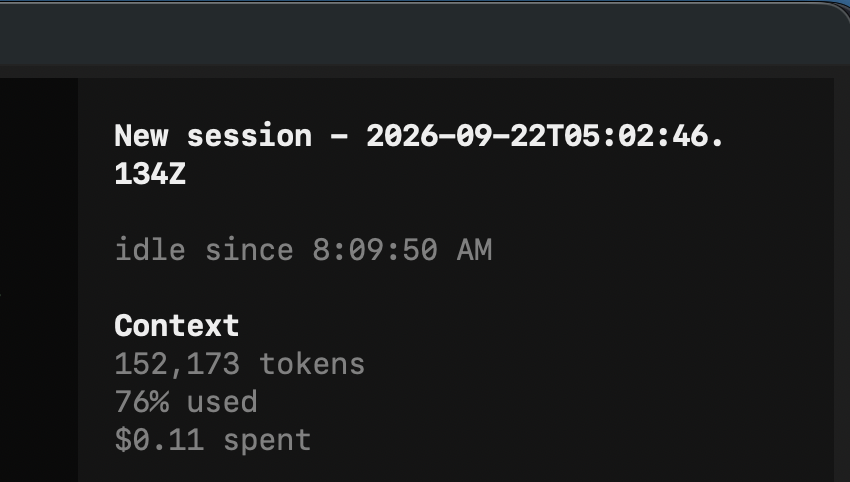

When the agent finishes and the session goes quiet, the sidebar shows idle since 14:32:07. As soon as the session is busy again the line disappears, and it comes back with a fresh timestamp the next time the session goes idle.
Install
opencode plugin opencode-idle-since -g
Restart opencode. That's it — the plugin registers itself in your tui.json.
Manual install
Add the package to the plugin array of ~/.config/opencode/tui.json:
{
  "plugin": ["opencode-idle-since"]
}
Restart opencode afterwards.
Disable
Plugins are enabled by default. Turn this one off by its id:
{
  "plugin_enabled": {
    "idle-since": false
  }
}
Notes
- Shows the current session only.
- The time is rendered with
toLocaleTimeString(), so it follows your system locale. - npm plugin packages are cached under
~/.cache/opencode/packages/.
License
MIT
同类生态推荐

Docker Panel
opencode-docker-panel
Docker container panel for the OpenCode 2 TUI sidebar

Usage Monitor
opencode-usage-monitor
OpenCode v2 TUI sidebar plugin that displays API usage quotas for OpenAI, Z.AI (GLM), and DeepSeek providers

Ds Peak
opencode-ds-peak
Minimal opencode TUI sidebar dot showing whether DeepSeek is in peak or off-peak pricing, with a countdown to the next switch. Five languages.