
Docker Panel
Docker container panel for the OpenCode 2 TUI sidebar
2
近 30 天 +1
2,143
近 7 天 76
46.5
生态多维模型
6 天前
2026-10-15
快速安装与配置
opencode.json写入当前项目的 opencode.json,只对这个仓库生效。
opencode.json
{
  "$schema": "https://opencode.ai/config.json",
  "plugin": ["opencode-docker-panel@0.7.1"]
}
写入 ~/.config/opencode/opencode.json,对所有项目生效。
~/.config/opencode/opencode.json
{
  "$schema": "https://opencode.ai/config.json",
  "plugin": ["opencode-docker-panel@0.7.1"]
}
若你要在本地改造这个插件,先装到项目里再从本地路径引用。
shell
pnpm add -D opencode-docker-panelOpenCode 启动时会通过内嵌运行时自动加载 npm 依赖并缓存至本地目录,无需手动在全局环境执行安装。



A Docker container panel for the OpenCode 2 TUI sidebar, with Docker Desktop control.
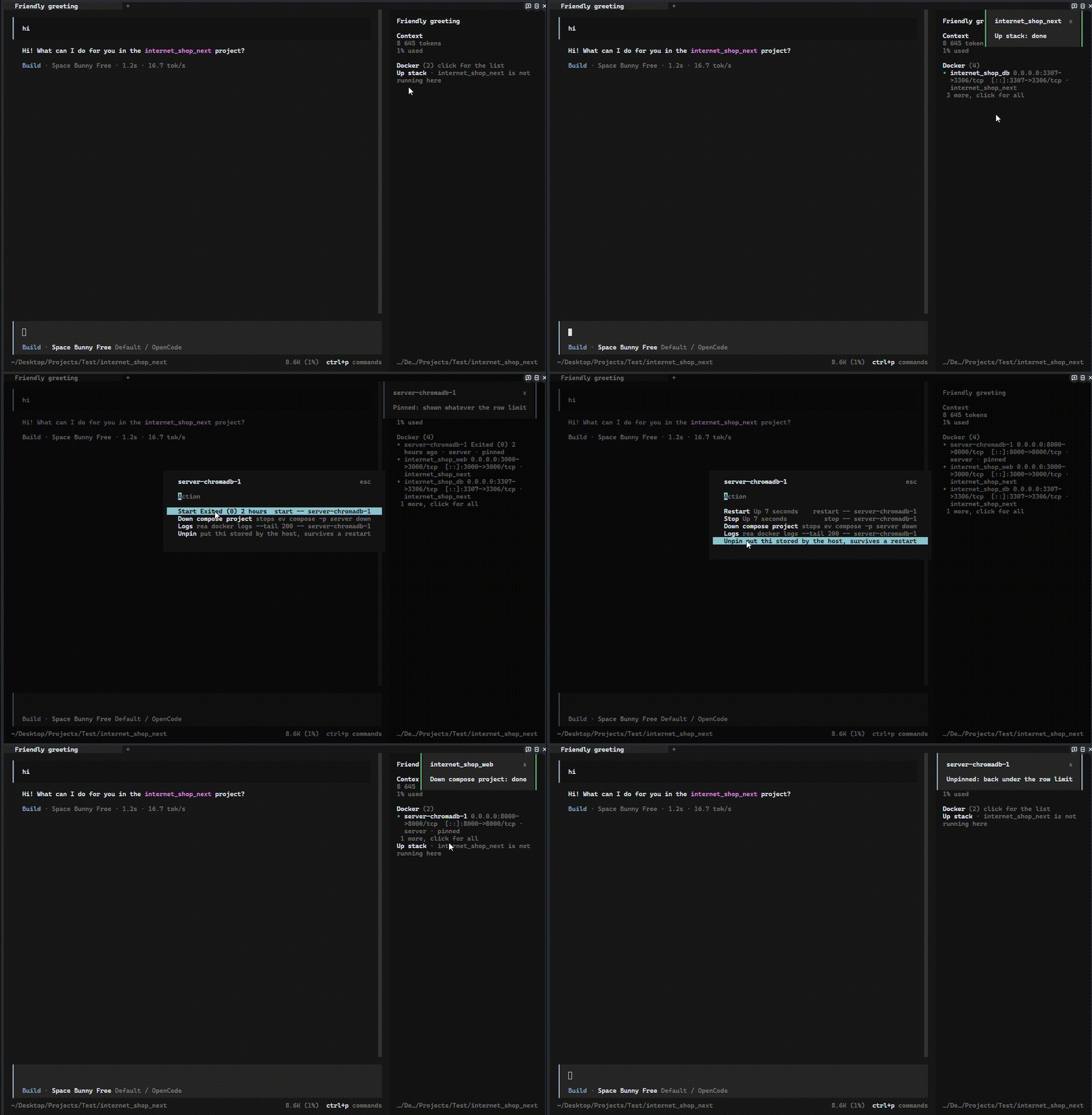
What it does, with demos: docs/features.md. Русская версия этого файла: README.ru.md, демонстрации на русском — docs/features.ru.md.
Requirements
- OpenCode 2 runtime with plugin slots (
opencode2) dockeronPATH- Engine control needs one more thing per platform. On Windows it is the
docker desktopCLI plugin. On Linux the engine is thedocker.servicesystemd unit, and controlling it needs a one-time root step: a sudoers rule forsystemctl start docker.serviceandsystemctl stop docker.service docker.socket. Without that rule the panel still lists containers, it just cannot start or stop the engine, and it says so when you try.
Install
Option A: let an LLM do it
Paste this into any agent (Claude Code, OpenCode, Cursor, and so on):
Install the opencode-docker-panel Docker sidebar plugin by following
https://github.com/victor-ochenin/opencodeDockerPlugin#installation
Option B: manual setup
Add the plugin to ~/.config/opencode/cli.json. Create the file if it does not exist and keep
whatever is already in it.
{
  "$schema": "https://opencode.ai/v2/cli.json",
  "plugins": ["opencode-docker-panel"],
}
Two things trip people up here, so they are worth stating plainly:
- It goes in
cli.json, notopencode.json. This is a terminal-only plugin: it draws in the sidebar, andcli.jsonis the file the terminal client reads. - There is no login step and no provider to configure. It talks to the local
dockerCLI and nothing else.
Restart the TUI afterwards. The host installs the package on the next start; nothing to copy and nothing to build.
Pin a version when you want a known state: { "package": "opencode-docker-panel@0.6.0" }.
Verification
There is no CLI check for this one: the plugin draws in the terminal UI, so opencode run will
never show it. Verify in the TUI.
docker psreturns at least one container. If it fails, the panel has nothing to draw and says so.- Restart the TUI and open a session.
- The sidebar gets a
Dockerheader with a container count. Running containers appear as rows, at most five of them, with aN more, click for allline under them when something is still hidden. - Click
Dockerto collapse the list, then click it again to open the full list. Pick a container to get its actions menu, and the last entry there isStop Docker Desktop.
Stop Docker Desktop and the sidebar gets a clickable Start Docker Desktop line instead of a line of text.
If the header never appears, the plugin did not load: check that the entry is in cli.json under
plugins, and check ~/.local/share/opencode/log/opencode.log for a load error.
Options
There are none. The panel follows Docker's own event stream, so there is nothing to configure and nothing to tune. It still polls as a safety net every 30 seconds, and every 3 seconds while Docker is stopped so that starting Docker Desktop from the tray shows up right away.
Before 0.6.0 there was an intervalMs option. It controlled how often the panel ran docker ps,
and it no longer does anything: events carry the updates and the poll is only a net. Leaving it in
your config is harmless.
Everything else lives in docs/features.md.
Changelog
Versions and dates are in CHANGELOG.md.
License
MIT
同类生态推荐

Timeline
@memef1f1y/opencode-timeline-plugin
Conversation history node viewer for the OpenCode TUI (sidebar timeline)

Usage Insights
opencode-usage-insights
OpenCode V2 plugin: a live turn telemetry line plus a persistent SQLite usage record, read back by an interactive /usage panel — models, providers, prompt cache, periods and latency.

Idle Since
opencode-idle-since
opencode TUI plugin — shows when the current session went idle, right in the sidebar