
61
近 30 天 +7
160
近 7 天 32
53.3
生态多维模型
1 天前
2026-10-19
快速安装与配置
opencode.json写入当前项目的 opencode.json,只对这个仓库生效。
opencode.json
{
  "$schema": "https://opencode.ai/config.json",
  "plugin": ["@streetturtle/opencode-recap@2.0.0"]
}
写入 ~/.config/opencode/opencode.json,对所有项目生效。
~/.config/opencode/opencode.json
{
  "$schema": "https://opencode.ai/config.json",
  "plugin": ["@streetturtle/opencode-recap@2.0.0"]
}
若你要在本地改造这个插件,先装到项目里再从本地路径引用。
shell
pnpm add -D @streetturtle/opencode-recapOpenCode 启动时会通过内嵌运行时自动加载 npm 依赖并缓存至本地目录,无需手动在全局环境执行安装。
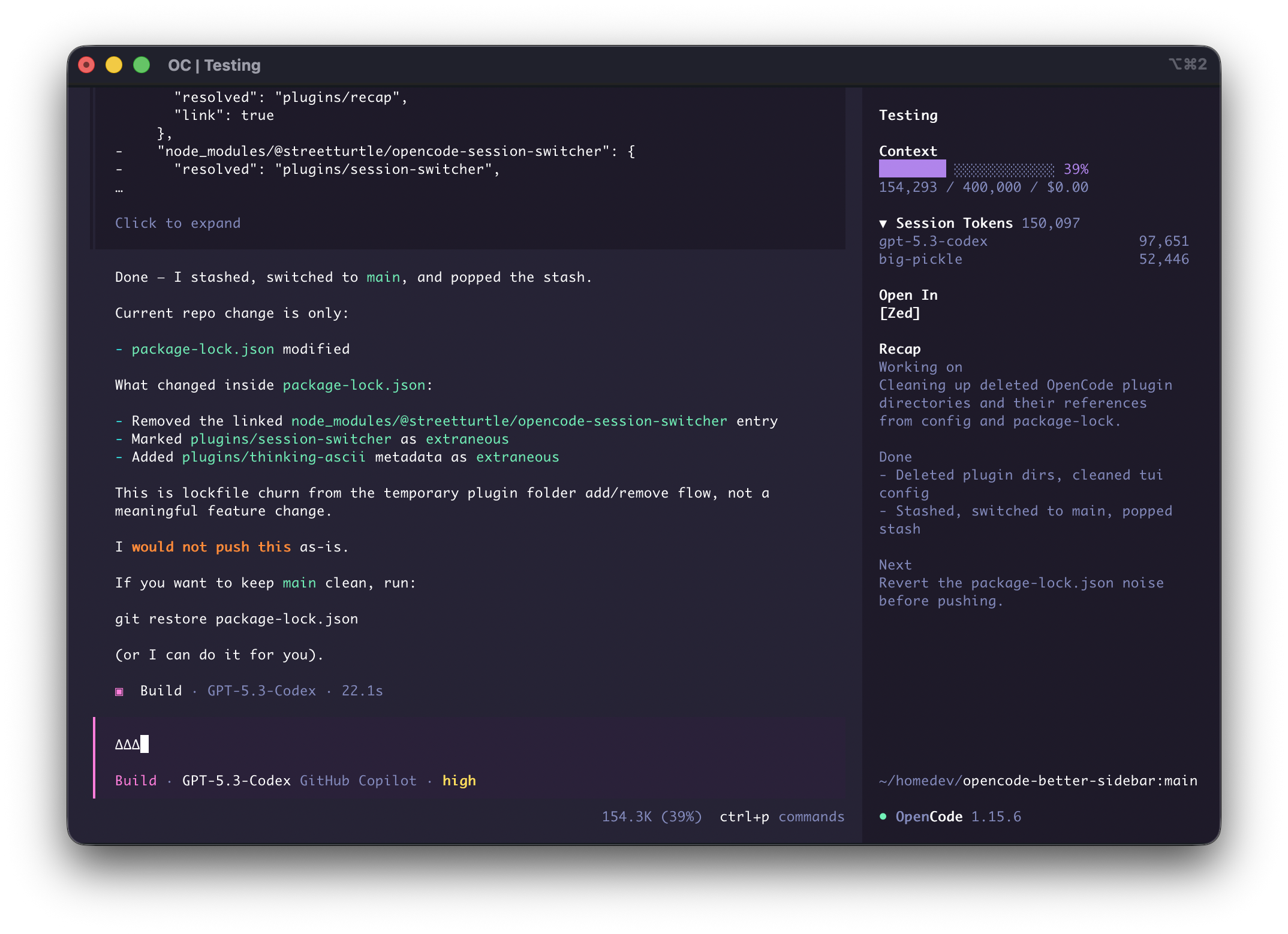
Small, focused OpenCode sidebar plugins that make daily coding sessions faster.
If this helps your workflow, please star the repo.
Install
Requires OpenCode 2.0 or newer.
opencode plugin add @streetturtle/opencode-open-in
opencode plugin add @streetturtle/opencode-context-progress
opencode plugin add @streetturtle/opencode-recap
opencode plugin add @streetturtle/opencode-session-tokens
opencode plugin add @streetturtle/opencode-current-prompt
or from OpenCode, press ctrl+p -> "Install Plugin" -> "@streetturtle/opencode-open-in"
Plugin Pack
@streetturtle/opencode-open-in- quick buttons to open the current session folder in Zed, VS Code, or Cursor.@streetturtle/opencode-context-progress` - context usage progress bar with token usage, window limit, and spend.@streetturtle/opencode-recap- one-click AI recap for the current session.@streetturtle/opencode-session-tokens- collapsible session token totals with per-model breakdown.@streetturtle/opencode-current-prompt- keeps the latest user prompt visible in the sidebar.
同类生态推荐

Context Progress
@streetturtle/opencode-context-progress
OpenCode TUI sidebar plugin for context usage progress
Session Tokens
@streetturtle/opencode-session-tokens
OpenCode TUI sidebar plugin for session token totals and per-model breakdown
Open In
@streetturtle/opencode-open-in
OpenCode TUI sidebar plugin to open session folders in IDEs