
Tui Context
OpenCode TUI plugin that renders session context-window usage as a segmented bar in the sidebar
0
195
近 7 天 14
34.1
生态多维模型
2 小时前
2026-10-21
快速安装与配置
opencode.json写入当前项目的 opencode.json,只对这个仓库生效。
opencode.json
{
  "$schema": "https://opencode.ai/config.json",
  "plugin": ["opencode-tui-context@2.1.1"]
}
写入 ~/.config/opencode/opencode.json,对所有项目生效。
~/.config/opencode/opencode.json
{
  "$schema": "https://opencode.ai/config.json",
  "plugin": ["opencode-tui-context@2.1.1"]
}
若你要在本地改造这个插件,先装到项目里再从本地路径引用。
shell
pnpm add -D opencode-tui-contextOpenCode 启动时会通过内嵌运行时自动加载 npm 依赖并缓存至本地目录,无需手动在全局环境执行安装。
See context usage and token composition at a glance in the OpenCode sidebar.


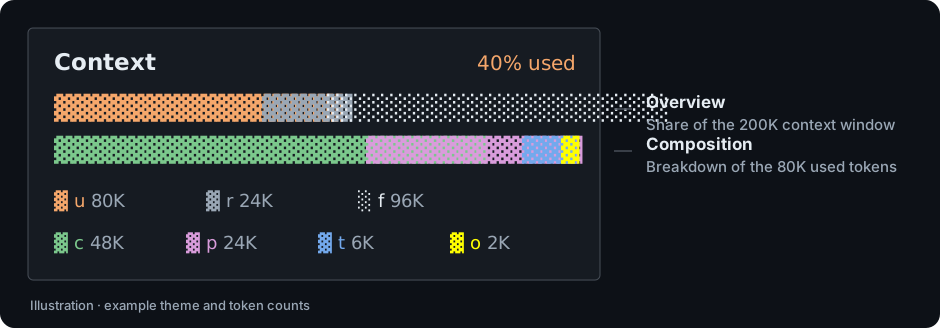
Illustration with sample data; actual colors follow your OpenCode theme, except for the yellow output segment.
- Two views: context-window capacity and a breakdown of reported tokens.
- Fits your sidebar: bars and legends adapt to the available width.
- No extra model calls: reads existing usage data without a tokenizer or credentials.
Quick start
One package version supports OpenCode V1 and V2. Check opencode --version, then use the matching command:
| OpenCode | Install 2.1.1 |
Global configuration |
|---|---|---|
V1 >=1.18.31 <2 |
opencode plugin -g opencode-tui-context@2.1.1 |
tui.json → plugin |
V2 >=2.0.32 <3 |
opencode plugin add opencode-tui-context@2.1.1 |
cli.json → plugins |
OpenCode downloads the prebuilt package; no local build or manual adapter selection is needed. Restart OpenCode, open a session, and show the sidebar. The Context panel displays the latest assistant usage with positive output tokens in the active context; until then, it shows no usage snapshot yet.
See the user guide for ZIP/source installation, upgrades, and sidebar settings.
Reading the panel
- Top bar: used, reserved, and free context-window space. Reserved space is a display estimate based on the model's output limit; it does not reserve tokens in OpenCode.
- Bottom bar: the used tokens split into cache, prompt, reasoning, and output. It shows composition, so it can be full while the top bar still has free space.
| Bar | Legend | Segment | Meaning |
|---|---|---|---|
| Overview | u |
used |
Total used tokens |
| Overview | r |
reserved |
Remaining output reservation (estimated) |
| Overview | f |
free |
Space remaining after usage and reservation |
| Composition | c |
cached |
Cache-read tokens |
| Composition | p |
prompt |
Input + cache-write tokens |
| Composition | t |
think |
Reasoning tokens |
| Composition | o |
out |
Output tokens |
The panel reflects the latest assistant message reporting positive output tokens in the active context. It is not cumulative session usage or an exact count of the next prompt.
See the user guide for segment meanings and calculation details.
Optional configuration
The defaults work without additional configuration. Both host versions accept the same options; their configuration formats differ. Use the V1/V2 examples to edit the existing entry and preserve other settings and plugins.
| Option | Default | Purpose |
|---|---|---|
showLegend |
true |
Show token legends when space permits. |
exclude |
[] |
Hide selected segments and their legends. |
barWidth |
24 |
Initial outer panel width; measured sidebar width takes over. Not a fixed bar width. |
Restart OpenCode after changes. The full configuration reference lists supported segments and option behavior.
Documentation and support
- User guide: other installation methods, configuration, calculations, troubleshooting, updates, and removal.
- Contributing: development setup, checks, and source layout.
- Release guide: packaging and publishing for maintainers.
- Report an issue: include your OpenCode version, OS, and steps to reproduce.
License
MIT © opencode-tui-context contributors.
同类生态推荐

Thinking Meter
opencode-thinking-meter
OpenCode TUI plugin: counts the turns cut off mid-thought, says whether the output cap or the context window did it, and shows what thinking costs per turn and after which tool.
Compaction Meter
opencode-compaction-meter
OpenCode TUI plugin: how many times the session has compacted, tool calls per cycle, room after each restart, and whether the last summary was cut off. Spots compaction thrash while you work.

Sidebar Token Metrics
opencode-sidebar-token-metrics
OpenCode sidebar plugin showing generation speed (tok/s), cache hit rate, and average time-to-first-token (TTFT).