
1
0
22.4
生态多维模型
9 小时前
2026-10-20
快速安装与配置
opencode.json写入当前项目的 opencode.json,只对这个仓库生效。
opencode.json
{
  "$schema": "https://opencode.ai/config.json",
  "plugin": ["opencode-launchpad@0.1.0"]
}
写入 ~/.config/opencode/opencode.json,对所有项目生效。
~/.config/opencode/opencode.json
{
  "$schema": "https://opencode.ai/config.json",
  "plugin": ["opencode-launchpad@0.1.0"]
}
若你要在本地改造这个插件,先装到项目里再从本地路径引用。
shell
pnpm add -D opencode-launchpadOpenCode 启动时会通过内嵌运行时自动加载 npm 依赖并缓存至本地目录,无需手动在全局环境执行安装。
Quick install
Launchpad targets OpenCode V2. Add opencode-launchpad to the existing plugins array in
~/.config/opencode/cli.json (or $XDG_CONFIG_HOME/opencode/cli.json):
{
  "plugins": ["opencode-launchpad"]
}
Keep your other plugin entries and settings. OpenCode installs the package; restart the TUI to load Launchpad. Open Launchpad: settings in the command palette to hide, edit, or add buttons.
Screenshots
Cargo commands in the sidebar
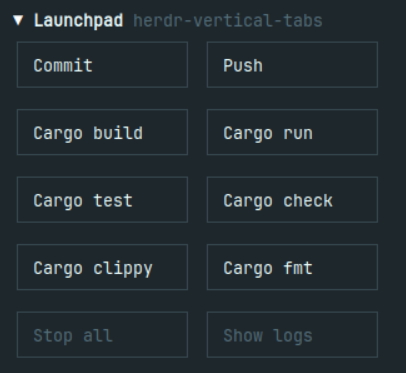
Button visibility and custom buttons
.png)
Edit a runner
.png)
Overview
OpenCode TUI plugin. The visible name of this plugin is Launchpad. It adds a grid of rectangular runner buttons to the session sidebar, always below every quota block, plus palette commands and a live log dialog. Buttons come from the project's package scripts and Cargo manifests, plus specialized Flutter, Next.js, build, install, and analysis actions. Existing zsh aliases are not changed. Discovery never starts a script; running an action requires a click or a palette command.
The npm package is opencode-launchpad. The registered plugin id local.launchpad, the palette
command ids local.launchpad.<action>, and the persistence keys and config paths below keep the older
control name on purpose, so existing host storage, config files, and saved keybindings stay valid.
The rename changes only user-visible text. See "Name and identity".
▾ Launchpad  Vetory
╭─────────╮ ╭─────────────╮
│ Build   │ │ Live mobile │
╰─────────╯ ╰─────────────╯
╭──────────╮ ╭───────────╮
│ Live web │ │ Next live │
╰──────────╯ ╰───────────╯
╭─────────────╮ ╭─────────╮
│ ADB install │ │ Analyze │
╰─────────────╯ ╰─────────╯
╭──────────╮ ╭───────────╮
│ Stop all │ │ Show logs │
╰──────────╯ ╰───────────╯
Rows
| Button | Alias | Runs | Shown when |
|---|---|---|---|
| Build | vet-build |
build:mobile:hosted, else build:mobile |
the script exists |
| Live mobile | vet-live |
live, else flutter run |
the script exists, or a Flutter project is above the folder |
| Live web | vet-live-web |
live:web, else flutter run -d web-server |
the script exists, or Flutter plus a web/ folder |
| Next live | – | dev:web, else dev |
dev:web exists, or dev exists and next is a dependency |
| ADB install | – | adb install -r <apk>, else install:adb |
a built APK exists, or an install script exists |
| Analyze | – | mobile:analyze, else analyze, else flutter analyze |
a script exists, or a Flutter project is above the folder |
Every other defined package script, including test, gets a button. A specialized action claims
only the script and package it actually runs, so that script does not get a duplicate button.
Same-named scripts from different packages remain separate actions, with package-relative labels.
Discovery uses only the bounded package chain described below; it does not scan child packages.
When a Cargo.toml exists, Launchpad also shows Cargo build, Cargo run, Cargo test,
Cargo check, Cargo clippy, and Cargo fmt. These run cargo build, cargo run,
cargo test, cargo check, cargo clippy, and cargo fmt --check, respectively. Format check
does not rewrite files. Rust-only projects need no package.json.
Cargo discovery chooses the nearest manifest above the session directory, stopping at existing
repository/workspace boundaries. Each Cargo command runs from that manifest's directory. Discovery
does not parse workspace members, enumerate crates, or invoke Cargo. Cargo run remains available
for library-only or multi-binary projects; Cargo reports missing or ambiguous binaries in the log.
Clippy and rustfmt must already be installed; Launchpad does not install toolchains or components.
Unsupported actions are hidden, not disabled. A project without a matching script, Cargo manifest, or Flutter target gets no runner button.
Analyze is static analysis only. It runs the project's own script when one exists, and flutter analyze in a Flutter project otherwise. It never runs a build, and it is not a validation umbrella:
no validate:* script is called. It takes no defines file and reads no stdin.
Two plugin-level controls sit in one row under the grid. Stop all signals every run this plugin
started, and Show logs reopens retained output without starting anything. Both are disabled while
they have nothing to act on, and both use the control colour rule: an enabled control is never muted.
Commit and Push are the first row inside the section, above the command grid, in the same box and
the same style as every other row, so the vertical gap is identical everywhere. They follow the git
service the plugin builds on demand. Both buttons are hidden outside Git repositories, including
when the session starts in a nested directory or a linked worktree. Click-time Git checks still
validate the captured directory before either flow proceeds.
Both flows open a dialog and neither one touches the repository before you approve what it will do.
Commit — the dialog lists the changed files and marks each one session change (confirmed by the
current session or its descendants) or unattributed (no confirmed matching change). Descendants include
native OpenCode subagents and OMO Slim subagents linked through the host's parentID relationship.
Unrelated sessions in the same repository do not count. Attribution uses the native host client and
bounded, paginated session history. It
only includes descendants whose directory matches the captured session directory. Children in other
or unverifiable directories are skipped with a warning rather than guessing how their paths map.
Incomplete discovery or history reads show a warning; confirmed
paths remain usable, while unknown files stay unchecked. Confirmed session changes start selected; unattributed
files remain unchecked. Review and adjust the selection before continuing. A file the service refused
to touch (a conflict, a submodule, an ambiguous rename, an
unsafe path) is shown with its reason and cannot be picked. Continue freezes exactly the selected
files into a private index and shows the full patch. If that patch cannot be shown in full, the review
is dropped and nothing is committed. The preview then preflights the generator: the plugin reads the host's
provider and model metadata, preferring the configured opencodex route when it advertises
gpt-6-luna, and otherwise accepting native OpenAI Luna only when OpenAI advertises the exact
gpt-6-luna model or a single Luna-named model. That preflight sends no diff and makes no model
call. A host that exposes neither provider nor model listing keeps the historical fixed opencodex /
gpt-6-luna (low) default for compatibility; the preview calls that destination the assumed default,
not a verified route. The preview names the actual provider and model that will receive the diff and
states that this selected frozen diff is the only thing leaving the machine in the flow. One
Generate message action becomes available after the preflight answers; pressing it is the approval
and sends that exact diff. Write message is always available on the review, even when the
preflight fails: it opens the same editor with no generation and no commit. Generation uses OpenCode's
native text API, without tools or a child session; a host without that adapter is refused before the
action is available. If neither route is available, the review stops with an actionable error and
sends nothing: it never guesses a model. A provider, authentication, or generation failure after
approval becomes a safe generic error, so provider text cannot echo the reviewed diff. Neither
switches or retries the other provider or model.
The returned draft opens in a multiline message editor that uses the body height; the frozen diff is
not repeated there. A visible counter reads Message · line N of M. Enter inserts a newline; use
Save message or Alt+Enter to save the draft before the separate final Commit confirmation. The
editor opens at the start so the subject is reviewable first. Arrows scroll the field, Home returns to
the top, End shows the tail, and the counter follows the caret; text longer than the field scrolls
inside it instead of being cut. The final confirmation keeps a fixed line naming the controls:
the mouse wheel or PgUp/PgDn scrolls, End jumps to the end, and Home returns to the top. Its 4–16 row
scroll area labels Message, marks — end of message —, and then labels Frozen diff; Commit,
Edit message, Back, and Cancel stay fixed below it, and wrap onto more rows at narrow
widths instead of running off screen. Generated drafts are
bounded to 60 lines and 4000 characters, so a longer model reply is shortened before you review it;
Commit refuses a manually saved message longer than 4000 characters with "The commit message is too
long". No display step truncates the saved message.
Clearing the field and saving removes
the draft and returns to the preview; cancelling an edit discards unsaved changes and keeps the previously saved message. Neither action
commits anything. Generated subjects use plain descriptions, without feat:, fix:, or other
Conventional Commit prefixes. The generation prompt forbids AI attribution. Manual edits are kept as
written. Commit then commits those files from the frozen index, never skipping hooks,
and reports the short hash. A private reference-transaction guard accepts only the frozen branch (or
detached HEAD) at the frozen commit: a concurrent commit, a ref move, or a same-hash branch switch is
rejected before the ref updates, and the reported hash is the one that guard recorded. Hooks are
dispatched from the configured hooks path, including relative, absolute and /dev/null settings.
The message can be edited again before the final confirm. If the commit
lands but a later step fails (a hook rewrote what was committed, moved HEAD, the index moved, the
reset failed), the dialog says so, shows the full commit hash, and stops: the commit is already in
history, so it is never retried. When the guard cannot record the landed commit, the outcome is
reported as unknown rather than as a known commit. Close the window and reconcile the leftover files
by hand.
In the file-selection screen, ⊘ adds an untracked file to the repository-root .gitignore.
The rule targets that exact path, not a folder or file extension. Tracked and blocked entries cannot
be ignored through this control: .gitignore does not stop tracking existing files. Ignoring a file
does not stage or commit anything. The list refreshes while keeping your other selections.
Push — the dialog resolves the exact destination from @{push} (never a guessed remote), and shows
the branch, the remote URL with embedded credentials redacted, the upstream ref and the outgoing commits. Confirm push opens a second
step, and only Push now sends it: one explicit remote and a refspec naming the frozen commit, never a
force flag. A target that moved since the review, a detached HEAD, a mirror remote, or a remote with
several push URLs is refused instead of guessed.
Escape and the dialog's own close button close the flow. Cancel also closes the flow except in the
message editor, where it discards unsaved edits and returns to the review. Before a commit or push starts,
cancelling drops the frozen review and its temp index without committing or pushing. Closing the dialog
does not undo an already-started commit or push: its result is still reported, and its temporary files
are kept until the operation finishes. The session and the folder are captured when you click,
so switching tabs afterwards cannot widen a flow to another project.
Which project is which
Detection reads a chain of package.json files, nearest first, starting at the session directory and
stopping at the workspace or repository boundary: .git, a workspaces field, pnpm-workspace.yaml,
or lerna.json. A directory outside such a boundary never inherits an unrelated parent's scripts.
Each action resolves against that chain and runs from the folder that owns the script:
- Vetory root session: all six buttons; every command runs from the repository root, and
ADB installruns fromapps/mobile, where the APK was built. apps/websession: all six buttons.Next liveusesapps/web's owndevscript and runs fromapps/web;Build,Live mobile, andLive webborrow the root scripts and run from the root.- A project with its own
package.jsonbut no boundary: only that package's own scripts count, so no Vetory command or defines file leaks in. - The package manager comes from the lockfile at the outermost package of the chain
(
pnpm-lock.yaml,bun.lock,yarn.lock,package-lock.json; npm when none match). BUILD_DEFINES_FILEis set to<owner>/local-public-defines.jsonforbuild:mobile:hosted,live, andlive:webonly when that file exists next to the owning package. The file is never read.- The APK for
ADB installis looked up inbuild/app/outputs/flutter-apk/of the nearest Flutter project above the session, and otherwise of the app one level down (apps/<name>, then any child) from the session's own package and from the workspace root.app-release.apkwins,app-debug.apkis the fallback, and an absent file hides the button. No path is ever assumed.
Layout
Two columns, as many rows as the discovered actions need, each cell a bordered rectangle. Actions pack row-major, so a project with two supported actions shows a single row. A lone button fills the whole row and centers its label, including Git and utility rows with one visible control.
| left | right | |
|---|---|---|
| git | Commit | Push |
| row 1 | Build | Live mobile |
| row 2 | Live web | Next live |
| row 3 | ADB install | Analyze |
| controls | Stop all | Show logs |
Clicking the section header collapses the rows and leaves the header in place, last in the sidebar.
The arrow is a white full triangle, ▼ while expanded and ▶ while collapsed, and the title keeps
the sidebar foreground. Collapsing is view state: no command is stopped, no output is dropped, and
expanding shows the same runs again. The state belongs to the mounted sidebar, so it starts expanded
after a restart.
When nothing is supported and this project has no run to stop or read, the whole section, header
included, is hidden.
The control row uses the same box as an action row and the section adds no vertical padding, so the
gap between every row, including the one before Stop all and Show logs, is identical.
Cells share the row with flexGrow: 1 and flexBasis: 0, so they split whatever width the sidebar
gives them. Labels wrap onto a second line when the cell is too narrow; nothing is clipped, and no
status prefix or suffix takes label width.
A button paints no background of its own, so the sidebar background is the button background and
a button can never read as a gray block outside its frame. Every label uses text.base, the same
foreground the sidebar itself draws with, so no state can dim a label into the background. The frame
carries the state:
| State | Border | Label |
|---|---|---|
| idle | border.base, single |
text.base |
| hover | text.base, single |
text.base |
| running | text.base, double |
text.base |
| finished / stopped | border.base, single |
text.base |
| failed | text.feedback.error.base, heavy |
text.base |
A finished run looks like an idle button again: it stays clickable, and the log dialog carries the
result. Hover only brightens an idle frame; a running or failed button keeps its own frame so the
state stays visible under the pointer. The dialog controls follow the same rule: an enabled control
uses text.base, and only a disabled one is muted.
text.action.primary.* is never used. In the host theme it is a light interactive hue meant for
accent fills, and it reads as near-black against the sidebar. Border styles are square only: a rounded
frame draws the fill on the corner cells, which reads as a rectangle larger than its own outline.
background.action.* is transparent and is never used as a fill. Token lookups fall back
(text.muted → text.base, text.feedback.error.base → text.error → text.base) for themes that
omit a path, so a missing entry degrades to a readable colour instead of no colour at all.
Interaction
- Click a row to start that command in the current session's directory. The directory is resolved on click, so switching tabs cannot start the previous project.
- Clicking an already running row focuses its log instead of starting a second copy.
- The log dialog shows the command, directory, status, and the retained output in a scroll box. It
offers
Stop s,Reload r,Restart R, andClose esc.r/Rare written to the child's stdin and apply to Flutter live runs; they are disabled for non-interactive commands. The sames,r/Rkeys are bound in the dialog's modal layer, so pressing them drives the same stop/reload/restart as the buttons; a keystroke the run cannot take is reported instead of looking like a success.Stop sis disabled while a stop is already in flight, and a refusal is reported instead of being swallowed. The layer bindssto the runner's stop path, never as a byte typed at the child. eschides the dialog and nothing else. The command keeps running with its log, and the row stays clickable, so reopening the log shows the same output. The keys are claimed by a modal layer the dialog registers while it is open, so they cannot intercept input anywhere else, and they are released when the dialog closes.- Upper case is spelled
shift+rin OpenCode's keymap: a bind string is parsed as a key name plus modifiers, so a bare"R"never matches a key event.Reload rtherefore bindsrandRestart Rbindsshift+r. - Palette:
Launchpad: <descriptive name>,Launchpad: stop all,Launchpad: show log. The log command opens the active project's run, and never another project's; with no run of its own it says so instead of opening something unrelated.stop allreports how many runs it stopped, how many were already stopping, and how many refused, so a partial result is never shown as a clean success. ADB installis a one-shot command:adb install -r <apk>in the Flutter folder that owns the APK. No-sis passed, so one connected device is used and several devices makeadbprint its own error into the log; the button never picks a device.Reload randRestart Rstay disabled for it, because the command does not read stdin.
Button visibility
Open Launchpad: settings from the command palette to toggle individual script buttons and the built-in Commit, Push, Stop all, and Show logs controls. Hiding a button does not stop its process, discard its logs, or remove its palette command. Show all buttons, available in the settings dialog and as Launchpad: show all buttons, clears all saved hiding choices.
Visibility uses stable action identities rather than labels. Script identities include the owning package's absolute directory, so same-named scripts in different packages have separate settings. Moving a project changes those identities; its scripts appear with default visibility at the new path. Cargo actions, specialized actions, and built-in controls use shared identities: hiding one hides that action across projects. Show all buttons restores hidden actions across all projects.
Settings use the host's durable plugin storage when available, then the legacy host key/value store.
Hosts without either use $XDG_CONFIG_HOME/opencode/control/visibility.json, or
~/.config/opencode/control/visibility.json when XDG_CONFIG_HOME is unset. Failed saves report a
warning; a local toggle can still work without surviving a restart.
The inspected plugin SDK exposes no native Settings registration API. Launchpad therefore uses its own palette dialog, not an entry in OpenCode's native Settings screen.
Runner button editing
Use ↑ and ↓ on the left of a runner in Launchpad: settings to change its position. The sidebar fills two columns from left to right, then continues on the next row. Order is saved per project directory. Hidden runners keep their place in the settings list; newly discovered commands appear after the saved order. Git and utility controls stay in their fixed rows. Moving a button never runs it or changes its command, visibility, logs, or stop target.
Launchpad settings also supports renaming runner buttons, changing their executable and arguments,
and adding custom buttons. Commit, Push, Stop all, and Show logs remain protected controls.
Arguments are a JSON array of strings, for example ["test", "--workspace"] for executable
cargo. Commands run without a shell: pipes, redirects, and shell expansion are not interpreted.
Saving, loading, or editing a button never runs it.
Existing runners keep their detected working directory. Custom buttons use the current project's directory. Names and commands are saved per project directory; nested project directories have separate settings. Moving a project does not migrate its saved button configuration. Overrides replace runner-specific environment additions and disable interactive stdin; resetting the runner restores its detected defaults. Custom buttons can be deleted without stopping an already running process or discarding its logs. Hidden buttons remain available in the palette.
Button configuration uses durable host storage, legacy key/value storage, or a separate
buttons.json beside the fallback visibility file. Save failures remain visible in settings.
Avoid putting credentials in arguments: saved command configuration and command logs are not secret stores.
Live log
The dialog body is a scrollbox (the OpenTUI scroll element), bounded to a 3–16 row viewport and
sticky to the bottom: it follows new output only while it is already at the end, so scrolling up to
read history is never yanked back. The header and the control row stay fixed outside the scroll area.
The wheel scrolls it. Keyboard scrolling is best effort: the box is focusable, so arrow keys, j/k,
PageUp/PageDown, and Home/End work when the host focuses it, and the dialog asks for that
focus when it opens. A plugin cannot force focus (focused is read-only), so a host that keeps focus
elsewhere leaves the wheel as the scrolling path.
Counters:
| Where | Shows |
|---|---|
| Status line, running | running 42s · 137 lines, refreshed once a second |
| Status line, stopping | stopping after 8s · 137 lines, while a stop is in flight |
| Status line, leftovers | stopped after 8s, leftovers still stopping, leftovers still stopping |
| Status line, finished | finished in 42s · 137 lines, frozen at the final duration |
| Status line, stopped / failed | stopped after 8s, failed after 3s (exit 1) |
| Status line, refused stop | any of the above plus · stop signal failed (EPERM: …) |
| Progress line | the child's own latest carriage-return line, e.g. Gradle's Running Gradle task … |
A carriage return rewrites the current line instead of appending one, so a counter that redraws itself
stays a single live line. When that line is finished by a newline it becomes normal history. Only a
tool that redraws with \r can show a counter this way; a tool whose spinner is animated only for a
terminal gets no spinner here, because the child writes to a pipe and not to a TTY. The plugin does
not fake build stages or set TERM/CI to coax one out.
Each run gets its own process group (detached on POSIX), so the descendants a script spawns
(flutter, next) die with it. Stop sends SIGTERM to the group, then SIGKILL after five seconds.
The group id is signalled only while the plugin can still prove the group is its own: while the leader
lives, its recorded start time rules out a recycled pid, and after the leader exits, a group id stays
reserved for as long as any member remains — so a group that is provably gone is never signalled again.
A signal that fails for any reason other than "already gone" is recorded and reported to the user, not
hidden as success. The plugin never kills by process name or port. Pressing stop again before the grace
period ends is a no-op and schedules no second timer. Unloading the plugin, or exiting the TUI process,
sends SIGTERM to every owned group directly and escalates a group already waiting out its timer to
SIGKILL, because unref'd timers do not survive the host exiting. A run that already finished with an
empty group is never signalled; a leader that exits on its own while descendants still hold its group
is reaped at once (SIGTERM, then the same grace SIGKILL), so a backgrounded wrapper cannot silently
leak child processes. Stop all signals only the plugin's own runs, and reports how many it stopped,
how many were already stopping, and how many refused, so a partial result is never shown as a clean
success and an in-flight stop is never counted twice. Output is capped at 200 lines, 400 characters
per line, with terminal escapes stripped; the dialog shows all retained lines.
Install
cli.json (or equivalent plugins entry):
"plugins": ["opencode-launchpad"]
OpenCode resolves and installs the package. To run a local checkout instead, point at its directory:
"plugins": ["./local-plugins/opencode-launchpad"]
Position is controlled by the slot itself: ui.slot({ after: "sidebar.content" }) places the block
after every sidebar.content contribution, so it stays last no matter which order plugins register
in. Listing it last in cli.json is still the convention here. Restart the TUI after changing the
list.
Reload: edit the files and restart OpenCode. Uninstall: remove the list entry (and, for a local checkout, the directory).
Name and identity
| What | Value | Visible to users |
|---|---|---|
| Section heading, palette group, palette titles | Launchpad |
yes |
| npm package | opencode-launchpad |
install name only |
| Registered plugin id | local.launchpad |
no |
| Palette command ids | local.launchpad.<action> |
no (the palette shows titles) |
| Persistence keys and config paths | control.visibility, control.buttons, opencode/control/… |
no |
Only the visible text was renamed. The plugin id, every command id, the persistence keys
(control.visibility, control.buttons) and the config fallback paths (opencode/control/) keep the
older control name on purpose, so existing host storage, config files, and saved keybindings stay
valid. Command ids can be referenced by user keybindings: a keybinding that used
local.project-runners.<action> must now use local.launchpad.<action>. opencode plugin list shows
- in the ID column for every local plugin, so nothing there displays the id.
Tests
cd ~/.config/opencode/local-plugins/opencode-launchpad
node --test
Real child processes verify output capture, nonzero exits, missing binaries, duplicate
starts, output bounds, carriage-return counters, retained history and tail requests, injected-clock
elapsed time, stop, dispose, stdin, and that a stopped run's own grandchild dies with its process
group. Targeted cases prove a leader that exits before its group still reaches the grace SIGKILL,
a gone group receives no late signal, a refused signal is reported instead of a silent success, a
repeated stop schedules no second timer, dispose escalates a pending stop without touching a finished
run, a leader that exits with a live descendant still loses it, and stopAll returns truthful
{stopped, failed} counts (including a refused run). A mock host verifies slot placement, palette
commands, click-time directory resolution,
per-project detection (monorepo chain, boundary, hidden actions, active-tab switching), spawn
failures, dialog controls, the full history the dialog reads, and cleanup. The ADB action is resolved
against fixtures only — release before debug, debug fallback, hidden without an APK, a project install
script winning over the APK, the APK found from a workspace root and from a nested package, and a
one-shot spawn with no -s; no test ever runs adb. Analyze is resolved the same way: the project
script first, flutter analyze as the Flutter fallback, no defines file, no stdin, and hidden when
neither exists. The runtime is covered behaviourally too: stop all counts only what it stopped and
reports an in-flight stop as such, Show logs reopens the active project's output without spawning
and explains an empty history, and a stop request for a vanished run is answered rather than ignored.
The Git flows are covered against the service with scripted Git responses and a native text-generation
double, without provider calls: the click-time session and folder, the session
diff preselecting only confirmed safe session changes, a blocked file refusing selection, the exact patch and
stat shown for review, the preview preflight reading provider/model metadata before the action is
offered, preferring OpenCodex when it advertises Luna, falling back to native OpenAI Luna only when it
is advertised, and refusing to send when neither exists or the probe fails, stalls past its deadline,
or the host lacks the text adapter, the inline disclosure naming the selected provider and model and
marking the legacy fixed default as assumed rather than verified, a manual Write message path that
generates nothing, generation sending only the frozen selected diff after the single Generate action
and only once, a review frozen while the flow is cancelled being discarded, a thrown preview or
generation becoming a safe generic error, a press before that preflight answering being a no-op, no
automatic send before the approval, a generation failure never retrying another provider, and a late or
cancelled probe never changing state,
the editable message prompt, the commit running the frozen selection
without --no-verify, a truncated patch being dropped instead of committed blind, the push target
resolved from @{push} and confirmed in a second step, one explicit remote and refspec with no force
flag, the API refusing to push before that confirmation, and cancellation before mutation dropping
the private index and the push token without committing or pushing. Closing during a mutation defers
cleanup until it settles and still reports its outcome. Public push destinations redact embedded
credentials while target checks retain the exact URL. The session diff is read from the live host
snapshot when it exists and from the native host client otherwise. Partial reads retain confirmed
paths and warn; files without a confirmed match remain unattributed and unchecked. Failure
paths are covered too: a repository that cannot be read, a push target that cannot be resolved, a
commit that landed but failed its post-commit check (the full hash is reported, the flow becomes
terminal, a second Commit press is a no-op, and closing still drops the review), and a
missing service or missing steps.
Escape hiding is covered both ways: the layer it
registers clears the popup without signalling the child, and a layer whose dialog has unmounted hands
the key back to the host. The same layer's keys are covered too: r writes its own byte to the live
run, shift+r restarts (and a bare R is never bound, because that bind can never match), s runs
the stop path and never types at the child, a disposed layer writes nothing, a non-live run warns
instead of writing, and a finished run or a run with a closed input reports the refusal without
stopping the run. Each dialog layer drives the run it was mounted for: after the host swaps the popup
onto another run, the new layer keeps working and the closed dialog no longer drives its old run. The colour decisions are pure functions in
runners.js (token, buttonVisual, controlVisual, statusLine, statusTone), so tests assert
the actual returned colours and status text: no state resolves the accent hue, no enabled state mutes
its label, a missing theme path degrades to a readable colour, and only a failed run or a refused stop
is painted as an error. Source checks guard the markup: no background fill anywhere in the view, no
colour table in the view, no truncation, no rounded border, a bottom-sticky scroll box, controls
below the scroll area, and a header toggle that hides the rows without reaching a run.
Fixtures also cover package-script ownership and duplicate suppression, Cargo discovery and fixed commands, Git directories and worktree pointers, saved visibility, external settings changes, and storage failures. Cargo runtime tests use mocked processes; no test runs Cargo or installs components.
view.render.test.mjs exercises the actual Sidebar component through a standalone OpenTUI renderer,
including singleton rows, narrow widths, long labels, and Cargo buttons. The Git review scenarios also
render a message longer than the editor field and a confirmation taller than the dialog: the subject is
on screen at the start, End and the mouse reach the tail, the saved text keeps every line, the Commit
controls stay fixed, and no row is replaced by an ellipsis. The renderer harness needs
Bun, OpenTUI, Solid, and the Babel Solid transform; see its imports for the required runtime packages.
It is not the host's exact plugin loading path.
Not covered: rendering inside the live OpenCode host, real Flutter, Next.js, or Cargo startup, and mouse handling on every terminal emulator. Those need a manual TUI check.
Limits
- No interactive terminal widget exists in the plugin API, so live output is a bounded log, not a full terminal. A carriage-return counter is preserved as one live line; a spinner that only draws on a TTY never appears.
- Button bounds are checked in a standalone OpenTUI renderer, not the live host. Confirm host slot sizing, scrolling, and dialog focus once in the TUI.
- The scroll viewport is capped at 16 rows because the plugin API exposes no terminal height. On a very short terminal the dialog is taller than the host may clip.
- Dialog
r/Ronly work when the underlying command reads stdin. Wrapper scripts that reroute stdin will ignore them. ADB installinstalls the release APK when one exists and the debug APK otherwise, not necessarily the build you just ran: pressBuildfirst when the APK must be current. The install is-r(replace) on the deviceadbselects, and the plugin neither lists nor chooses devices.- Process-group control is POSIX only. On Windows the run is signalled directly, so a wrapper script's own children may outlive a stop; group identity checks are skipped there too.
- The stop grace period trades latency for cleanup: a child that ignores
SIGTERMkeeps its group alive until the five-second timer escalates toSIGKILL. During shutdown (dispose) that escalation is immediate, so the grace period is only skipped when the TUI is exiting. - The Git flows need the
gitbinary onPATH. Committing needs Git 2.29 or newer, because the commit guard runs as areference-transactionhook and older versions ignore that hook; the flow refuses instead of committing without the guard. Generated messages additionally need the native OpenCode text-generation API plus either an available OpenCodex provider advertisinggpt-6-lunaor a native OpenAI provider advertising that exact model or a single Luna-named one; Copilot CLI is not required. The preview preflight reads host metadata only, makes no model call, and gives up after ten seconds; a host without the native text adapter is refused before the Generate action is offered. A host that lists neither providers nor models keeps the fixedopencodex/gpt-6-luna(low) assumption, so it cannot detect a missing proxy. Generation sends only the frozen selected diff after the single Generate action, with a 120-second deadline. Subjects use plain English without Conventional Commit prefixes such asfeat:orfix:. A provider failure after approval is reported without silently selecting a different provider or model; if neither provider is available the flow stops with an actionable error. Pushpushes the branch's own@{push}destination with one refspec and no force flag. It does not offer a remote picker, and it never pushes tags.- Unless a stop is already in flight, a group is only signalled while its identity is provable: the plugin checks the leader's recorded start time, then a bounded probe. A wrapper that backgrounds a long-lived process and exits is still reaped, so this is not a supervisor for intentionally daemonised children.
- Plugin children die with the TUI. They are not reattached by a later session.
Analyzeruns the project's own script when one exists, so whatever that script does is what runs; the plugin only guarantees that it never picks a build or avalidate:*script on its own.- Collapsing is per mounted sidebar and is not written anywhere, so it starts expanded again after a restart or a remount.
同类生态推荐

Dir Tree Tui
opencode-dir-tree-tui
OpenCode V2 TUI plugin: VS Code-style file tree in the sidebar with git status coloring and click-to-open

Quotes Tui
opencode-quotes-tui
OpenCode TUI plugin that replaces the home screen tips with a random quote

Tokenmeter Tui
opencode-tokenmeter-tui
OpenCode TUI plugin: TokenMeter sidebar — live token usage, cost, and delegation tree for sessions