
Gpt Imagegen
OpenCode plugin for GPT Image 2 generation through your ChatGPT subscription, with reference images and safe PNG output.
109
近 30 天 +13
1,648
近 7 天 588
62.7
生态多维模型
17 小时前
2026-10-20
快速安装与配置
opencode.json写入当前项目的 opencode.json,只对这个仓库生效。
opencode.json
{
  "$schema": "https://opencode.ai/config.json",
  "plugin": ["opencode-gpt-imagegen@1.0.2"]
}
写入 ~/.config/opencode/opencode.json,对所有项目生效。
~/.config/opencode/opencode.json
{
  "$schema": "https://opencode.ai/config.json",
  "plugin": ["opencode-gpt-imagegen@1.0.2"]
}
若你要在本地改造这个插件,先装到项目里再从本地路径引用。
shell
pnpm add -D opencode-gpt-imagegenOpenCode 启动时会通过内嵌运行时自动加载 npm 依赖并缓存至本地目录,无需手动在全局环境执行安装。
⚠️ Plugin versions before
0.1.13no longer generate images. GPT-5.5 retired from Codex with ChatGPT sign-in on October 14, 2026, and those versions use it. Follow the update steps to install the latest version.
📣
1.0.0changes howgpt_imagegenis used.sizenow accepts only seven fixed sizes, andqualityis removed. See the release notes for all changes.
📣 OpenAI API key support is on hold. This plugin supports only ChatGPT sign-in. If you need API key support, please share your use case in #120.
Bring ChatGPT Images 2.0 (
gpt-image-2) to OpenCode. Use it through your ChatGPT subscription (no API costs!).



Highlights
- Subscription-friendly. Generations ride on the same Codex backend channel OpenCode already uses for ChatGPT subscription chat — billed against your existing ChatGPT Plus, Pro, or Business plan, not your API credits.
- Reference images. Pass up to five input images alongside the prompt for style guidance, edit targets, or compositing inputs.
- Transparent backgrounds. Ask for a transparent background, a cutout, or background removal, and the agent passes
background: "transparent"to get an RGBA PNG. The cutout edges can be rough, with a faint semi-transparent halo. For a clean cutout, generate the image on a plain background and remove the background yourself.
Installation
Add this plugin to your OpenCode config. For example, in opencode.json:
{
  "$schema": "https://opencode.ai/config.json",
  "plugin": ["opencode-gpt-imagegen"]
}
OpenCode auto-installs the package via Bun on next launch — no separate npm install step is needed. The plugin requires OpenCode to be authenticated with ChatGPT.
Updating the plugin
OpenCode caches npm plugins, so restarting it may keep an older version. To update this plugin:
- Check the
pluginentry in your OpenCode config. Use"opencode-gpt-imagegen"or"opencode-gpt-imagegen@latest"to request the latest version. If you pinned a version, remove the version suffix or change it to the version you want to install. - Quit OpenCode completely.
- If your entry is unversioned or uses
@latest, delete the cached directory~/.cache/opencode/packages/opencode-gpt-imagegen@latest/. - Restart OpenCode to install the requested version.
If you use an unversioned entry or @latest but do not have that directory, see OpenCode's cache-clearing instructions for other cache layouts.
Usage
Just ask your agent in natural language and gpt_imagegen will be picked up.
The four examples below are the actual prompts and outputs of this repo's e2e test suite — see tests/e2e/gpt_imagegen.test.ts for the assertions. The e2e prompts name the tool and the output path explicitly to keep the test runs predictable. In normal use, you can just describe the image you want.
Example A — generate
Use the gpt_imagegen tool to generate an image at character.png. Content: a man wearing a navy-blue samue and a red hachimaki headband, standing in a garden of cherry blossoms in full bloom. Style: hand-drawn 90s Japanese animation style. Size: 1024x1536 (portrait).

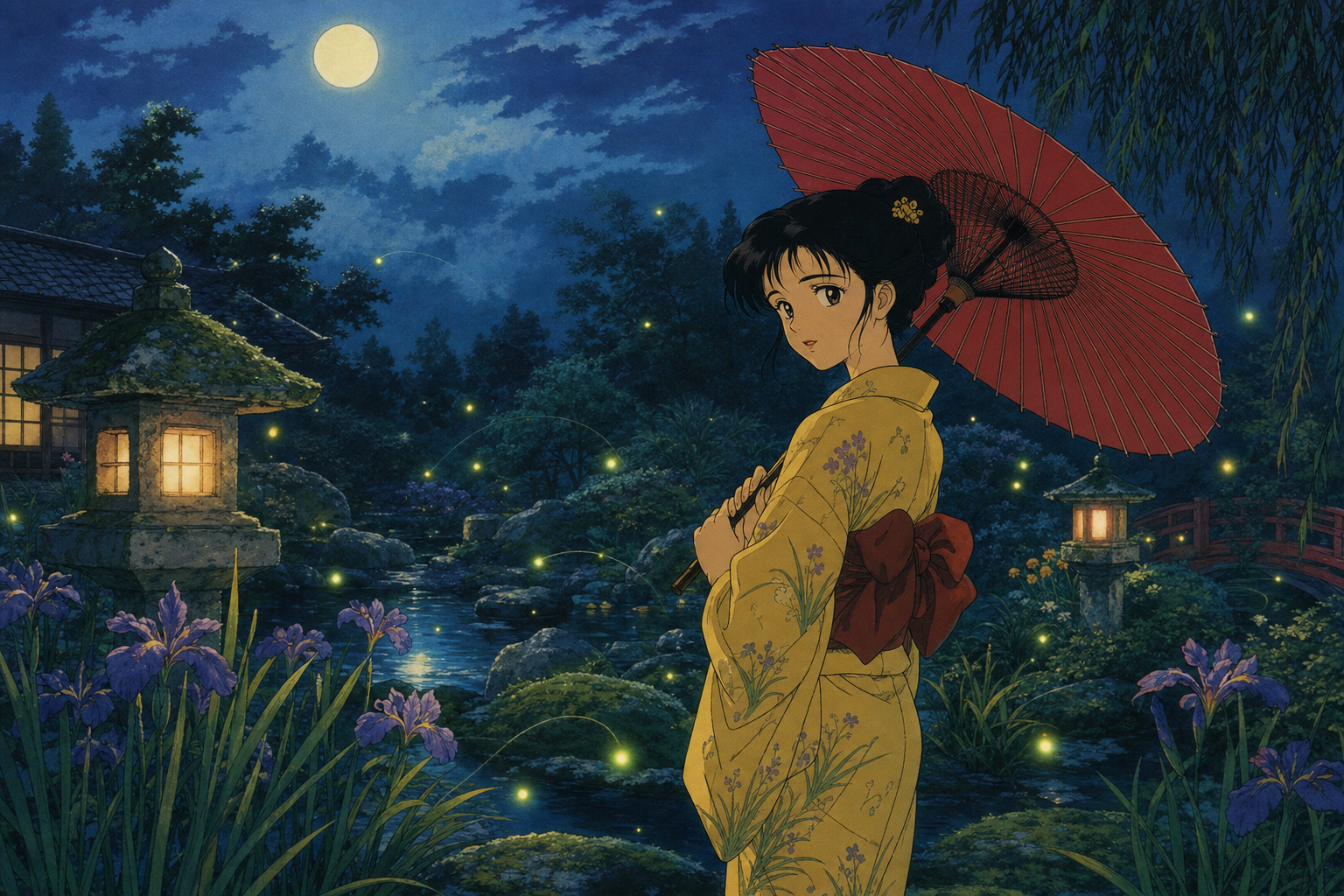
Example B — auto-versioning
gpt_imagegen never overwrites an existing file: when the out path is already taken, it picks -v2, -v3, … instead.
Use the gpt_imagegen tool to generate an image at character.png. Content: a woman wearing a yellow yukata and holding a red wagasa parasol, standing in a garden at night with fireflies dancing around her. Style: hand-drawn 90s Japanese animation style. Size: 1536x1024 (landscape).
The previous character.png is left untouched; the new image lands at character-v2.png.
Example C — feed existing image files as input
Pass up to five image paths via the images argument and the model uses them as references for the next generation — for style guidance, characters to keep, scenes to extend, and so on.
Use the gpt_imagegen tool to generate an image at together.png. Pass ./character.png and ./character-v2.png in the images argument. Content: the man from Image 1 (navy samue + red hachimaki) and the woman from Image 2 (yellow yukata + red wagasa) standing side by side on the engawa veranda of an old Japanese house, smiling at the viewer. Preserve each character's outfit, hairstyle, and props exactly. Style: hand-drawn 90s Japanese animation style. Size: 1672x941.

Example D — transparent background
Ask for a transparent background, and the agent passes background: "transparent" to get an RGBA PNG.
Use the gpt_imagegen tool to generate an image at sticker.png. Content: a sticker of a red paper lantern with a transparent background. Style: hand-drawn 90s Japanese animation style. Size: 1254x1254.

Sizes
gpt_imagegen generates only these sizes: 1254x1254 (1:1), 1536x1024 (3:2), 1024x1536 (2:3), 1448x1086 (4:3), 1086x1448 (3:4), 1672x941 (16:9), and 941x1672 (9:16).
The Codex image backend does not take pixel dimensions. It always generates about 1.57 megapixels and takes only the aspect ratio from the prompt. These sizes are common aspect ratios at that pixel count, so the backend produces them as requested. The output can still differ from the requested size by 1px (#107).
If you ask for an unsupported size, the tool instructs the agent to ask you which supported size to use. The agent also asks when you give no size and the request does not imply a shape. When the request implies a shape, such as a YouTube thumbnail or an app icon, the agent picks the matching size without asking. To get another exact size, resize or crop the output afterwards, for example with ImageMagick.
How it works
OpenCode already talks to the OpenAI Codex backend to power ChatGPT subscription chat. This plugin calls the image generation endpoints of that backend (images/generations, or images/edits when reference images are given), the same endpoints the Codex CLI uses, and writes the returned PNG to disk. Auth is read from OpenCode's standard auth.json; no new credential surface is introduced.
Contributing
Small bug fixes are welcome as direct pull requests. For features, refactors, or behavior changes, please open an issue first. See CONTRIBUTING.md for details.
Disclaimer
This is an unofficial, third-party plugin, not affiliated with or endorsed by OpenAI or OpenCode.
It calls the same Codex backend that OpenCode itself uses for ChatGPT subscription chat, through the image generation endpoints that the Codex CLI uses. Use must comply with OpenAI's Terms of Use and Usage Policies.
Star History
同类生态推荐

Gpt Image
opencode-gpt-image
Plug-and-play image generation & editing tools for opencode, powered by OpenAI gpt-image-2.

Gpt Image
opencode-gpt-image-plugin
opencode plugin for OpenAI GPT image generation (gpt-image-2, gpt-image-1.5) via a CLIProxyAPI/OpenAI-compatible endpoint.

Oc Codex Multi Auth
oc-codex-multi-auth
OpenCode plugin for ChatGPT Plus/Pro OAuth with Codex/GPT-5 routing, multi-account rotation, account switching, health checks, diagnostics, and recovery tools