
0
12
近 7 天 12
26.8
生态多维模型
23 小时前
2026-10-20
快速安装与配置
opencode.json写入当前项目的 opencode.json,只对这个仓库生效。
opencode.json
{
  "$schema": "https://opencode.ai/config.json",
  "plugin": ["opencode-go-meter@1.0.8"]
}
写入 ~/.config/opencode/opencode.json,对所有项目生效。
~/.config/opencode/opencode.json
{
  "$schema": "https://opencode.ai/config.json",
  "plugin": ["opencode-go-meter@1.0.8"]
}
若你要在本地改造这个插件,先装到项目里再从本地路径引用。
shell
pnpm add -D opencode-go-meterOpenCode 启动时会通过内嵌运行时自动加载 npm 依赖并缓存至本地目录,无需手动在全局环境执行安装。





This plugin only works for opencode-go subscribers. It reads your key
from ~/.local/share/opencode/auth.json (the opencode-go entry) and calls
https://opencode.ai/zen/go/v1/usage. With no opencode-go subscription there is nothing to show.
A TUI plugin for opencode v2: your context usage and your opencode-go plan windows in the sidebar and on the prompt footer row, with a forecast of where the current pace lands by each reset.
Requirements
- opencode v2 — the generation whose plugins are loaded from
~/.config/opencode/plugins/and built on@opencode/plugin/tui(ui.slot,ui.dialog). It ships its own Bun, so nothing else is needed. The v1 plugin API is a different generation and this plugin does not target it. - An opencode-go subscription, and its key in
~/.local/share/opencode/auth.json— the same file opencode writes when you log in.
Install
opencode plugin add opencode-go-meter
Restart opencode: the plugin is read at startup. To update later: opencode plugin update,
then restart.
For hacking on it, install from a clone instead — plugins are also discovered from
~/.config/opencode/plugins/<name>/ and need no opencode.json entry:
git clone https://github.com/LeonVeganMan/opencode-go-meter ~/.config/opencode/plugins/opencode-go-meter
The clone is for development only. opencode plugin add installs the npm package
alongside it, and OpenCode would then load the same plugin twice: duplicated palette
entries and a doubled sidebar block. Pick one — move the clone out of
~/.config/opencode/plugins/ before installing from npm.
The built-in blocks this plugin replaces are the reason it exists. If you keep them, disable them in
cli.json so the figures are not shown twice:
{ "disabled": ["-opencode.sidebar.context", "-opencode.prompt.footer"] }
What it shows
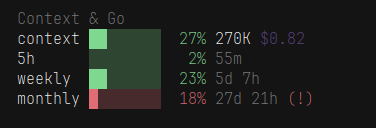
Sidebar, one "Context & Go" block:
Context & Go
context ████████   6% 56.8K $0.08
5h      ████████  20% 2h 16m
weekly  ████████  17% 5d 14h
monthly ████████  14% 28d 3h (!)
- The first row is the session's context: a bar, the percentage, the tokens used and, on the sidebar, the session cost.
- One row per plan window: the bar and the percentage in the threshold colour, the countdown to that
window's reset, and
(!)when the pace seen so far would saturate the window before it resets. - A window that is only forecasting a breach already takes the alert colour: 14% used but heading for 152% looks like an alert, not like a healthy window.
Prompt footer row: the same context figures in compact form, then | 5h:20% w:17% m:14%.
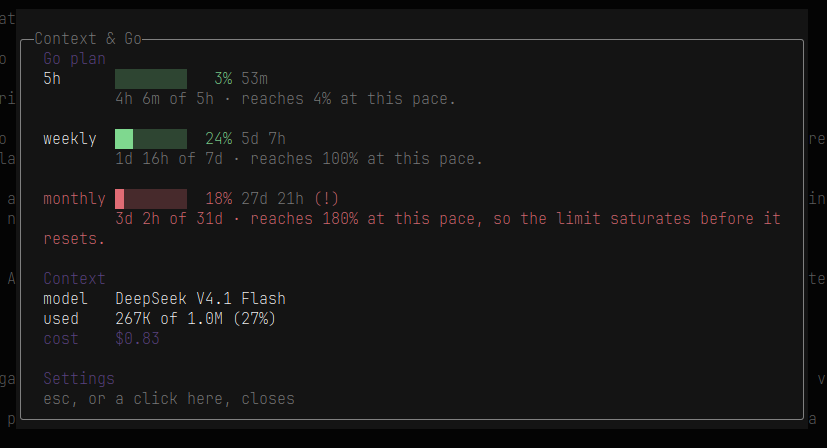
Clicking the title or any row opens one detail dialog: every window with how much of it has elapsed and where the pace lands by the reset, the model, the used tokens against the context window, the cost, and a Settings row. The dialog also opens by itself the first time a window starts forecasting past the threshold — once per alert, not on every refresh.
Where the numbers come from
The endpoint sends only a percentage and the timestamp of the next reset, no window length. The
window's start is derived from that timestamp: the reset minus 5 hours for the 5h window, minus 7
days for the weekly one, minus one calendar month for the monthly one. All three land in the past,
which is what makes the derivation checkable. How far into a window you are, combined with the
percentage used, is the pace: percent × window / elapsed. Below 5% of a window elapsed no forecast
is attempted, because a burst right after a reset would project to thousands.
Opening the panel
- Restart opencode after installing — the plugin source is read at startup.
- Click
Context & Goin the sidebar, or any row under it. - In the dialog that opens, click the
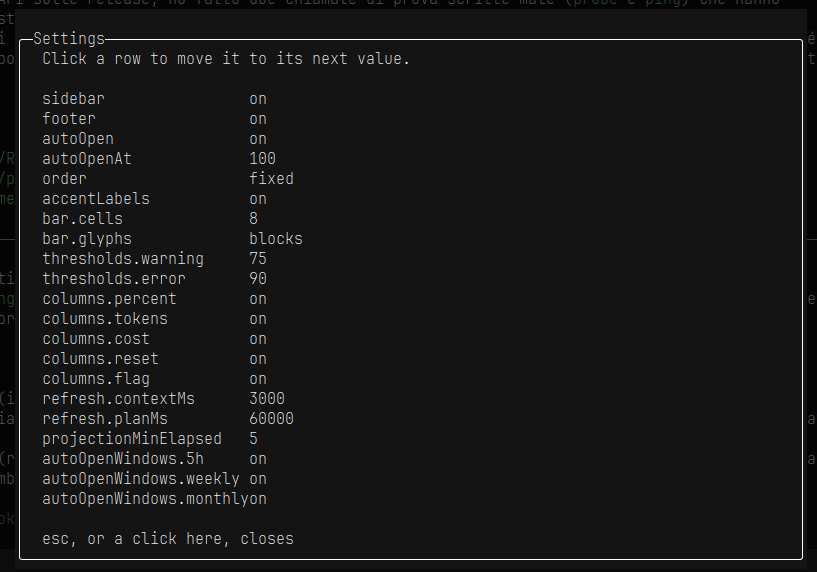
Settingsrow at the bottom. - Click a row to move it to its next value;
config.jsonis written immediately.
The panel lives in that dialog, so with both sidebar and footer off there would be no way in. In
that case a single muted go-meter word stays in the footer as the door: click it to open the
dialog, then Settings. Editing config.json by hand works just as well — one key is enough,
everything else keeps its default.
Clicking
| Where | What it does |
|---|---|
Context & Go, the sidebar title |
Opens the info dialog |
Any row under the title (context, 5h, weekly, monthly) |
Opens the same info dialog |
The Settings row at the bottom of the dialog |
Opens the options panel |
| Any row in the panel | Moves that option to its next value and saves it immediately |
| The closing line of the dialog | Closes it (esc may work too, the click always does) |
go-meter, the word left in the footer when both views are off |
Opens the info dialog |
The click target is the whole row, not just the text.
Screenshots
Sidebar — the context row and the three plan windows. The (!) marks a window whose current pace
saturates it before the reset, and that window's bar takes the alert colour with it:
Status line — the same context figures, then the plan percentages, and the (!) when a window is
heading for its limit:

The info dialog, opened by clicking the title or any row, with the Settings row at the bottom:
The options panel, opened from that Settings row. Every click moves a row to its next value and
writes config.json straight away:
Options
Click any row in Settings to move it to its next value: the panel writes config.json beside
tui.tsx, the same file you can edit by hand. A missing key means the default, and the file is
re-read on a timer, so neither a click nor an edit needs a restart.
| Key | Default | What it does |
|---|---|---|
sidebar |
true |
The sidebar block |
footer |
true |
The prompt footer block |
autoOpen |
true |
Open the detail dialog by itself on a new alert |
autoOpenAt |
100 |
Projected percentage that counts as an alert |
autoOpenWindows |
["5h","weekly","monthly"] |
Which windows may raise it |
thresholds.warning |
75 |
Percentage that turns a figure amber |
thresholds.error |
90 |
Percentage that turns a figure red |
bar.cells |
8 |
Bar width in cells |
bar.glyphs |
"blocks" |
"blocks" or "ascii" (#/-) for fonts that draw the blocks double width |
columns.percent |
true |
The percentage run on each row |
columns.tokens |
true |
The tokens used on the context row |
columns.cost |
true |
The session cost on the context row |
columns.reset |
true |
The reset countdown on each plan row |
columns.flag |
true |
The (!) forecast flag |
order |
"fixed" |
"fixed" (5h, weekly, monthly) or "projection" (worst forecast first) |
accentLabels |
true |
Section headers in the theme accent instead of grey |
refresh.contextMs |
3000 |
How often the context figures are recomputed |
refresh.planMs |
60000 |
How often the plan windows are fetched |
projectionMinElapsed |
5 |
Below this much of a window elapsed, no forecast is attempted |
One option is not in the file: with sidebar, footer and autoOpen all false nothing can show or
announce the figures, and the endpoint is never called.
Troubleshooting
plan n/ain the sidebar. The call to the usage endpoint failed (no opencode-go subscription, noopencode-gokey inauth.json, or the network). The context row keeps working: it reads local session data. The plan rows come back on the next successful refresh.- Nothing appears at all. Restart opencode (the plugin is read at startup); check the folder is
~/.config/opencode/plugins/opencode-go-meter/; checksidebarandfooterare not bothfalseinconfig.json. - The same figures appear twice. The built-ins
opencode.sidebar.contextandopencode.prompt.footerare still enabled — disable them incli.jsonas shown above. - The bar is wider than one column, or a row wraps. A font that draws
█/░double width: setbar.glyphsto"ascii". - No
(!)on a window that is clearly going to blow. A forecast needs at leastprojectionMinElapsedpercent of the window behind it (5 by default), otherwise a burst right after a reset would project to thousands.
Development
bun test # window math, response parsing, config merge and the panel's cycle
Pure logic lives in src/, is dependency-free and is what the tests exercise; tui.tsx renders and
wires it into the opencode host. bun build ./tui.tsx --external '*' --target=bun checks that the
entry still bundles.
License
MIT.
同类生态推荐

Go Limits
opencode-go-limits
OpenCode TUI sidebar widget: opencode Go subscription usage limits (session/weekly/monthly) as bars + percentages

Usage Limits
opencode-usage-limits
Show OpenCode Go and ClinePass subscription usage (5-hour / weekly / monthly) in the OpenCode TUI sidebar.

Tui Quota Usage
opencode-tui-quota-usage
OpenCode quota usage sidebar tracker for OpenCode V2 CLI/TUI