
roleboxOpenCode plugin — define custom AI agent roles via YAML with per-role prompts, models, skills, and permissions
0
1,840
820 in 7 days
40.0
Multi-signal model
2 hours ago
2026-08-20
Install and configure
opencode.jsonWrites to this project's opencode.json — applies to this repository only.
opencode.json
{
  "$schema": "https://opencode.ai/config.json",
  "plugin": ["rolebox@1.4.0"]
}
Writes to ~/.config/opencode/opencode.json — applies to every project.
~/.config/opencode/opencode.json
{
  "$schema": "https://opencode.ai/config.json",
  "plugin": ["rolebox@1.4.0"]
}
If you want to modify the plugin locally, install it into the project and reference the local path.
shell
pnpm add -D roleboxopencode loads npm dependencies through its embedded runtime on startup and caches them locally — no manual global install needed.
rolebox
An agent-harness plugin — for opencode, pi, and dsh — with persistent memory, multi-agent dispatch, LSP integration, and engineering-team workflows.



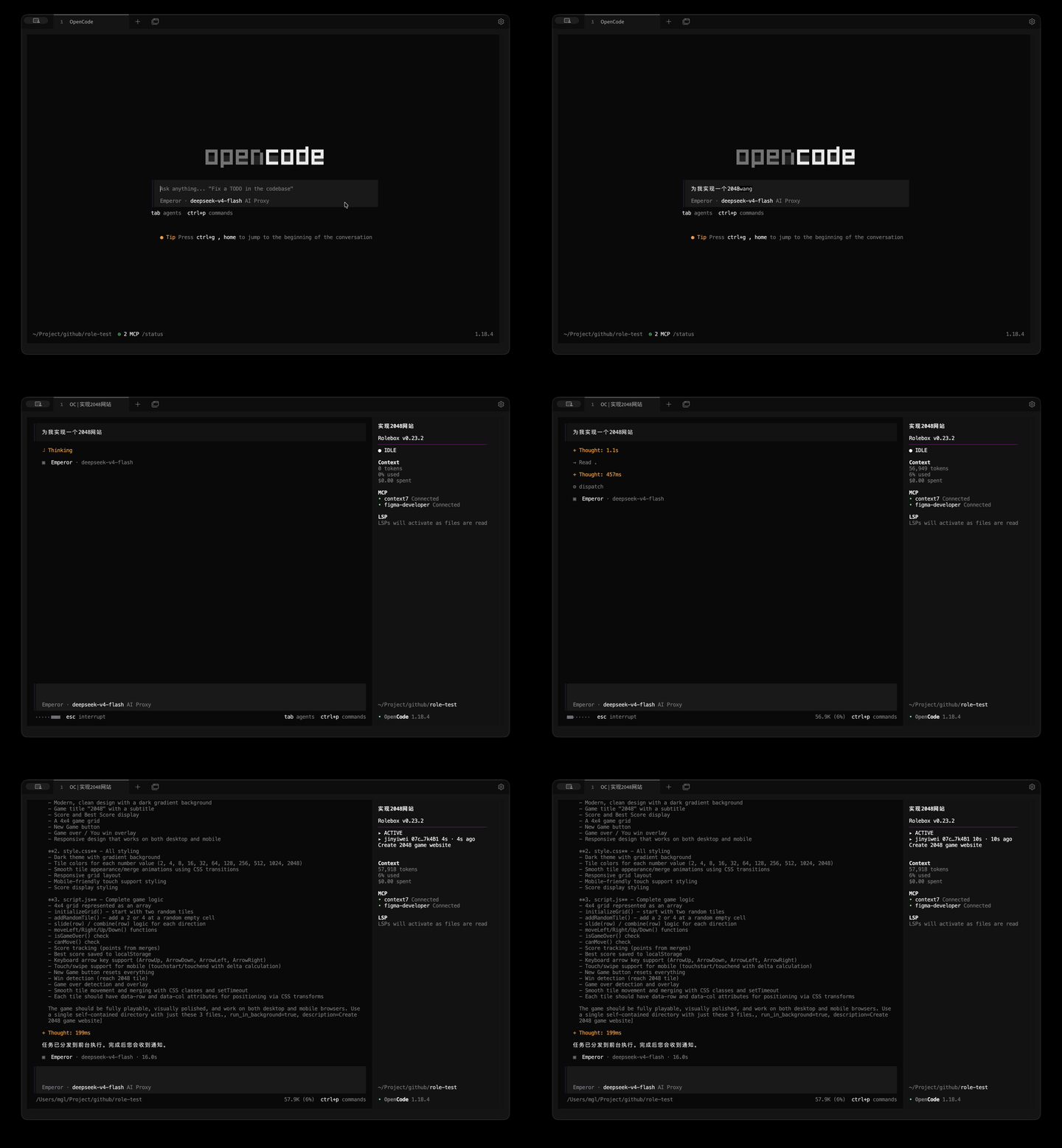
The Emperor orchestrator plans, dispatches to specialists, and validates the result — no code written by the orchestrator itself.
Upgrading from 0.x.x? rolebox 1.x replaced the 0.x execution model. In 0.x, workflows were declared in
role.yaml(collaboration:block with built-in topologies likepipeline,review-loop,star) and routed automatically by the v1 graph machinery. In 1.x, workflows are imperatively built and run on a graph execution engine — you callgraph_create→graph_add_node/graph_add_edge→graph_runand observe results withgraph_status. The v1 collaboration auto-advance machinery was decommissioned (the legacy task-query surface survives as a thintask_*compatibility layer). See Graph execution engine and docs/graph-legacy-v1-decommission.md.
Supported harnesses
rolebox runs on three agent harnesses. Each resolves its own config tree — roles, skills, and runtime state live under the harness's home directory:
| Harness | Config directory | Roles directory | Global skills | Env override |
|---|---|---|---|---|
| opencode | ~/.config/opencode |
~/.config/opencode/rolebox |
~/.config/opencode/skills |
XDG_CONFIG_HOME |
| pi | ~/.pi/agent |
~/.pi/agent/rolebox |
~/.pi/agent/skills |
PI_CODING_AGENT_DIR |
| dsh | ~/.dsh |
~/.dsh/rolebox |
~/.dsh/skills |
DSH_HOME |
On every harness, a rolebox/ directory in the current working directory takes precedence over the global roles directory — handy for project-local role definitions. Registry roles installed with rolebox install <name> are deployed to a harness with rolebox sync <opencode|pi|dsh>.
Jump to setup: opencode · pi · dsh
Quick Start (opencode)
Install the plugin into opencode's config directory:
cd ~/.config/opencode && npm install rolebox
Register it in opencode.jsonc:
{
  "plugin": ["rolebox"]
}
Create your first role:
mkdir -p ~/.config/opencode/rolebox
cd ~/.config/opencode/rolebox && rolebox init my-agent -y
A ready-to-use role directory is created in ~/.config/opencode/rolebox/my-agent/. Restart opencode and pick the agent from your agent list.
To install a pre-built role from the registry (e.g. the Emperor orchestrator):
rolebox install emperor
rolebox sync opencode
sync symlinks each installed role into ~/.config/opencode/rolebox/{roleId}. Verify with rolebox status, which also checks that the plugin is registered in opencode.jsonc and that skill symlinks are intact.
Directory layout
| Path | Purpose |
|---|---|
~/.config/opencode/rolebox/ |
Role definitions ({roleId}/role.yaml) |
~/.config/opencode/skills/ |
Global skills (referenced via opencode_skills:) |
~/.config/opencode/role_config.yaml |
Model alias mappings |
~/.config/opencode/opencode.jsonc |
opencode config — plugin registration + provider/model list |
{project}/.rolebox/ |
Per-workspace runtime state (memory DB, engine state, event logs) |
XDG_CONFIG_HOME relocates the whole ~/.config/opencode tree.
Running as a Pi extension
rolebox ships a pi extension (rolebox/pi → dist/pi-extension.js) that boots the full runtime on pi's ExtensionAPI: role discovery, agent registration, the shared tool surface (memory, hashline, graph engine, LSP, web, session tools), skill resources, and dispatch. The package declares it under the pi.extensions key in package.json, so pi's package manager picks it up automatically.
Install
pi install npm:rolebox
This writes the package into ~/.pi/agent/settings.json (packages array) and installs it under ~/.pi/agent/npm/. Use pi install -l npm:rolebox for a project-local install (.pi/settings.json, shareable with your team). Restart pi — the extension logs discovered roles at startup.
Alternatively, for a from-source checkout, point settings.json at the built extension directly:
{
  "extensions": ["/path/to/rolebox/dist/pi-extension.js"]
}
Add roles
Roles load from {cwd}/rolebox when present, otherwise from ~/.pi/agent/rolebox:
mkdir -p ~/.pi/agent/rolebox
cd ~/.pi/agent/rolebox && rolebox init my-agent -y
Or deploy registry roles:
rolebox install emperor
rolebox sync pi
sync pi symlinks each installed role into ~/.pi/agent/rolebox/{roleId}.
Directory layout
| Path | Purpose |
|---|---|
~/.pi/agent/rolebox/ |
Role definitions ({roleId}/role.yaml) |
~/.pi/agent/skills/ |
Global skills (referenced via opencode_skills:) |
~/.pi/agent/role_config.yaml |
Model alias mappings |
{project}/.rolebox/ |
Per-workspace runtime state (memory DB, engine state, event logs) |
PI_CODING_AGENT_DIR relocates the whole ~/.pi/agent tree (pi's own config-directory override — rolebox follows it).
Platform notes
- The full shared opencode tool surface is registered on pi (parity is enforced by
tests/pi-parity.test.ts) — see the matrix in docs/compatibility.md. - Hot reload (
asset_hot_reload), the extension loader, the crash-recovery engine, and the TUI are opencode-only — see docs/limitations.md.
Running as a dsh plugin
rolebox can also run inside DeepSeek Harness (dsh) — a Cordis-based agent harness. The package ships a Cordis plugin entry (rolebox/dsh) that boots the full rolebox runtime on dsh's services: role discovery, tool registration, graph dispatch, and loop mode. The entry is delivered as a dsh profile bundle (a dsh.bundle declaration in package.json plus a cordis.patch.yml layer), per the contract in docs/dsh-plugin-contract.md.
Install into a profile
dsh plugin --profile <name> add rolebox
dsh plugin add forwards to pnpm inside the profile directory and reconciles the profile's dsh.profile.bundles list — rolebox's bundle layer is appended and its plugin row (id: rolebox, name: rolebox/dsh) is inserted into the composed entry tree on the next boot. The plugin waits for dsh's tools, sessions, and subagents services (its inject list), so it activates only after dsh-base's bundle rows mount them — which the default profile template already provides.
Add roles
Roles load from {cwd}/rolebox when present, otherwise from {dsh home}/rolebox ($DSH_HOME when set, else ~/.dsh):
mkdir -p ~/.dsh/rolebox
cd ~/.dsh/rolebox && rolebox init my-agent -y
Or deploy registry roles:
rolebox install emperor
rolebox sync dsh
sync dsh symlinks each installed role into ~/.dsh/rolebox/{roleId}.
Directory layout
| Path | Purpose |
|---|---|
~/.dsh/rolebox/ |
Role definitions ({roleId}/role.yaml) — overridable via the roleboxDir config option |
~/.dsh/skills/ |
Global skills — overridable via the skillsDir config option |
~/.dsh/role_config.yaml |
Model alias mappings |
{project}/.rolebox/ |
Per-workspace runtime state (memory DB, engine state, event logs) |
DSH_HOME relocates the whole ~/.dsh tree (blank values are treated as unset).
Config
All options are optional; the plugin activates with the dsh-home defaults alone:
| Option | Type | Default | Description |
|---|---|---|---|
roleboxDir |
string |
{dsh home}/rolebox |
Directory containing role.yaml files (override the default under $DSH_HOME) |
skillsDir |
string |
{dsh home}/skills |
Global skills directory |
defaultRole |
string |
— | Role id (directory name) promoted to primary mode |
enabledNamespaces |
string[] |
all | Tool allow-list: exact tool names or namespace prefixes (e.g. hashline, graph); "*" or absent registers every tool |
Set them by patching the rolebox row's config from your profile's own cordis.patch.yml (applied after every bundle layer):
# ~/.dsh/profiles/<name>/cordis.patch.yml
- id: rolebox
  config:
    roleboxDir: /absolute/path/to/roles
    enabledNamespaces: ["asset", "graph", "hashline", "loop", "memory", "reference", "session", "signal"]
Warning — config is replaced, not merged. An
id-targeted patch replaces the row'sconfigwholesale (dsh'sapplyEntryPatchesassigns per-key, no deep merge). If your profile patch overrides the rolebox row'sconfigfor any option, the bundle layer's own config keys are lost unless re-declared in the same patch. Only the last- id: roleboxpatch in the file takes effect for each key.
Note (verified at boot): the dsh base profile already registers a global
web_search/web_fetchtool (via@deepseek-ai/dsh-tool-web). dsh's tool registry rejects duplicate global tool names, so if rolebox registers its ownweb_search/web_fetch/web_readon top, the boot fails withtool "web_search" is already registered. Exclude the collidingwebnamespace from rolebox's set in the profile patch (as above) and let dsh's own web tools serve — or register rolebox's tools under another allow-list that avoids the overlap.
Role-switch UI in the dsh web app
The web profile auto-mounts the role-switch dock — no extra config needed. The package ships a dsh.client slot plugin (package.json dsh.client, platform: "web") that the web app's client-module registry picks up automatically and mounts into the conversation.input.dock slot (the list/session-scoped row above the composer). The dock is a collapsible role-list panel: a header carrying the current status, one row per role (name plus description · model · mode metadata, with a current-role indicator), a Return to base agent row that appears only while a role is active, and a Retry row after a failed switch or clear. Clicking a row switches to that role; on mount (and on session change) the dock hydrates the session's persisted active role so the highlight survives a reload. All requests go to rolebox's REST surface over same-origin relative paths.
The /rolebox host route is served by dsh's own web server: during apply(), the plugin probes for the optional webServer service (ctx.get("webServer")) and registers a prefix route for /rolebox on it. The API under the prefix:
| Endpoint | Method | Description |
|---|---|---|
/rolebox/roles |
GET | JSON array of switchable roles (id / name / description / model / mode, primary roles only) |
/rolebox/roles/active |
GET | { session, role } — the active role id for the session, or null for the base agent |
/rolebox/roles/switch |
POST | Body { role: string, session?: string } — switch the session's active role |
/rolebox/roles/active |
DELETE | Clear the active role for the session (back to the base agent) |
The session key is optional everywhere: an explicit session wins, otherwise the most recently active session in the store is used. Every non-2xx response is JSON with the stable shape { "ok": false, "error": string } (400 / 404 / 405 / 413 / 500).
Headless profiles simply skip route registration. The webServer service only exists when the web profile is active; without it, the plugin skips the /rolebox registration with a debug log and keeps running normally — there is no bind host or port on this plugin, and no web surface to configure.
What switching a role does. A switch is per-session and takes effect on the next model turn. The active role's system prompt is injected into the model-facing prompt through dsh's system-prompt registry — rolebox contributes a rolebox:role section (the active role's full system prompt) and a rolebox:context context entry (its available-functions block), both resolved per session so a web-UI switch reaches the running session. Headless profiles have no prompt registry and degrade with a warning. Spawned subagents inherit the active role too: the dsh agent registrar prepends its system prompt to the spawn request and applies its model override at spawn time. The dock's clear/retry/hydrate behaviors close the loop — Return to base agent clears the active role, a failed switch or clear keeps the previous state and offers Retry, and a reload hydrates the persisted active role. See docs/dsh-plugin-contract.md §4.4/§4.5 for the web-UI route and system-prompt deep material, and examples/dsh/cordis.patch.yml for a fully configured profile patch.
Plain-entry fallback (no bundle)
If you installed rolebox as a plain dependency and want to activate it manually, insert the entry row yourself in the profile's cordis.patch.yml:
- insert:
    - id: rolebox
      name: rolebox/dsh
      config: {}
name is the package subpath export rolebox/dsh (→ dist/dsh-plugin.js), which default-exports the Cordis object plugin { name, inject, Config, apply }. The package root (main → dist/index.js) is the opencode plugin and is not a Cordis plugin — always reference the rolebox/dsh subpath. See examples/dsh/cordis.patch.yml for a fully configured example and docs/dsh-plugin-contract.md §5 for the bundle/patch semantics.
Why rolebox
- Persistent memory — SQLite + FTS5 stores decisions, conventions, and lessons across sessions. Workspace-scoped or role-private. Relevant memories auto-inject at session start via
<available_memory>. - Multi-agent dispatch — define specialist roles in YAML and dispatch them in parallel with concurrency control and budget tracking. The Emperor orchestrator handles planning, delegation, validation, and revision across a team of sub-agents — without writing code.
- LSP integration and hashline editing — 30+ language server tools (go-to-definition, diagnostics, references, rename, completions) available inside your assistant. Content-hash-anchored editing replaces fragile line numbers so edits survive concurrent file changes.
Graph execution engine
Introduced in 1.0, the graph execution engine is how rolebox now runs multi-agent workflows. Instead of a single orchestrator deciding who to dispatch to and when, you build an explicit graph of nodes and edges and the engine executes it: nodes are dispatched to sub-agents, edges carry results and signals between them, and the engine tracks budget, approval gates, and loop caps on every dispatch.
The engine is driven by an imperative toolset — graph_create, graph_add_node, graph_add_edge, graph_add_loop, graph_run, graph_status, graph_cancel, graph_approve — registered in src/graph/tools/index.ts. The underlying engine lives in src/graph/engine/* (see docs/graph-engine-architecture.md).
Concepts
- Nodes — role-agnostic
{agent, prompt}tuples.graph_add_noderegisters one worker node; structural validation is atomic (an invalid node is rejected without mutating the graph). - Edges — directed edges define data flow and signal routing. Edge
typeis one of:always— activate the target when the source completes,on_signal— activate on a specific signal type (requiressignal_filter, e.g.["revise_needed"]),on_condition— activate when a named condition evaluates true (requirescondition).
- Loop groups —
graph_add_loopdeclares a bounded cycle of nodes with a hardmax_traversalscap and optional soft termination conditions (converged,stuck,result_matches,timeout_ms,signal, …). Loops re-dispatch within the same engine state (mode: "inherit"); per-round session isolation is not supported — use a separate graph per round. - Approval gates — a node with
needs_approval: truepauses the graph at that node. The engine emits[GRAPH BLOCKED]; the human resolves it withgraph_approve(graph_id, node_id, action)whereactionisapprove(continue) orreject(re-enter the node with feedback when it belongs to a loop group, otherwise escalate). - Observability —
graph_statusqueries node, loop, or graph state:format=treerenders the node dependency tree,scope=persistedreads graphs hydrated from the on-disk engine-state store,include_outputreturns materialized node results, andinclude_history/streamsurface loop rounds and signal events. Persisted state lives in.rolebox/state/engine-*.jsonplus an append-onlygraph-events-*.ndjsonevent log.
Usage
graph_run is non-blocking — it dispatches ready root nodes and returns immediately with phase, active_nodes, and pending_nodes. End your turn after graph_run; the engine emits a [GRAPH COMPLETE] system-reminder when all nodes finish (or [GRAPH BLOCKED] when a node awaits approval). On the next turn, read results once via graph_status(graph_id, include_output=true).
1. graph_create(name="review-workflow")                 → { graph_id: "review-workflow", ... }
2. graph_add_node(graph_id="review-workflow", id="writer",
     agent="emperor--jinyiwei--ui", prompt="Build the component")
3. graph_add_node(graph_id="review-workflow", id="reviewer",
     agent="emperor--jinyiwei--test", prompt="Review the result")
4. graph_add_edge(graph_id="review-workflow",
     from="writer", to="reviewer", type="always")
5. graph_run(graph_id="review-workflow")                → non-blocking; end your turn
6. [GRAPH COMPLETE] system-reminder arrives
7. graph_status(graph_id="review-workflow", include_output=true)   → read results once
Loop groups and approval gates compose on top of the same node/edge model:
graph_add_loop(graph_id="review-workflow", id="revise", nodes=["writer", "reviewer"],
  max_traversals=3, termination={ any_of: [{ signal: "revise_needed" }] })
graph_add_node(graph_id="review-workflow", id="finalize",
  agent="emperor--jinyiwei--docs", prompt="Finalize", needs_approval=true)
graph_approve(graph_id="review-workflow", node_id="finalize", action="approve")
See docs/graph-engine-architecture.md for the full engine architecture map and docs/graph-legacy-v1-decommission.md for how the v1 subsystem was replaced.
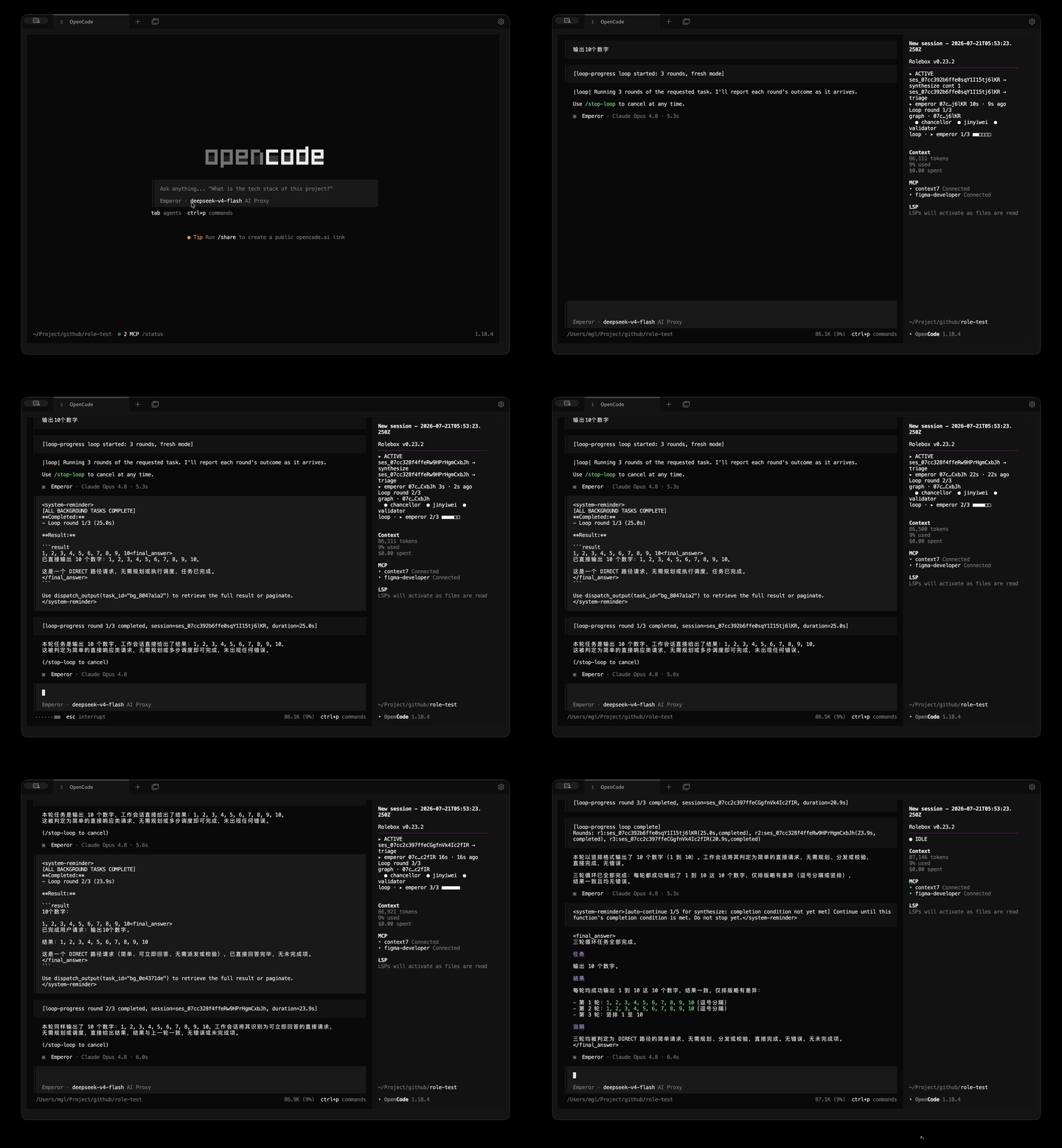
Loop mode
Run the same task across fresh sessions and iterate automatically — useful for refinement passes, batch fixes, and self-correcting workflows.
Features at a glance
- Dispatch system — parallel background execution with concurrency control, budget tracking, task retry, and dependency graphs. See docs/dispatch-config.md.
- Graph execution engine — explicit node/edge workflows with non-blocking
graph_run, signal- and condition-based edges, bounded loop groups, and approval gates. See docs/graph-engine-architecture.md. - Desktop notifications — native OS notifications with idle detection, quiet hours, event filtering, and smart throttling. See docs/hooks.md.
- Session management — 10 tools for searching, exporting, forking, diffing, and inspecting session history. See docs/session-tools-strategy.md.
- Function state machine — functions have active, gated, and dormant phases with evidence observation and artifact tracking. See docs/functions.md.
- Context assembly — cross-domain search across memory, assets, tasks, and sessions with token-bounded result blocks.
- Asset management — hot-reload roles, skills, and references at runtime; asset search, inspection, validation, and composition analysis.
Comparison: opencode vs + rolebox
| Capability | Raw opencode | + rolebox |
|---|---|---|
| Persistent memory | ❌ Sessions start blank | ✅ SQLite + FTS5, auto-inject past decisions |
| Multi-agent teams | ❌ Single agent | ✅ YAML-defined specialists, parallel dispatch |
| LSP integration | ❌ No language server access | ✅ 30+ tools (go-to-def, references, rename, diagnostics…) |
| Hashline editing | ❌ Line-number based | ✅ Content-hash anchored — edits never drift |
| Background dispatch | ❌ Sequential | ✅ Real concurrency with budget tracking |
| Hot-reload assets | ❌ Restart required | ✅ Edit YAML, reload instantly |
CLI Reference
| Command | Description |
|---|---|
rolebox init <name> |
Scaffold a new role directory |
rolebox install [name] |
Install a role from the registry (interactive picker when omitted) |
rolebox status |
List all installed roles and their status |
rolebox info [name] |
Detailed role inspection (interactive picker when omitted) |
rolebox sync <target> |
Deploy installed roles to a harness (opencode / pi / dsh) |
rolebox config [name] |
Configure models for a role (interactive picker when omitted) |
rolebox monitor |
Live dispatch metrics dashboard (TUI) |
rolebox memory search <query> |
Full-text search across persistent memory |
rolebox --version |
Show version |
Role Gallery
Pre-built roles available from the oh-my-role registry:
| Role | What it does |
|---|---|
| emperor | Top-level orchestrator — plans, delegates, validates complex work across a specialist team |
| software-architect | System design, trade-off analysis, ADRs, C4 models, and architecture reviews |
| react-frontend | React/Next.js component design, state management, and frontend architecture |
| ai-designer | AI application design with humane UX gates, interaction modeling, and design system creation |
| tauri | Desktop app development with Tauri v2 — IPC, plugins, window management, system tray |
| dart-flutter | Cross-platform mobile and desktop Flutter development with full gate review pipeline |
Install any role with rolebox install <name> and restart opencode.
Model Alias Configuration
Roles published on the oh-my-role registry often use placeholder model names (e.g. PLACEHOLDER, YOUR_MODEL_HERE) instead of real provider/model identifiers. Rather than editing each role's role.yaml manually, you can define local alias mappings once.
Create or edit role_config.yaml in your harness's config directory — ~/.config/opencode/role_config.yaml on opencode (same directory as opencode.jsonc), ~/.pi/agent/role_config.yaml on pi, ~/.dsh/role_config.yaml on dsh:
model_aliases:
  PLACEHOLDER: hfai/deepseek-v4-pro-max
  YOUR_MODEL_HERE: anthropic/claude-opus-4
  # key = placeholder string from role.yaml
  # value = provider/model_id for your actual model
How resolution works
At role load time, each model: field goes through a non-destructive fallback chain:
- Known models first — if the value matches a model already configured in your
opencode.jsoncprovider list, it passes through unchanged. - Alias lookup — if not known, rolebox checks
model_aliasesinrole_config.yaml. When a match is found, the mapped value is used (single-hop — no recursive chaining). - Passthrough with warning — if neither matches, the original value is preserved and a warning is logged. Loading never fails because of an unrecognized model.
This resolution covers both the role-level model field and all subagent model fields, including inherited values.
Error handling
- Missing config file — treated as an empty alias map; no error.
- Malformed YAML — warns and falls back to empty aliases; loading continues.
- Invalid alias entries (empty keys, non-string values, empty values) — skipped with a warning; valid entries in the same file still apply.
Hot-reload
Edits to role_config.yaml take effect on the next hot-reload cycle or role bootstrap. No process restart is required for the primary runtime. For CLI tools that bypass the bootstrap path, a restart is needed.
Docs Index
| Topic | Docs |
|---|---|
| Create a Role | docs/create-a-role.md |
| role.yaml Reference | docs/role-yaml.md |
| Directory Structure | docs/directory-structure.md |
| Functions | docs/functions.md |
| Skills | docs/skills.md |
| References | docs/references.md |
| Subagents | docs/subagents.md |
| Collaboration Graph | docs/collaboration-graph.md |
| Graph Engine Architecture | docs/graph-engine-architecture.md |
| Graph v1 Decommission | docs/graph-legacy-v1-decommission.md |
| Memory Strategy | docs/memory-strategy.md |
| CLI | docs/cli.md |
| Session Tools | docs/session-tools-strategy.md |
| Dispatch Config | docs/dispatch-config.md |
| Custom Hooks | docs/hooks.md |
| Extensions | docs/extensions.md |
| Registry | docs/registry.md |
| Error Handling | docs/error-handling.md |
| Limitations | docs/limitations.md |
| Compatibility | docs/compatibility.md |
| dsh Plugin Contract | docs/dsh-plugin-contract.md |
Contributing
Contributions welcome. See CONTRIBUTING.md for guidelines.
License
MIT — see the LICENSE file.