
Rolebox
Agent plugin for major harnesses — DeepSeek Harness (DSH), OpenCode, Pi and Codex: define custom AI agent roles with per-role prompts, models, skills, permissions, memory and multi-agent orchestration.
3
近 30 天 +2
8,822
近 7 天 398
52.5
生态多维模型
1 小时前
2026-10-21
快速安装与配置
opencode.json写入当前项目的 opencode.json,只对这个仓库生效。
opencode.json
{
  "$schema": "https://opencode.ai/config.json",
  "plugin": ["rolebox@2.0.0"]
}
写入 ~/.config/opencode/opencode.json,对所有项目生效。
~/.config/opencode/opencode.json
{
  "$schema": "https://opencode.ai/config.json",
  "plugin": ["rolebox@2.0.0"]
}
若你要在本地改造这个插件,先装到项目里再从本地路径引用。
shell
pnpm add -D roleboxOpenCode 启动时会通过内嵌运行时自动加载 npm 依赖并缓存至本地目录,无需手动在全局环境执行安装。
rolebox
Turn one coding agent into a configured engineering team.
Specialist YAML roles with their own prompts, models, skills and permissions — run as explicit
graphs, with memory that survives the session.
One plugin for opencode, pi, dsh and Codex.






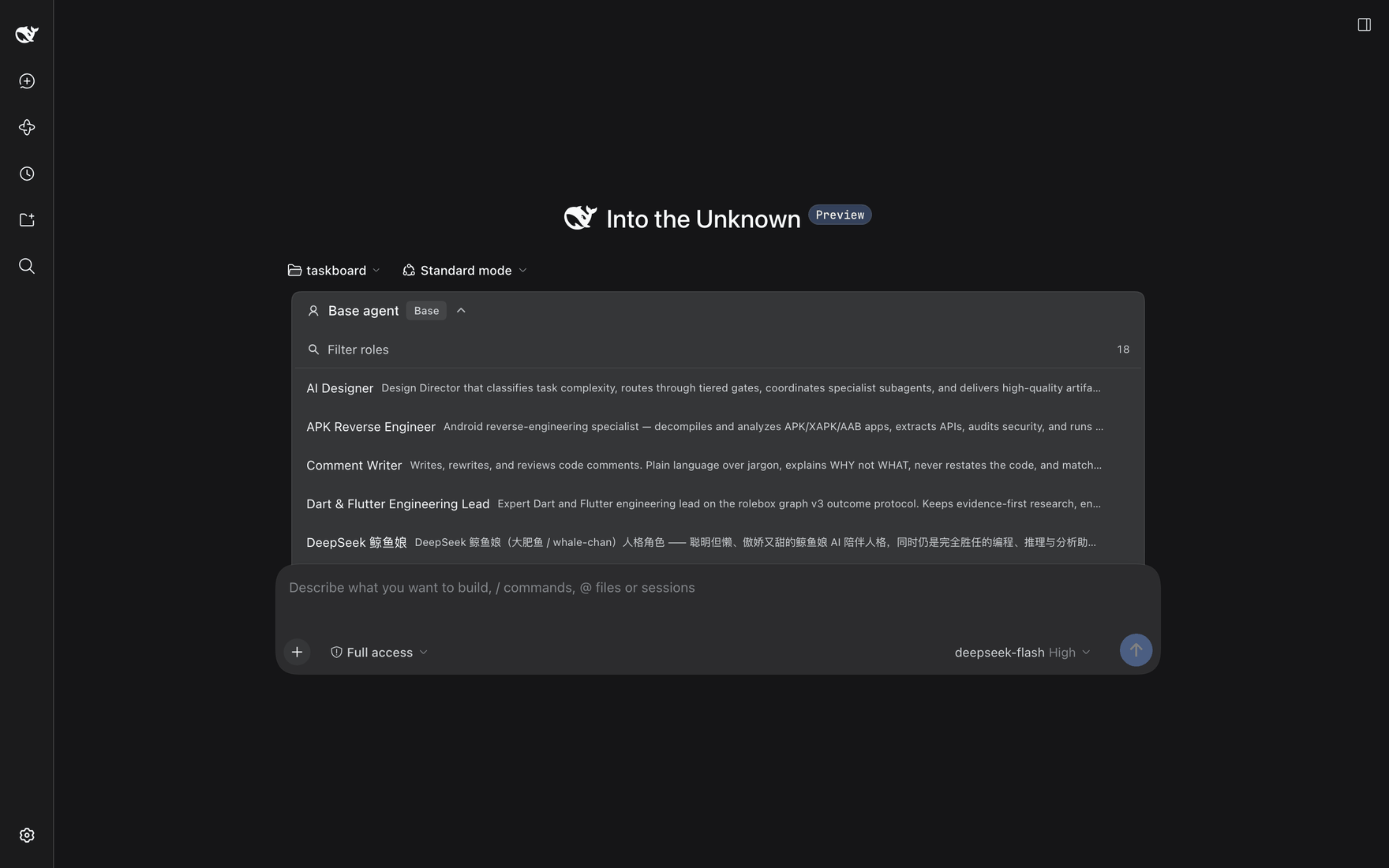
The role picker, opened from the composer: Filter roles searches the 18 loaded roles, each row a display name and a one-line description, and the header names the current selection, Base agent.
What it is · See it work · Install · Roles · What you get · Engine · CLI · Docs
What it is
A general coding agent is one agent with one prompt. rolebox turns it into your configured team: specialists defined in YAML, each with its own prompt, model, skills and permissions, working the same task together. What they learn survives the session — decisions, conventions and lessons persist in memory and come back at the next session start.
The team is not a prompt chain. Work is declared: graph_declare writes a version-3 declaration naming each node's agent, its brief, and the outcomes it may report; the host dispatches the entry nodes and a worker settles its node with graph_submit_outcome. A node advances only through an accepted outcome — a free-form report is never read as progress. Loops are bounded and declared, and every step is inspectable while it runs.
At a glance
- Roles — 18 specialists on the public oh-my-role registry, or write your own in one YAML file.
- Runtime — the graph v3 outcome protocol: declared nodes and edges, accepted outcomes, bounded repair loops.
- Memory — SQLite + FTS5, auto-injected at session start and searchable from the CLI.
- Tools — 32
lsp_*language-server tools,hashline_*edits anchored to content hashes, skills, references, custom functions and hooks. - Desktop — a 12-tool
computer_*family:computer_screenshot,computer_windows,computer_displays,computer_focus,computer_click,computer_move,computer_scroll,computer_drag,computer_type,computer_key,computer_status,computer_permissions. - Visibility — the dsh Rolebox monitor pane, the
rolebox monitorTUI, and channel-filtered logs.
See it work
Every screenshot in this README was captured from a live dsh session on a demo workspace. Each caption states only what that capture shows.
1 · Every loaded role, on one page
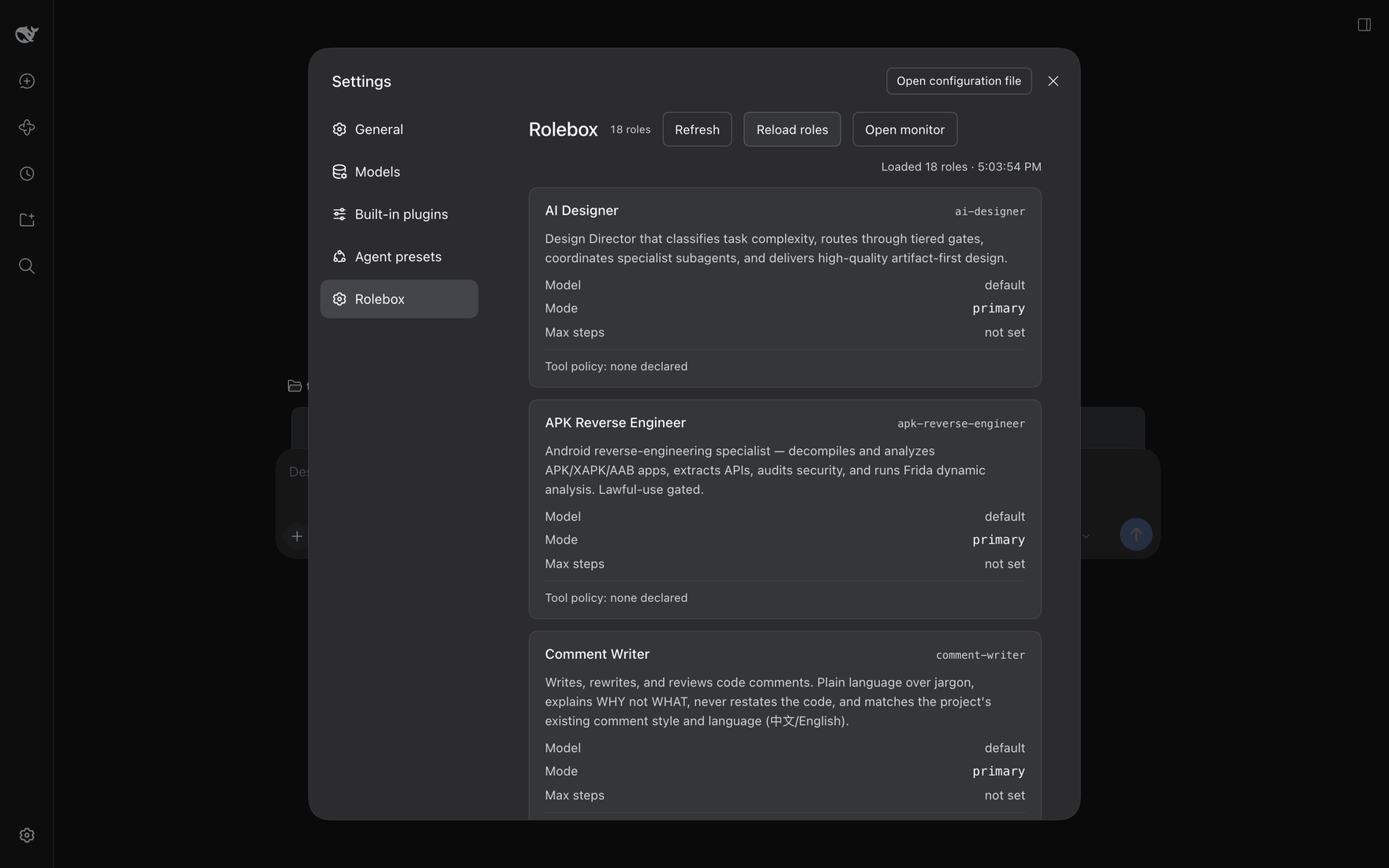
Settings → Rolebox: the 18 roles that loaded, each with its slug, description and declared tool policy.
Each card carries the display name, the slug at the right (ai-designer, apk-reverse-engineer, comment-writer in the capture), a description paragraph, then three label/value rows — Model, Mode, Max steps — and a Tool policy: footer. In this capture every visible card reads Model default, Mode primary, Max steps not set and Tool policy: none declared; no card names a source or origin path. The header carries the 18 roles badge, the Refresh, Reload roles and Open monitor buttons, and a right-aligned Loaded 18 roles · <time> line recording when the load happened.
2 · Work is declared as a graph, not prompted node by node
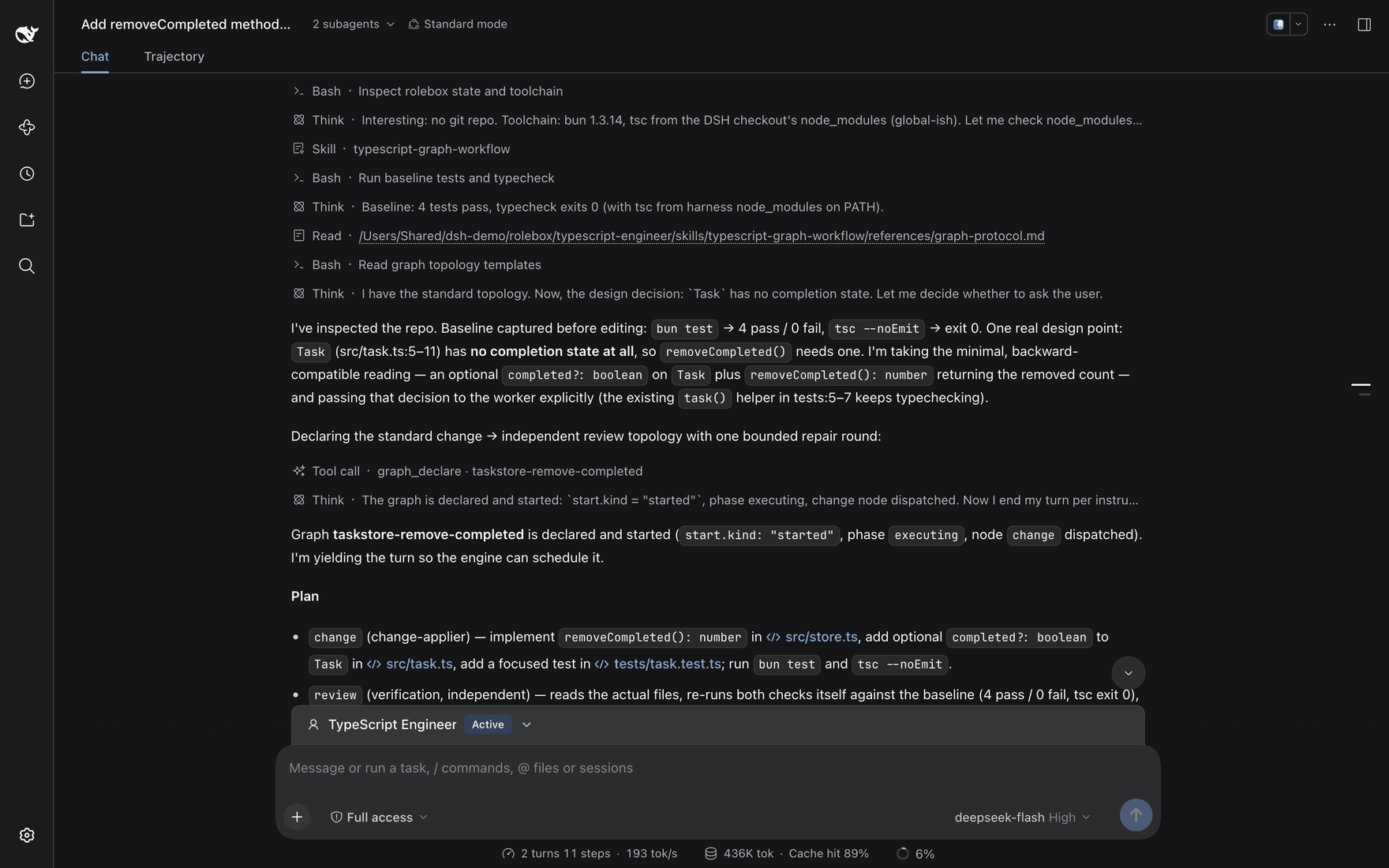
The TypeScript Engineer loads its own skill, reads the protocol reference, and declares the work with graph_declare.
The role does not do the work inline. It inspects the repo and records a baseline before editing — bun test → 4 pass / 0 fail, tsc --noEmit → exit 0 — then names one real design point: Task has no completion state at all, so removeCompleted() needs one. It takes the minimal, backward-compatible reading — an optional completed?: boolean on Task plus removeCompleted(): number returning the removed count — and passes that decision to the worker explicitly.
It then declares graph_declare · taskstore-remove-completed and yields the turn so the engine can schedule it. The plan names exactly two nodes and one bounded repair round:
change(change-applier) — implementremoveCompleted(): numberinsrc/store.ts, add the optionalcompleted?: booleanfield toTaskinsrc/task.ts, add a focused test intests/task.test.ts, and runbun testandtsc --noEmit.review(verification, independent) — read the actual files and re-run both checks against the same baseline.
The turn closes on the declaration being started (start.kind: started, phase executing, node change dispatched). The capture states no execution budget.
3 · Independent verification, then reconciliation
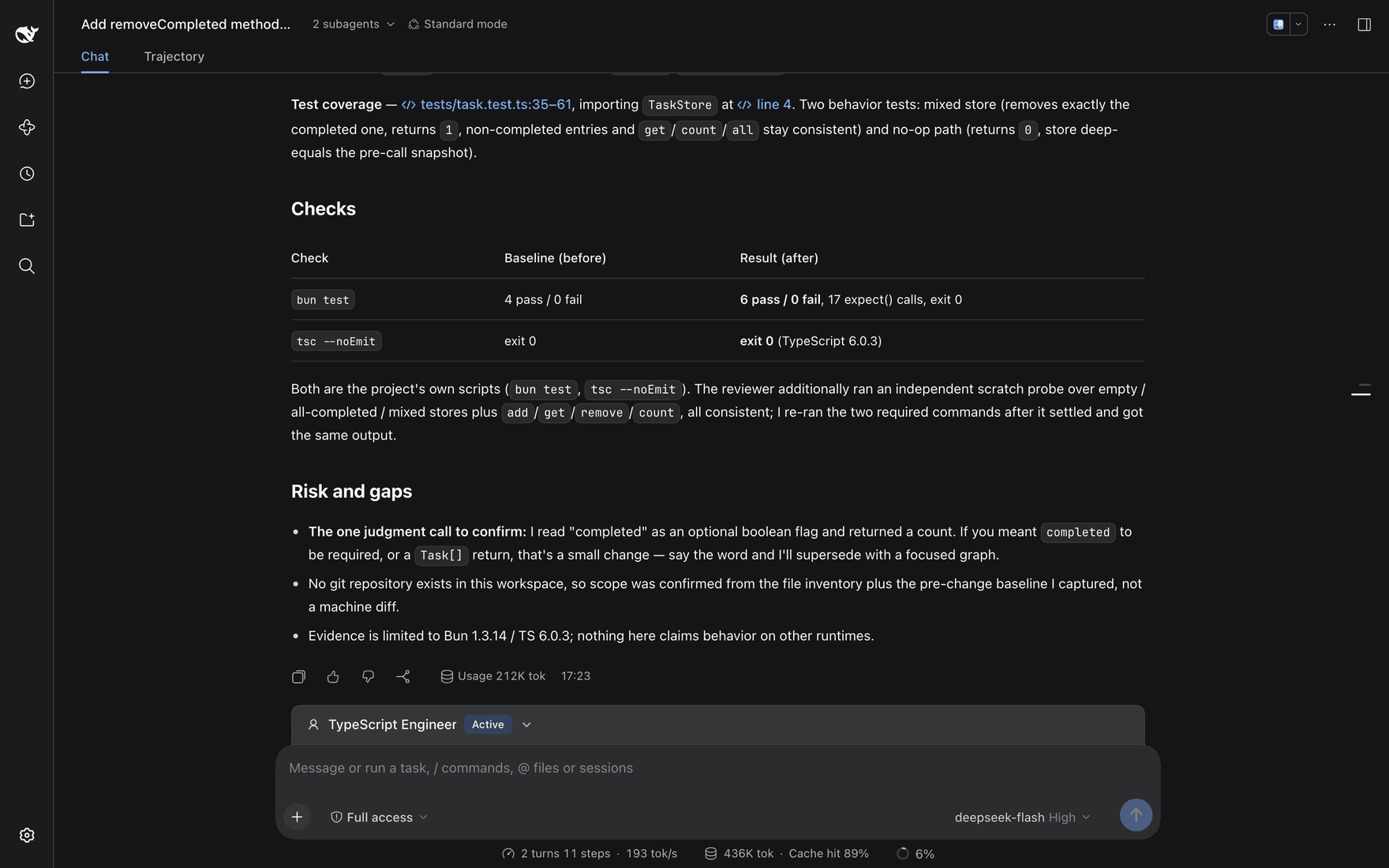
Accepted results come back; the parent reconciles them, re-runs the checks itself, and states what was verified and what remains uncertain.
Both nodes ran in their own sessions, and the verifying node is not the node that wrote the code. The closing synthesis reports the test coverage — tests/task.test.ts:35-61, importing TaskStore at line 4 — as two behavior tests: a mixed store that removes exactly the completed entry and returns 1 while non-completed entries and get/count/all stay consistent, and a no-op path that returns 0 with the store deep-equal to a pre-call snapshot.
A Checks table sets each check against its baseline: bun test went from 4 pass / 0 fail to 6 pass / 0 fail, 17 expect() calls, exit 0, and tsc --noEmit stayed at exit 0 (TypeScript 6.0.3). Both are the project's own scripts; the reviewer additionally ran an independent scratch probe over empty, all-completed and mixed stores plus add / get / remove / count, and the parent re-ran the two required commands after the reviewer settled and got the same output.
The Risk and gaps list keeps three things open on purpose: the one judgment call still to confirm (whether completed should be required, or the return a Task[]); the fact that no git repository exists in the workspace, so scope was confirmed from the file inventory plus the pre-change baseline rather than a machine diff; and the fact that the evidence covers Bun 1.3.14 / TypeScript 6.0.3 and claims nothing about other runtimes.
4 · One brief in, one outcome out
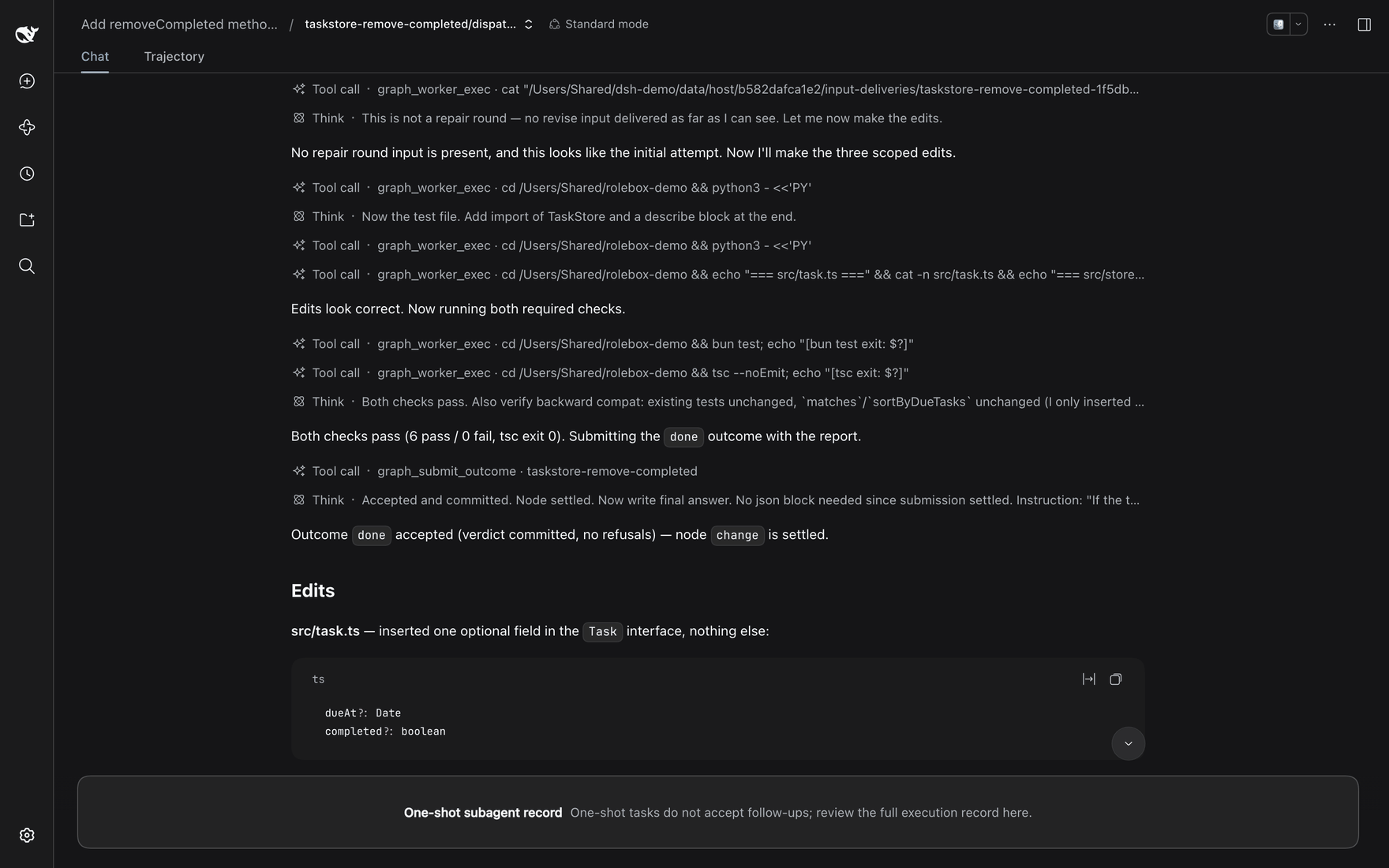
One brief in, one outcome out: the worker makes the scoped edits, runs both checks, and settles node change with the done outcome.
A dispatched worker is a one-shot session with exactly two tools — graph_worker_exec for reads, commands and permitted edits, and graph_submit_outcome to settle its node. It cannot dispatch, and it cannot read or steer graph state. Here the worker's whole record is cat of its host handoff, the scoped edits, cat -n verification of the edited files, bun test and tsc --noEmit. It notes that this was not a repair round (no revise input was delivered), makes the three scoped edits, reports 6 pass / 0 fail, tsc exit 0, and closes on Outcome done accepted (verdict committed, no refusals) — node change is settled. The banner across the bottom is the one-shot contract: the record does not accept follow-ups.
5 · Watch the engine while it runs
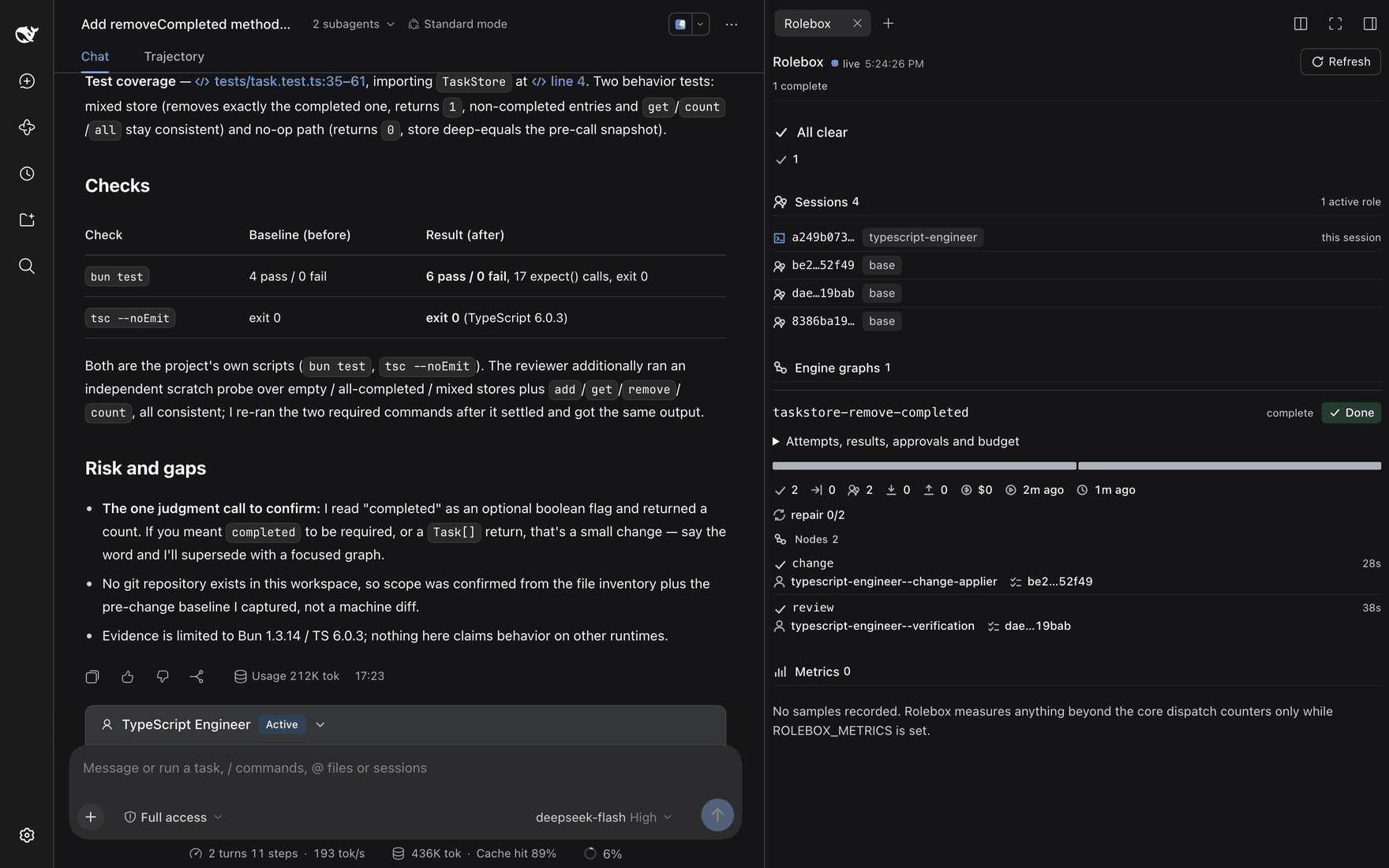
The monitor pane: live sessions and their active role, the engine graph with each node's agent and duration, the repair counter and the run's budget expander.
The Rolebox pane in dsh's right sidebar is the live engine view. In the capture it reports Sessions 4 with one active role — the session being viewed runs typescript-engineer, the other three run base — and Engine graphs 1: taskstore-remove-completed, marked complete and Done, with an expander for attempts, results, approvals and budget, a progress bar with the run's counters, and repair 0/2. Under Nodes 2, each node names its agent, worker session and duration: change ran typescript-engineer--change-applier for 28s, review ran typescript-engineer--verification for 38s. Metrics 0 reports No samples recorded and says the pane measures anything beyond the core dispatch counters only while ROLEBOX_METRICS is set. No loops section appears in this pane.
6 · The same run from a terminal
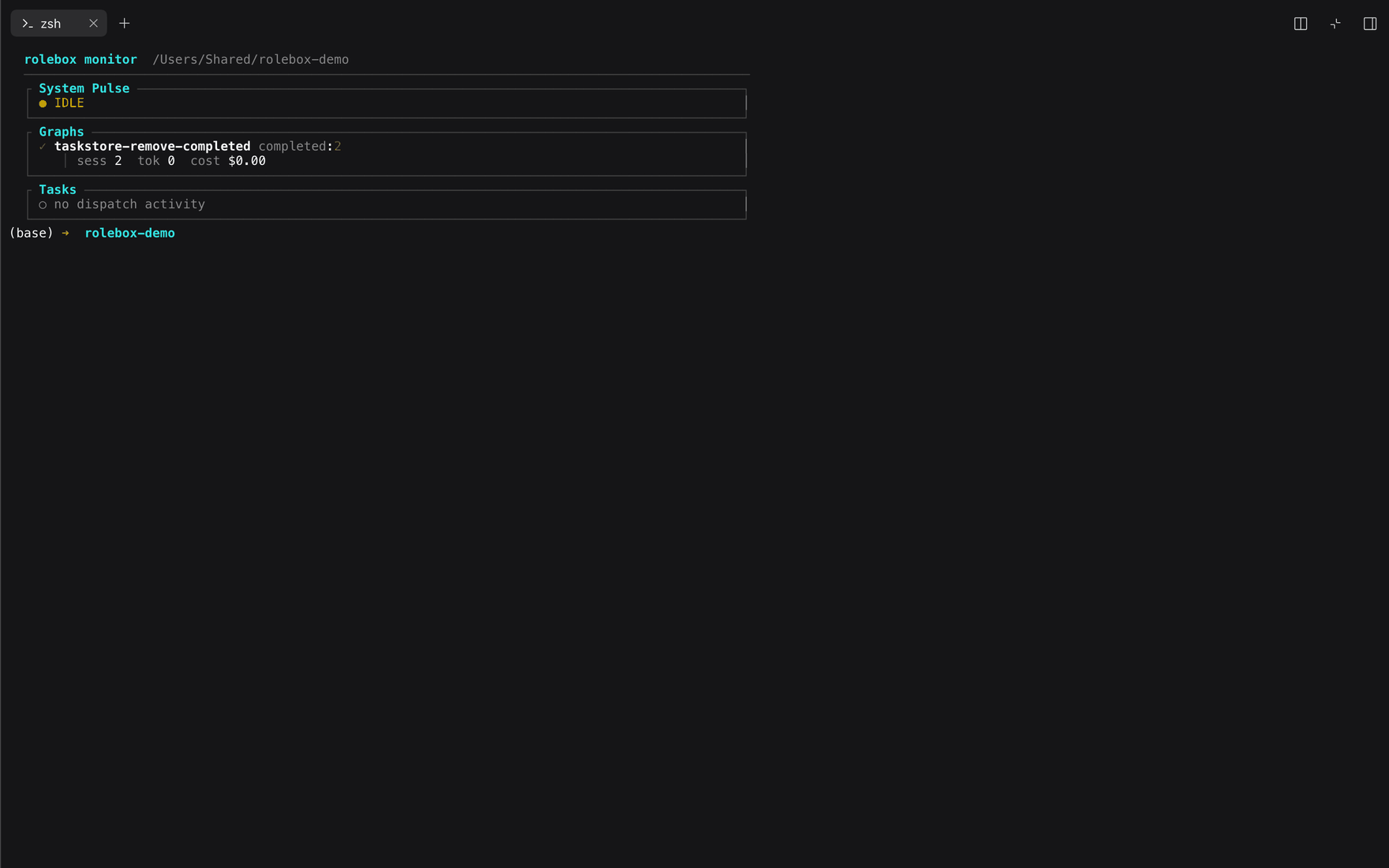
The same run from the terminal: rolebox monitor as System Pulse, Graphs and Tasks panes.
rolebox monitor renders the project's persisted dispatch state as a dashboard of boxed panes under a header naming the command and the workspace it read. At capture time System Pulse reads IDLE; Graphs lists taskstore-remove-completed completed: 2 with sess 2 tok 0 cost $0.00 beneath it; and Tasks reports no dispatch activity.
7 · Logs, filtered by channel and by session
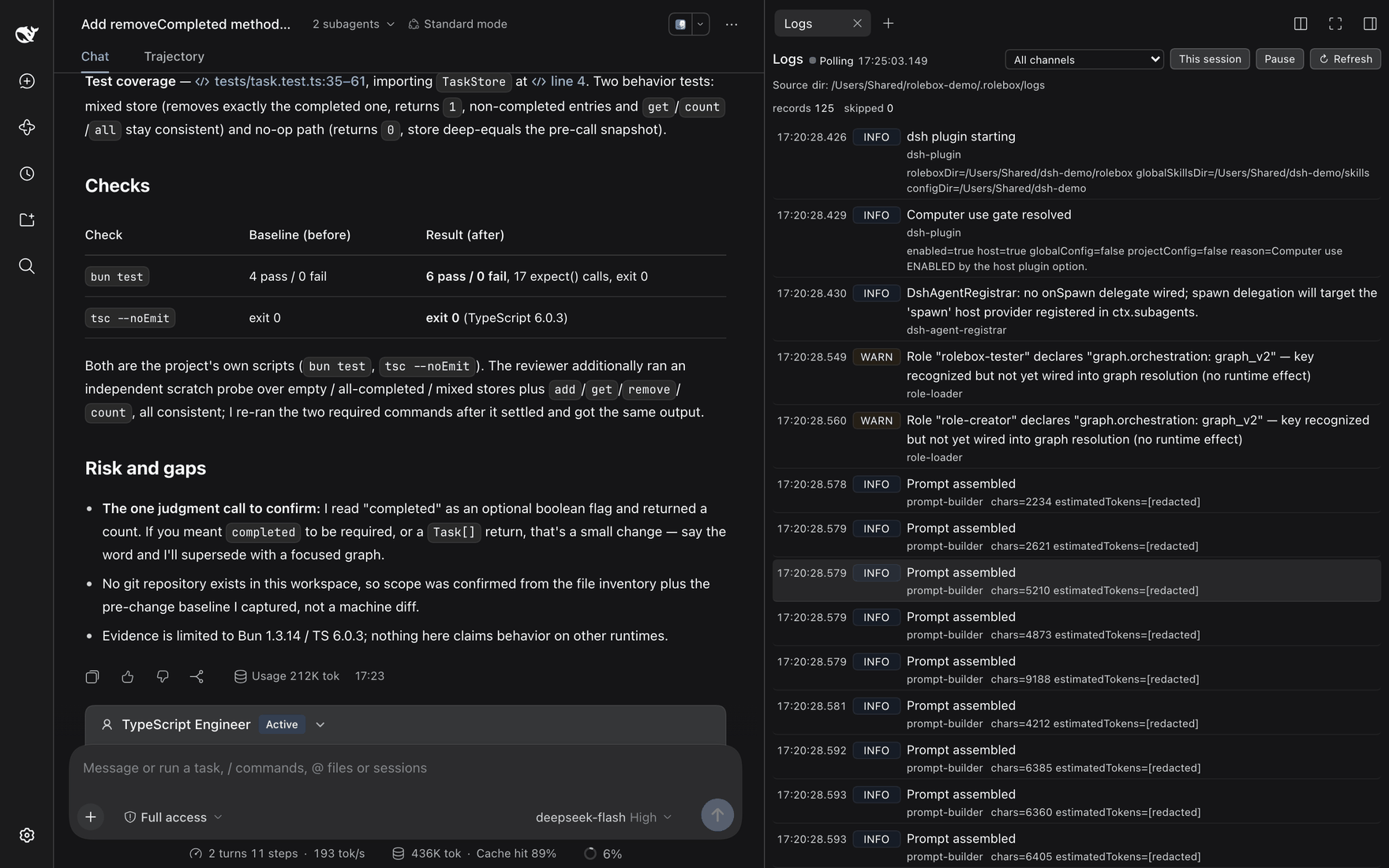
Plugin startup, role loading and prompt assembly, one record per event, filterable by channel or by session.
The Logs pane polls the workspace's .rolebox/logs directory (in the capture records 125, skipped 0) and renders one line per record: timestamp, level, title, channel and details. The records shown include the dsh-plugin startup lines and the computer-use gate verdict, dsh-agent-registrar reporting that no onSpawn delegate is wired, role-loader warnings that a role declares graph.orchestration: graph_v2 and that the key is recognized but not wired into graph resolution, and a run of prompt-builder Prompt assembled lines with their character counts. The levels shown are INFO and WARN, and the controls are an All channels dropdown, a This session filter, Pause and Refresh. The pane and rolebox logs read the same log files, so what ran in the UI is debuggable from a shell.
Loop mode
Loop mode runs the same task across N rounds, each dispatched to its own fresh session. |loop:3| seeds every round with the previous round's summary (inherit, the default); |loop:3,fresh| starts each round from a clean slate. The parser (src/loop/params.ts) also accepts on/true for inherit and no-inherit/off/false for fresh, and clamps N to a hard cap of 50. Useful for refinement passes, batch fixes and self-correcting workflows.
Also in the box, reachable from the same session: persistent memory (rolebox memory), skills and references, LINE#HASH-anchored hashline_* editing, MCP servers, custom hooks, turn-end copilot functions, and rolebox's own computer-use family.
Install
rolebox runs on four harnesses. A rolebox/ directory in the current working directory takes precedence over the global roles directory; registry roles install with rolebox install <name> and deploy with rolebox sync <opencode|pi|dsh|codex>. Each harness has a minimum version — Harness versions lists them and why.
| Harness | Config directory | Roles directory | Global skills | Env override |
|---|---|---|---|---|
| opencode | ~/.config/opencode |
~/.config/opencode/rolebox |
~/.config/opencode/skills |
XDG_CONFIG_HOME |
| pi | ~/.pi/agent |
~/.pi/agent/rolebox |
~/.pi/agent/skills |
PI_CODING_AGENT_DIR |
| dsh | ~/.dsh |
~/.dsh/rolebox |
~/.dsh/skills |
DSH_HOME |
| Codex | ~/.codex |
~/.codex/rolebox |
~/.codex/skills |
CODEX_HOME |
opencode
cd ~/.config/opencode && npm install rolebox
mkdir -p ~/.config/opencode/rolebox && cd ~/.config/opencode/rolebox && rolebox init my-agent -y
// ~/.config/opencode/opencode.jsonc
{ "plugin": ["rolebox"] }
opencode 1.x loads the package root ({ id, server }); opencode v2 resolves the same installed package through its plugin entrypoint rolebox/server ({ id, setup }, src/entries/opencode2.ts) instead, so no second package or extra install step is needed. What v2 registers — and every surface where it degrades — is listed in compatibility.md.
pi
pi install npm:rolebox     # project-local instead: pi install -l npm:rolebox
mkdir -p ~/.pi/agent/rolebox && cd ~/.pi/agent/rolebox && rolebox init my-agent -y
# from a checkout instead: add "extensions": ["/path/to/rolebox/dist/entries/pi.js"] to ~/.pi/agent/settings.json
dsh
dsh plugin --profile <name> add rolebox    # installs the bundle into that profile
dsh plugin --profile web add rolebox       # installs the bundle into the web profile
mkdir -p ~/.dsh/rolebox && cd ~/.dsh/rolebox && rolebox init my-agent -y   # $DSH_HOME/rolebox if set
Restart the harness. A non-bundle dsh install instead needs one - insert: row naming the profile-relative ./node_modules/rolebox/dist/entries/dsh.js in the profile's cordis.patch.yml — see examples/dsh/cordis.patch.yml. Profile patch semantics, the web role-switch dock, and the /rolebox REST surface are documented in docs/dsh-plugin-contract.md.
Codex
npm install -g rolebox     # or run from a checkout built with `bun run build`
rolebox sync codex
rolebox sync codex writes the local plugin bundle under $CODEX_HOME/rolebox-marketplace (~/.codex/rolebox-marketplace by default), registers it in the Codex config.toml, and deploys installed roles to $CODEX_HOME/rolebox. The bundle starts the rolebox MCP server (rolebox mcp), which exposes rolebox's canonical tools over stdio. Restart Codex afterwards. Details: docs/codex.md.
Deprecated entry paths
The former dist/index.js, dist/pi-extension.js, and dist/dsh-plugin.js artifacts still resolve as generated re-export aliases, but they are deprecated — new checkouts and profile rows should use the canonical dist/entries/*.js paths instead.
Roles
Eighteen roles are published on the oh-my-role registry. rolebox install <name> fetches one, rolebox sync <harness> deploys it, and rolebox init scaffolds your own.
| Role | What it does |
|---|---|
| emperor | Top-level orchestrator — triages the request, dispatches planner/executor subtrees, synthesises results with closed-loop validation. Never writes code itself. |
| software-architecture | Architecture orchestrator — design, review, ADRs, migration plans, and architecture-shaping implementation through specialist subagents. |
| ai-designer | Design director — tiered routing, artifact-first output, severity-layered quality gates. |
| typescript-engineer | Graph-native TypeScript engineer — type modelling, runtime debugging, API design, module packaging, workspace builds. |
| react-frontend | React/Next.js developer — component architecture, hooks, state, Tailwind, data fetching, accessibility, TDD. |
| dart-flutter | Dart & Flutter engineering lead — evidence-first research, engineering briefs, risk-based specialist gates. |
| jetpack-compose | Jetpack Compose and Android lead — invariant-driven design, encapsulation-preserving tests, AOSP/AndroidX source tracing. |
| rust-engineer | Rust lead — complexity-tier routing with safety, async, API, performance and platform gates. |
| tauri | Tauri desktop developer — IPC, plugins, permissions, system tray, window customisation, testing. |
| git-master | Git operations specialist — working tree, commits, branches, merge/rebase, stash, tags, history, undo, worktrees. Safe by default. |
| apk-reverse-engineer | Android reverse engineering — decompile APK/XAPK/AAB, extract APIs, audit security, run Frida dynamic analysis. Lawful-use gated. |
| oss-finder | Open-source research — finds, source-traces, evaluates and recommends implementations with evidence. |
| supersearch | Search specialist — triangulates local files, code, git history, web, GitHub and official docs. |
| teacher | On-demand programming mentor — conceptual answers, idiomatic patterns, code critique, library internals. |
| comment-writer | Comment specialist — writes, rewrites and reviews comments; explains WHY, not WHAT. |
| role-creator | Meta-role — interviews you, scaffolds a new role, then verifies it through four tiers. |
| rolebox-tester | Functional tester for rolebox itself — runs chosen test modules on demand, or the full suite. |
| deepseek-whale-girl | A tsundere whale-girl companion persona that is still a fully capable coding assistant. 🐋 |
A role is a directory: role.yaml (name, model, mode, permissions, subagents, skills), its prompts, and its assets. Start with create-a-role.md and the role.yaml reference.
What you get
| Default single agent | With rolebox | |
|---|---|---|
| Who does the work | One prompt for every task | Specialists with their own prompt, model, skills and permissions |
| Remembering | Sessions start blank | SQLite + FTS5 memory, auto-injected at session start |
| Switching | Reconfigure and restart | Switch role in place; the transcript survives |
| Concurrency | One agent at a time | Parallel dispatched workers with engine-managed limits |
| Autonomy | Free-form chat | Declared graphs with accepted outcomes and bounded repair loops |
| Code navigation | Text search | 32 lsp_* tools — definition, references, rename, diagnostics, call hierarchy |
| Editing | Line numbers that drift | hashline_* edits anchored to LINE#HASH content hashes |
| Observability | Whatever the host logs | Monitor pane, rolebox monitor TUI, channel-filtered logs |
| Desktop | None | 12-tool computer-use family: screenshot, windows, displays, focus, click, move, scroll, drag, type, key, status, permissions |
| Iterating | Restart to pick up changes | Edit YAML, hot-reload the asset |
How the team runs
The graph engine is how the team runs. graph_declare writes a version-3 declaration — each node's agent, brief and the outcomes it may report, plus the edges that route an accepted outcome — and reports persistence separately from the host's initial start decision. The host dispatches the entry nodes; a worker settles its node with graph_submit_outcome, which commits the node's state and arms the next node.
graph_control applies the trusted lifecycle commands (failure, timeout, cancel, retry, budget-stop, and approval requests with their decisions); graph_status reads the recorded state back; graph_audit inventories the persisted store. Loops live in declared loop groups with a traversal cap, so a repair can repeat but never forever.
Architecture and the full toolset: graph-outcome-protocol.md · operations: graph-v3-operations.md · internals: graph-engine-architecture.md.
CLI
| Command | Description |
|---|---|
rolebox init <name> |
Scaffold a new role directory |
rolebox install [name] |
Install a role from a registry (picker when omitted) |
rolebox uninstall [name] |
Remove an installed role |
rolebox update [name] |
Update an installed role to the registry version |
rolebox list |
Show installed roles |
rolebox search <query> |
Search the configured registries |
rolebox registry |
Configured role sources: add, remove, list, default |
rolebox status |
Overall health and harness integration |
rolebox info [name] |
Inspect one installed role in detail (picker when omitted) |
rolebox sync <target> |
Deploy installed roles to opencode / pi / dsh / codex |
rolebox config [name] |
Configure models for a role and its subagents (--target selects the harness) |
rolebox monitor |
Runtime dashboard for a project's persisted dispatch state (TUI, --json, Prometheus export) |
rolebox logs |
Query, follow and prune the rolebox log files (logs files, logs prune) |
rolebox memory |
Manage the rolebox memory store (list, show, search, delete, export, clean, stats) |
rolebox checkpoint |
Manage dispatch checkpoints (list, clean) |
rolebox mcp |
Run the rolebox MCP server on stdio (Codex integration) |
Full flags and examples: cli.md.
Model aliases
Registry roles ship placeholder model names, because a role should not be hard-coded to one provider. Map them once in role_config.yaml — ~/.config/opencode/role_config.yaml, ~/.pi/agent/role_config.yaml, ~/.dsh/role_config.yaml, or ~/.codex/role_config.yaml (the harness config directory):
model_aliases:
  provider/tier-1-flagship: your-provider/your-strongest-model
  provider/tier-2-reasoning: your-provider/your-reasoning-model
  provider/tier-3-fast: your-provider/your-fast-model
Unrecognized values pass through unchanged with a warning. Full resolution chain, error handling and hot-reload: model-aliases.md.
Docs
Concepts
| Graph outcome protocol | Graph v3 operations | Graph engine architecture |
| Memory strategy | Session tools | Copilot (turn-end) |
| Functions | Hooks | Extensions |
Build a role
| Create a role | role.yaml reference | Directory structure |
| Skills | References | Subagents |
| Registry | Model aliases |
Harnesses
| Compatibility matrix | dsh plugin contract | dsh provider notes |
| Codex | Computer use | Limitations |
Operations
| CLI | Dispatch config | Error handling |
| Logging | Logging architecture | Install/update audit |
| CLI output audit |
Upgrading from 0.x or 1.x? rolebox 2.x (
package.jsoncurrently reads2.0.0) runs work through the graph outcome protocol:graph_declarepersists a version-3 declaration, and a node advances only through an outcome its worker submits withgraph_submit_outcome. An existing (legacy) declaration must be rewritten for the version-3 grammar and started as a new run. A persisted legacy state body stays readable but is never advanced, and this protocol has no incremental node or edge construction tool. See docs/graph-outcome-protocol.md.
Contributing
Contributions welcome — see CONTRIBUTING.md. The test layout, per-module slices and repository conventions are in AGENTS.md.
License
MIT — see the LICENSE file.
同类生态推荐

Matrixx
opencode-matrixx
The Best AI Agent Harness - Batteries-Included OpenCode Plugin with Multi-Model Orchestration, Parallel Background Agents, and Crafted LSP/AST Tools

Vv Opencode
@osovv/vv-opencode
An opinionated agentic development layer for OpenCode — spec-first when it matters, review-driven execution, portable model roles, safer tools, and long-run safety.

Herdr
opencode-herdr
Route OpenCode agents through Herdr panes as herdr/<adapter>/<model> (Cursor, Claude, Codex, OpenCode)