
Skills Tui
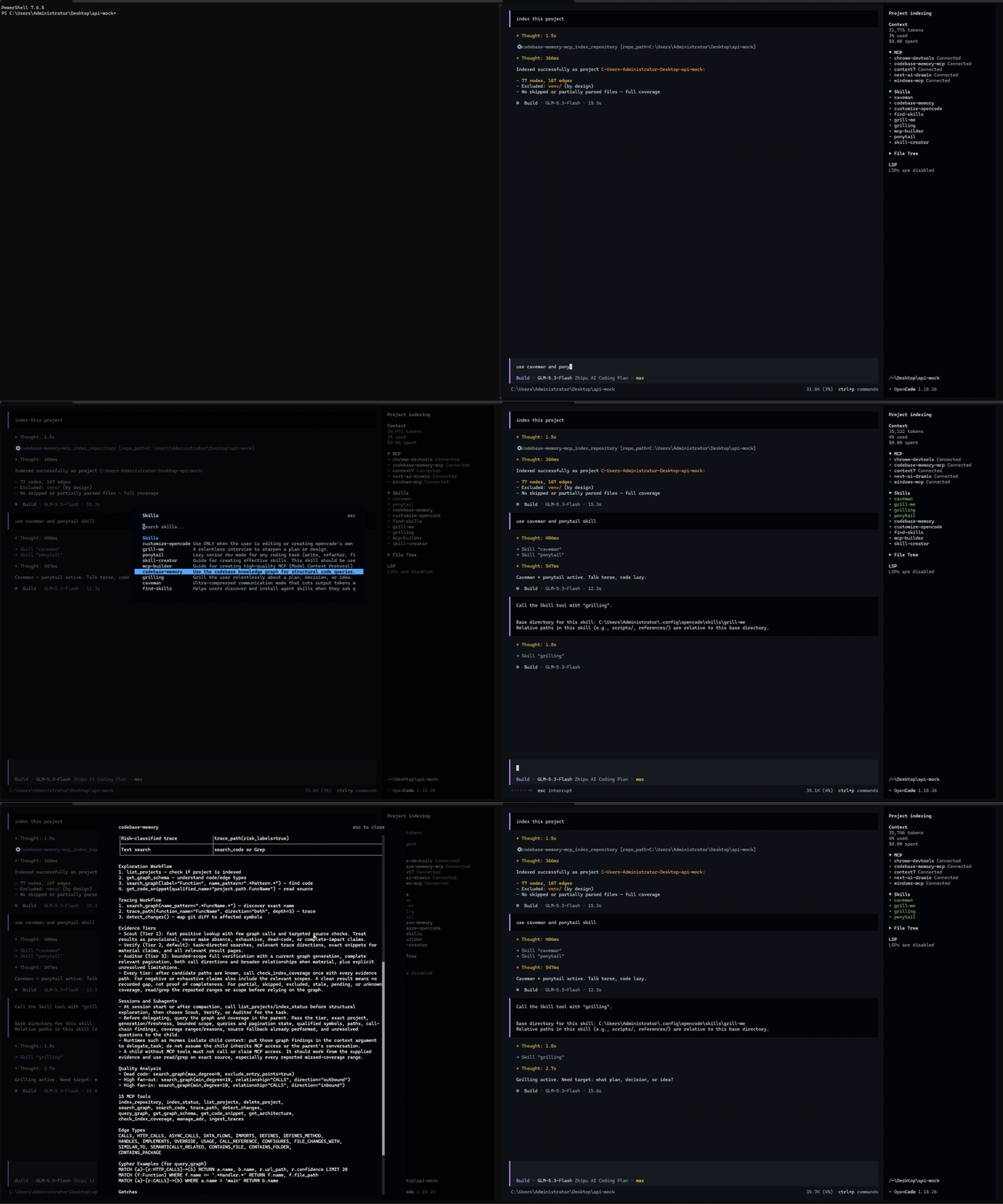
OpenCode TUI plugin that shows skills and loaded state in the sidebar
54
+32 in 30 days
1,714
250 in 7 days
62.8
Multi-signal model
6 days ago
2026-10-15
Install and configure
opencode.jsonWrites to this project's opencode.json — applies to this repository only.
opencode.json
{
  "$schema": "https://opencode.ai/config.json",
  "plugin": ["opencode-skills-tui@1.2.2"]
}
Writes to ~/.config/opencode/opencode.json — applies to every project.
~/.config/opencode/opencode.json
{
  "$schema": "https://opencode.ai/config.json",
  "plugin": ["opencode-skills-tui@1.2.2"]
}
If you want to modify the plugin locally, install it into the project and reference the local path.
shell
pnpm add -D opencode-skills-tuiOpenCode loads npm dependencies through its embedded runtime on startup and caches them locally — no manual global install needed.



Browse skills, track loaded state, preview SKILL.md, and insert skill attachments from the OpenCode terminal sidebar.
📦 Install / update / remove
Requires OpenCode ≥ 2.0. Terminal UI (TUI) only.
opencode plugin add opencode-skills-tui
- Update:
opencode plugin update opencode-skills-tui - Remove:
opencode plugin remove opencode-skills-tui
On V1, see the V1 guide.
⚙️ Parameters
Run /skills-sidebar to open the settings panel.
| Setting | Description | Available values |
|---|---|---|
| Show sidebar | Show or hide the panel | on / off |
| Display scope | Choose which skills to show (see below) | model-visible / registered / loaded-only |
| Token estimation | Show static token estimates | list entry / load cost / total cost / off |
| Header counts | Show skill counts in the header | on / off |
| Skill overview | Choose the mouse button for a read-only preview | left-click / middle-click / right-click / off |
| Insert @mention | Choose the mouse button for inserting a native skill attachment into the prompt | left-click / middle-click / right-click / off |
Display scope:
model-visible: skills the model can discover and invoke automatically.loaded-only: only skills successfully loaded in the current stage, including hidden skills.registered: all skills registered for the host's current directory, including hidden skills.
Hidden skills: omitted from the model's available list by metadata or permission rules, not offered for automatic discovery/invocation, but can be explicitly loaded with
@skill-id. Hidden does not mean loading is disabled.Every scope retains current-stage loaded IDs. Loaded skills, including hidden ones, are pinned to the top. Automatic invocation still follows the host's permission rules. Display scope does not change permissions, and hiding the panel does not disable skills.
Sidebar colors:
Item Color Skills title and expand/collapse arrow White in dark mode; black in light mode Unloaded, model-visible skill names and bullets White in dark mode; black in light mode Loaded skill names and bullets, including hidden skills Theme selection highlight Unloaded hidden skills, header counts, and token estimates Theme muted color Colors update when the active mode or theme changes. Unloaded model-visible skills do not use the theme's body text color, which can resemble the loaded highlight in themes such as
tokyonight light.Token estimation:
list entry: estimated tokens for a model-visible listing entry (ID, name, description), without the skill body; hidden entries cost0.load cost: estimated additional tokens for one ordinary load, including the body and host-added information.total cost: per-skilllist entry + load cost, regardless of whether the skill is currently loaded.
These are static estimates, not live context usage, cumulative consumption or billing; unavailable values show
-.
Settings persist across sessions and restarts and sync across local TUI instances; collapse stays per-terminal.
💡 Notes
- Unloaded after compaction: OpenCode's context compaction (
/compact) is lossy and does not guarantee continued adherence to skill instructions. Successful compaction resets load marks; a new successful load highlights the skill again.loadedcounts distinct successfully loaded skills since session start or the latest successful compaction, not invocations. Unloaded does not mean all skill text is absent from context. - Preview: locally readable SKILL.md takes priority; otherwise the host's registered body is shown. Preview text may differ from model input. Colors follow the active theme, including changes while the preview is open; Markdown styling, text selection, and copying are preserved. Ctrl+click rendered HTTP(S) links to open them in your browser.
📁 Source structure
opencode-skills-tui/
├── src/
│   ├── tui.tsx                 # Plugin setup, preview, and native skill attachments
│   ├── skill-data.ts           # Skill visibility, load state, and token estimates
│   ├── open-link.ts            # Ctrl+click link opening
│   └── components/
│       ├── skills-panel.tsx    # Sidebar panel
│       └── skills-dialog.tsx   # Sidebar settings dialog
├── scripts/                    # Build and package validation
├── test/                       # Regression tests
├── assets/                     # Demo media
├── dist/                       # Generated TUI bundle
├── index.ts                    # Required no-op server entry
└── tui.tsx                     # Forwards to the compiled TUI bundle
🛠️ Local development
In a local checkout, use Bun:
bun install
bun run build
bun run test
Replace the npm entry with the checkout's absolute file:// URL in the existing plugins array in opencode.json(c). Rebuild and restart the TUI after code changes.
Similar plugins

Sidebar Token Metrics
opencode-sidebar-token-metrics
OpenCode sidebar plugin showing generation speed (tok/s), cache hit rate, and average time-to-first-token (TTFT).

Ds Peak
opencode-ds-peak
Minimal opencode TUI sidebar dot showing whether DeepSeek is in peak or off-peak pricing, with a countdown to the next switch. Five languages.

Timeline
@memef1f1y/opencode-timeline-plugin
Conversation history node viewer for the OpenCode TUI (sidebar timeline)