
Raven
Context-saving search and on-demand MCP routing for OpenCode through focused Raven agents.
36
557
487 in 7 days
49.5
Multi-signal model
9 days ago
2026-10-12
Install and configure
opencode.jsonWrites to this project's opencode.json — applies to this repository only.
opencode.json
{
  "$schema": "https://opencode.ai/config.json",
  "plugin": ["opencode-raven@2.3.2"]
}
Writes to ~/.config/opencode/opencode.json — applies to every project.
~/.config/opencode/opencode.json
{
  "$schema": "https://opencode.ai/config.json",
  "plugin": ["opencode-raven@2.3.2"]
}
If you want to modify the plugin locally, install it into the project and reference the local path.
shell
pnpm add -D opencode-ravenOpenCode loads npm dependencies through its embedded runtime on startup and caches them locally — no manual global install needed.
opencode-raven
Keep noisy tool work out of your main OpenCode context.
Supports OpenCode V2 (2.0.26+) and OpenCode V1 (1.18.29+), in one package.




|
Why RavenRaven delegates search and on-demand MCP retrieval to separate focused agents, then returns compact evidence to the calling session.
|
Install
Raven 2.3 supports OpenCode V2 (2.0.26+). OpenCode V1 (1.18.29+) remains supported in the same package—no separate plugin is needed.
OpenCode V2
Use the v2 plugins key in opencode.jsonc:
{
  "plugins": ["opencode-raven"]
}
OpenCode V1
Use the v1 plugin key in opencode.jsonc:
{
  "plugin": ["opencode-raven"]
}
Restart OpenCode, then run /raven to verify the loaded version, model, routing, MCP health, and estimated savings. A fresh install may ask for one additional restart after selecting its model.
OpenCode resolves the package from npm and caches it automatically.
Upgrading From OpenCode 1 To 2
Keep using opencode-raven; change its OpenCode config entry from plugin to plugins. Raven's existing ~/.config/opencode/opencode-raven/raven-config.json is shared by both versions, including models, on-demand MCPs, routing settings, and stats. Quit and restart OpenCode after upgrading.
OpenCode 1 uses Raven's server() entrypoint; OpenCode 2 uses setup() and automatically loads the terminal companion. The terminal companion displays /raven command results in a scrollable dialog (arrow keys, Page Up/Down, or mouse wheel; Esc to close) and delivers startup/update warnings as toasts, without sending a prompt to the model. The v2 server also exposes the typed opencode-raven/rpc command contract for other clients.
The v1 minimum is 1.18.29 because earlier versions cannot load the shared object entrypoint. See OpenCode's plugin migration guide for the upstream lifecycle and config changes.
For local development, v1 can load file:///path/to/opencode-raven/index.ts; v2 requires the package directory, file:///path/to/opencode-raven.
First-Time Setup
On first start, Raven checks OpenCode's connected provider catalog and automatically selects an available zero-cost, tool-capable model from the opencode provider for both Raven agents. Free-model availability is controlled by the provider and can change.
If a free model is found, Raven writes it to the config and asks you to restart OpenCode once to load it. After restarting, /raven shows it with (auto). Raven rechecks auto-selected models after startup and replaces one only when it is no longer available. A model you set manually is never replaced.
If no suitable free model is available, Raven shows a setup warning and leaves search routing inactive rather than silently using a paid model. Open OpenCode's model picker to choose an available model, then run:
/raven seek model <provider/model>
/raven mcp model <provider/model>
Restart OpenCode afterward. You can retry free-model detection at any time with /raven seek model auto and /raven mcp model auto.
Example
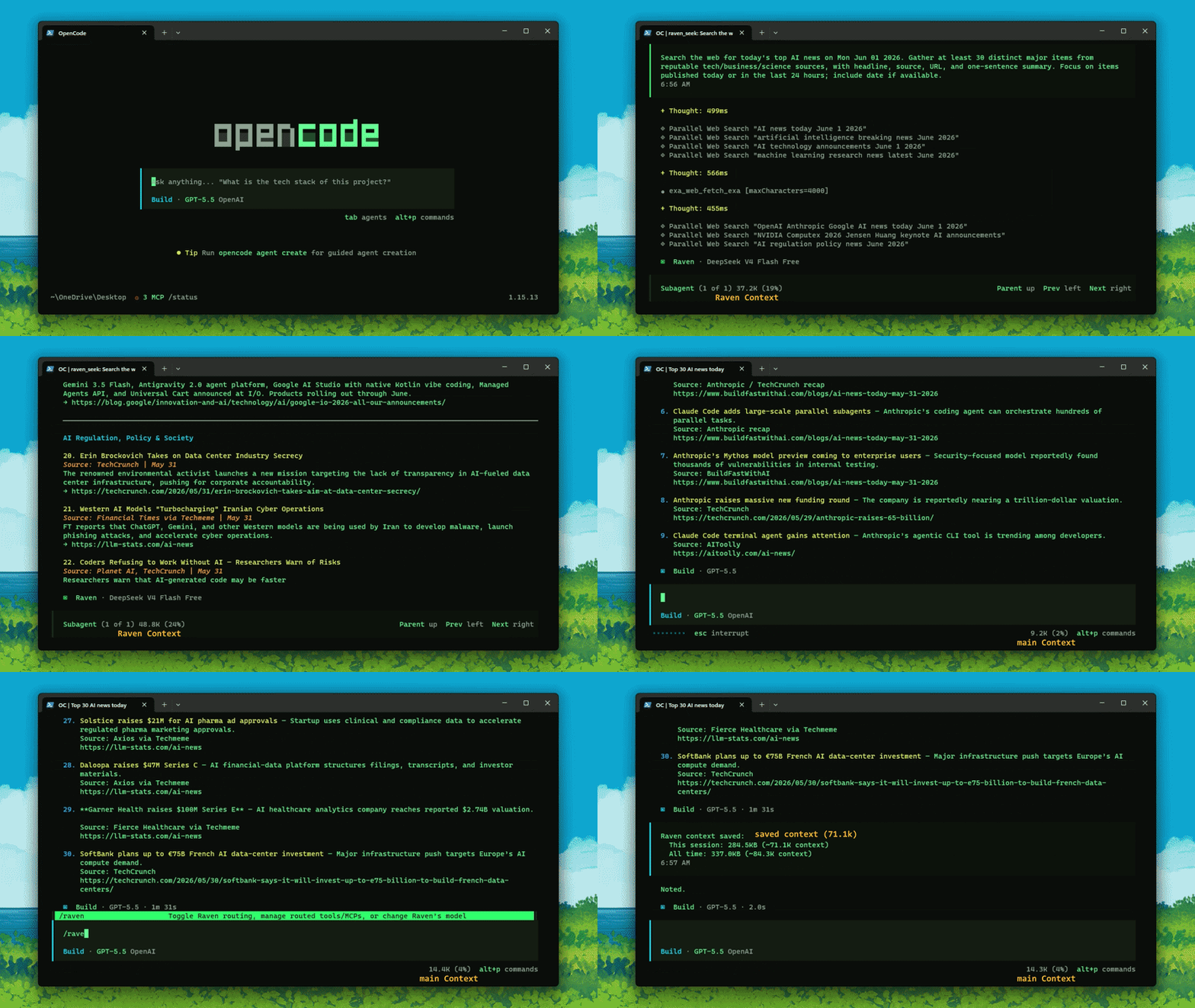
In this run, Raven handled the search-heavy web research in a child session and returned only the compact findings, keeping roughly 71K tokens of estimated tool and search context from flooding the main session. Actual savings vary by task, model, and tool output.
How It Works
Raven works automatically. Ask OpenCode for what you need as usual. You do not need to mention Raven, run a command, or manually call a delegation tool.
- Your agent attempts to use a routed search, fetch, shell-discovery, or MCP tool.
- Raven blocks the noisy direct call and gives the agent the exact
raven_seekretry. - The selected Raven agent creates a session attached directly to the root session or resumes one for a related follow-up.
- Raven performs retrieval work and returns compact evidence to the calling agent, which retains analysis and judgment.
The main model receives Raven's final answer instead of its raw tool output. Each result includes a Raven session ID that the main agent can pass back for a context-aware follow-up. Child sessions remain available in OpenCode's session/subagent view for inspection.
Background Retrieval (OpenCode V2)
On V2, raven_seek and raven_mcp run in the background by default. The initial response contains a child-session handle, not the findings. The calling agent can continue independent work; Raven delivers compact findings or a failure notice to that same calling session when retrieval finishes, including when the caller is itself a child session.
raven_seek(query="Find the current API documentation")
raven_mcp(query="Retrieve library examples", background=true)
raven_seek(query="Find the definition needed for my next step", background=false)
Use background: false when the next step depends on the answer. Do not poll, repeat a pending retrieval, or finalize conclusions that need its findings. Wait for the completion message before reusing its sessionId for a follow-up.
Background retrieval keeps Raven's configured timeouts, permissions, continuation checks, and context estimates. Returning the handle ends the calling tool, not the child retrieval. To stop it, open the returned child session and interrupt it. Deleting the calling session also cancels its pending retrievals.
Results are delivered through V2's durable synthetic inbox input, which can resume the calling agent and therefore cause another model turn. Undelivered results are retained in plugin storage and retried when that location's plugin next loads. A plugin/service restart cancels running work; Raven reports the interruption instead of automatically replaying searches or potentially stateful MCP calls. V1 keeps its existing foreground behavior.
Raven manages its own background child sessions using the public plugin APIs. This does not add native Ctrl+B background support to Raven's custom tools.
For direct search control, mention @Raven in any chat. This sends the request to the search agent, but it is optional and not required for automatic routing.
Under the hood, Raven registers two public delegation tools and one internal bridge:
| Tool | Purpose |
|---|---|
raven_seek |
Creates or resumes a Raven Search session for narrowly scoped evidence retrieval. |
raven_mcp |
Creates or resumes a Raven MCP session for configured on-demand MCP capabilities. |
raven_mcp_bridge |
Internal bridge used only by the Raven MCP agent. |
On OpenCode V2, Raven auto-approves permission checks for the public raven_seek and raven_mcp delegation tools instead of prompting on every call. Explicit deny rules still apply. This does not change permission checks for other tools or access restrictions on the internal MCP bridge.
For a related follow-up, the main agent can reuse the ID returned by the earlier call:
raven_seek(query="Research the available options")
raven_seek(query="Compare the first two in more detail", sessionId="ses_...")
Raven accepts a resumed session only when it belongs to the same root session tree and matching Raven agent. Do not pass session IDs between raven_seek and raven_mcp. Delegated sessions attach directly to the root so they remain visible in the main session's child switcher even when delegation starts inside another child.
OpenCode's built-in tools already exist; Raven routes selected calls instead of replacing those tools. Global MCPs also remain globally registered, so their schemas still enter the main session even when Raven routes their calls.
On-demand MCPs are different: Raven discovers and calls them internally, so their full schemas are not registered globally. Enabled servers are probed after startup to discover tools and health, then per-session connections are opened when Raven uses them. "On-demand" describes schema exposure and normal use, not the absence of a startup health probe.
On OpenCode V2, reopening the TUI triggers a fresh background health and tool-discovery check even if the shared service is still running. This runs once per workspace per TUI launch; returning from sessions or reactivating the plugin does not repeat it. Overlapping attachment checks share the same refresh. Use /raven mcp refresh [server_name] to retry manually without restarting the service.
Automatic and manual MCP refreshes use top-right notifications for progress and results, without opening a command dialog or a session tab.
Configuration
Raven creates its global configuration here:
~/.config/opencode/opencode-raven/raven-config.json
Manual edits require an OpenCode restart. Route and timeout commands apply immediately unless the command says otherwise.
| Field | Fresh-install default | Description |
|---|---|---|
raven_seek.model |
Auto-detected free OpenCode model, otherwise unset | Search-agent model. Manual values are preserved. |
raven_seek.autoSelectedModel |
Managed by Raven | Tracks whether the Search model can be safely refreshed automatically. |
raven_seek.reasoning_effort |
low |
Search-agent reasoning option. |
raven_seek.instructions |
"" |
Extra search-agent instructions. |
raven_seek.routeTools |
Search/fetch tools plus bash |
Exact tools routed through Raven Search. |
raven_seek.routeToolKeywords |
[] |
Case-insensitive routed tool-name substrings. |
raven_seek.excludeAgents |
[] |
Agents allowed to bypass search routing. |
raven_seek.excludeTools |
[] |
Exact tools never routed through Raven Search. |
raven_seek.timeout |
600 |
Search delegation timeout in seconds. |
raven_mcp.model |
Auto-detected free OpenCode model, otherwise unset | MCP-agent model. Manual values are preserved. |
raven_mcp.autoSelectedModel |
Managed by Raven | Tracks whether the MCP model can be safely refreshed automatically. |
raven_mcp.reasoning_effort |
low |
MCP-agent reasoning option. |
raven_mcp.instructions |
"" |
Extra MCP-agent instructions. |
raven_mcp.timeout |
600 |
MCP delegation and fallback connection timeout in seconds. |
raven_mcp.descriptionDetail |
"full" |
Full or minimized generated MCP guidance. |
raven_mcp.onDemandMcpServers |
Context7, Exa, Grep.app | Remote HTTP/SSE or local stdio MCP definitions. |
Existing flat configuration is migrated automatically on startup without a version field. Shared model, reasoning effort, instructions, and timeout values seed both sections; routing and MCP fields move to their corresponding sections.
On-Demand MCPs
Fresh installs include:
| MCP | Endpoint | Authentication |
|---|---|---|
| Context7 | https://mcp.context7.com/mcp |
Optional key for higher limits |
| Exa | https://mcp.exa.ai/mcp |
Optional key for higher limits |
| Grep.app | https://mcp.grep.app |
Public API |
Provider access policies can change. /raven mcp shows the result of Raven's current startup probe.
Merge changes into the existing raven_mcp.onDemandMcpServers object; replacing it removes omitted defaults. Header and environment values support {env:VARIABLE} placeholders.
Custom remote MCP or keyed endpoint:
{
  "raven_mcp": {
    "onDemandMcpServers": {
      "myDocs": {
        "type": "remote",
        "url": "https://example.com/mcp",
        "headers": { "Authorization": "Bearer {env:MY_DOCS_TOKEN}" }
      }
    }
  }
}
Custom local stdio MCP:
{
  "raven_mcp": {
    "onDemandMcpServers": {
      "myLocal": {
        "type": "local",
        "command": ["bunx", "some-mcp-server"],
        "environment": { "API_KEY": "{env:MY_LOCAL_KEY}" },
        "cwd": "C:\\path\\to\\workspace",
        "timeout": 60000
      }
    }
  }
}
Per-server timeout values are milliseconds. Local servers inherit the OpenCode process environment. Set enabled: false to keep an entry without probing or loading it.
Generated MCP metadata and main-model guidance live beside raven-config.json. Refresh them with /raven mcp refresh [server].
Routing
Default routed tools are grep, glob, webfetch, fetch, websearch, and search-like bash commands. On OpenCode 2, Raven also recognizes the native shell tool; bash and shell are routing aliases, so existing routing settings continue to work. Exact excludeTools entries use the host's actual tool name.
Global MCPs are automatically routed when their OpenCode tool names use the normal <server>_<tool> prefix. Use a keyword for suffix-style names:
/raven route keyword add exa
Route or unroute exact tools:
/raven route tool add linear_search_issues
/raven route tool remove bash
raven_seek.excludeTools leaves selected tools direct even if their MCP prefix is routed. raven_seek.excludeAgents bypasses routing for selected agents.
When bash is routed, Raven intercepts primary discovery commands such as rg, recursive grep, find -name, dir /s, and Get-ChildItem -Recurse, including common quoted shell wrappers. Bounded output filters such as command | grep ... remain direct.
Commands
| Command | Action |
|---|---|
/raven |
Show status, routing, MCP health, version, model, timeout, and stats. |
/raven help |
Show command help. |
/raven route |
Show and edit routed tools and keywords. |
/raven mcp |
Show on-demand MCP health and generated metadata. |
/raven mcp refresh [server] |
Recheck MCP health and regenerate metadata. |
| `/raven mcp detail full | minimized` |
/raven seek model <provider/model>|auto |
Change or auto-detect the search model; restart afterward. |
/raven seek effort <value> |
Change search reasoning effort; restart afterward. |
/raven seek timeout <seconds> |
Change the search delegation timeout. |
/raven mcp model <provider/model>|auto |
Change or auto-detect the MCP model; restart afterward. |
/raven mcp effort <value> |
Change MCP reasoning effort; restart afterward. |
/raven mcp timeout <seconds> |
Change the MCP delegation timeout. |
/raven stats |
Show estimated context avoided. |
/raven update |
Check npm, clear Raven's OpenCode package cache when needed, and show restart instructions. |
Security And Privacy
Raven is optimized for autonomous retrieval:
- Raven Search has read, search, unrestricted shell, external-directory, and globally configured MCP access without normal permission prompts.
- Raven MCP has only the internal on-demand MCP bridge and cannot use shell, local search, or edit tools.
- Its
edittool is denied, but shell access is not a read-only sandbox and can modify the system. - Queries are sent to Raven's configured model provider.
- Remote MCP requests are sent to their services; local MCP entries launch local commands and inherit environment values.
- Startup performs an npm update check and probes enabled on-demand MCPs.
Review Raven.md and your MCP commands before using Raven in sensitive environments.
Context Estimates
/raven stats reports delegated-session context and avoided on-demand MCP schema bytes. These are heuristic estimates based on OpenCode token metadata and serialized schemas, not billing measurements or guaranteed savings.
Troubleshooting
- First-time model warning: select a model in OpenCode's model picker, run
/raven seek model <provider/model>and/raven mcp model <provider/model>, then restart. Useautoas the model value to retry free-model detection. - Search provider or quota failure: run
/raven seek model <provider/model>, then restart OpenCode. - MCP-agent provider or quota failure: run
/raven mcp model <provider/model>, then restart OpenCode. - MCP failure: run
/raven mcp, then/raven mcp refresh <server>after correcting its URL, command, environment, or credentials. - Stale plugin version: run
/raven update, restart OpenCode, and follow the cache-clearing instructions it prints if needed. - Remove Raven: delete
"opencode-raven"fromplugin, restart, then optionally remove~/.config/opencode/opencode-raven/.
On OpenCode 2, remove it from plugins instead. /raven update uses v1 cache-clearing behavior only on OpenCode 1; on v2 it checks the version and provides restart/pinned-version instructions while leaving cache management to OpenCode.
Development Checks
bun install
bun test
bun run typecheck
bun scripts/smoke-compat.ts v1 /path/to/opencode-v1
bun scripts/smoke-compat.ts v2 /path/to/opencode-v2
The native smoke checks use isolated configuration and data directories. The v2 check uses a deterministic local model endpoint to exercise routed main-agent search, direct Raven child search, delegation completion, and command/RPC output without calling a paid model provider.
See CHANGELOG.md for release history.
Disclaimer
opencode-raven is an independent project and is not affiliated with the OpenCode team. Released under the MIT License.
Similar plugins

Hiai Opencode
@hiai-gg/hiai-opencode
HiAi OpenCode Plugin — multi-agent orchestration for OpenCode with 10 agents, LSP tools, browser automation, Memory, Session management, and Caveman protocol

Rolebox
rolebox
Agent plugin for major harnesses — DeepSeek Harness (DSH), OpenCode, Pi and Codex: define custom AI agent roles with per-role prompts, models, skills, permissions, memory and multi-agent orchestration.

Session Recall
opencode-session-recall
Everything your agent ever did is already in the database — this plugin lets it look