
opencode-session-id-pluginOpenCode TUI plugin: display the active session ID below the session title in the right sidebar. Restores the channel-gated dev-build behavior (sidebar.tsx InstallationChannel guard) on the stable release channel.
1
81
近 7 天 18
32.7
生态多维模型
1 个月前
2026-07-17
快速安装与配置
opencode.json写入当前项目的 opencode.json,只对这个仓库生效。
opencode.json
{
  "$schema": "https://opencode.ai/config.json",
  "plugin": ["opencode-session-id-plugin@1.1.1"]
}
写入 ~/.config/opencode/opencode.json,对所有项目生效。
~/.config/opencode/opencode.json
{
  "$schema": "https://opencode.ai/config.json",
  "plugin": ["opencode-session-id-plugin@1.1.1"]
}
若你要在本地改造这个插件,先装到项目里再从本地路径引用。
shell
pnpm add -D opencode-session-id-pluginopencode 启动时会通过内嵌运行时自动加载 npm 依赖并缓存至本地目录,无需手动在全局环境执行安装。



Your OpenCode session ID is hidden from the sidebar on the stable release channel. This plugin puts it back.
OpenCode ships the session ID under the session title in its TUI sidebar — but only on dev, edge, preview, and canary builds. On latest (stable), the line is gated off. If you run stable, you've never seen it. This plugin re-enables it unconditionally.
Screenshot
| Stable (default — no plugin) | With this plugin |
|---|---|
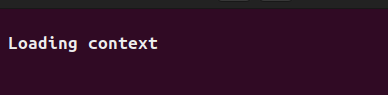 |
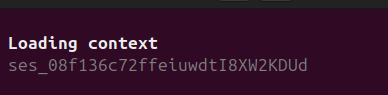 |
The session title stays bold at the top of the right sidebar; the active session ID renders directly below it in muted color — the line OpenCode hides on the latest channel.
What it does
- Shows your session ID in the right sidebar, directly under the session title — the line OpenCode hides on the
latestchannel. - Copy it for handoffs — the ID is the reliable key for labeling sessions, correlating with logs/traces, or passing context between sessions and tools.
- Know which session you're in — the auto-generated session title often collides; the ID is the only stable identifier.
- Zero config — one line in
tui.json, restart, done. No API keys, no model calls, no dependencies beyond the OpenCode TUI runtime.
Installation
Add the plugin to your OpenCode TUI config:
// ~/.config/opencode/tui.json
{
  "plugin": ["opencode-session-id-plugin"]
}
Restart OpenCode.
Local / pre-publish
{
  "plugin": ["file:///path/to/opencode-session-id-plugin"]
}
Compatibility
- OpenCode: requires TUI plugin support (the
sidebar_titleslot). Tested on the stable release channel. - Does not regress the default sidebar. The
sidebar_titleslot is hosted insingle_winnermode, so registering a plugin there replaces the default block. This plugin faithfully reproduces the whole default — the bold title, the session ID line, the workspace label, and the share URL — so installing it does not remove any line the default renders. If you don't use OpenCode workspaces, the workspace-label path is inert.
Why
OpenCode renders the session title in the right sidebar at packages/tui/src/routes/session/sidebar.tsx:
<text fg={theme.text}><b>{session()!.title}</b></text>
<Show when={InstallationChannel !== "latest"}>
  <text fg={theme.textMuted}>{props.sessionID}</text>
</Show>
The session-ID line is gated behind InstallationChannel !== "latest" — visible on dev/edge/preview/canary, hidden on stable. This was introduced in PR #23185 (feat(tui): show session ID in sidebar on non-prod channels), whose rationale was that correlating a running session with telemetry traces required guessing by the auto-generated title, which "is auto-generated and often collides. The session ID is the only reliable key." That rationale applies equally to stable-channel users.
How it works
- Registers a
sidebar_titleslot handler viaapi.slots.register. - Reads
props.session_id,props.title,props.share_url(provided by the host slot). - The session ID is always shown in
theme.textMuteddirectly below the bold title; the share URL renders when present; the workspace label is reproduced best-effort viaapi.client.experimental.workspace.list()+.status(), gated behindif (session.workspaceID).
Implementation notes
The runtime source of truth is a hand-authored dist/tui.js built against @opentui/solid's createElement / setProp / insert — the same pattern oh-my-opencode-slim and the opencode-token-speed-plugin fork use. No stock bundler correctly compiles Solid JSX for OpenCode's TUI runtime, so dist/tui.js is hand-authored; index.tsx is the equivalent TSX kept for reference and attribution.
Dependencies
solid-js—createSignal@opentui/solid—createElement,insert,setProp(peer dep of@opencode-ai/plugin)@opencode-ai/plugin— TUI plugin types
Related
- session-id — the companion server-side plugin. It injects
Session ID:into the agent's system prompt and exposes aget_session_idtool, so the agent can read the session ID too. This TUI plugin surfaces the same ID in the UI; together they make the session ID visible to both the user and the agent. - Repo: hardes11/opencode-session-id-plugin
License
MIT — see LICENSE.