
1
0
22.4
生态多维模型
17 小时前
2026-08-19
快速安装与配置
opencode.json写入当前项目的 opencode.json,只对这个仓库生效。
opencode.json
{
  "$schema": "https://opencode.ai/config.json",
  "plugin": ["opencode-session-cost@1.1.0"]
}
写入 ~/.config/opencode/opencode.json,对所有项目生效。
~/.config/opencode/opencode.json
{
  "$schema": "https://opencode.ai/config.json",
  "plugin": ["opencode-session-cost@1.1.0"]
}
若你要在本地改造这个插件,先装到项目里再从本地路径引用。
shell
pnpm add -D opencode-session-costopencode 启动时会通过内嵌运行时自动加载 npm 依赖并缓存至本地目录,无需手动在全局环境执行安装。


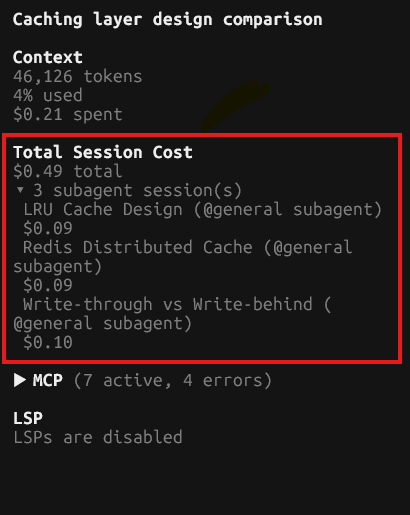
Do you know how much you're really spending on a session? Subagent costs hide from you by default in OpenCode. This plugin adds a sidebar block showing your true total — session + every subagent it spawned — and lets you expand it to see the cost of each one.
Installation
This is a TUI-only plugin. It has no server-side hook and must be added
to tui.json, not opencode.json.
Quick install (recommended)
Run this from a terminal — it installs the package and adds it to your
global tui.json automatically:
opencode plugin opencode-session-cost --global
Restart the OpenCode TUI afterwards for the sidebar block to appear.
Manual install
Add this to tui.json yourself instead:
{
  "plugin": [["opencode-session-cost", { "enabled": true }]]
}
Using a local checkout instead of the npm package? Point at the directory:
{
  "plugin": [
    ["/absolute/path/to/opencode-session-cost", { "enabled": true }]
  ]
}
Restart the OpenCode TUI after editing tui.json.
Options
| Option | Type | Default | Description |
|---|---|---|---|
enabled |
boolean | true |
When false, the plugin's tui() returns immediately and registers nothing. |
There is no provider allow-list and no other configuration — this works for every session regardless of model or provider.
Development
bun install
bun run typecheck   # tsc --noEmit
bun test            # bun:test, pure logic in src/cost.test.ts
bun run build        # Bun.build (JSX) + tsc --emitDeclarationOnly (types)
Contributing
Contributions are welcome. See CONTRIBUTING.md for development setup, coding standards, and the pull request process.
License
MIT — see LICENSE.