
opencode-quota-sidebar-plusOpenCode plugin that shows quota, subscription, and token usage in TUI sidebar panels and compact session titles
1
45
近 7 天 10
25.8
生态多维模型
4 个月前
2026-04-11
快速安装与配置
opencode.json写入当前项目的 opencode.json,只对这个仓库生效。
opencode.json
{
  "$schema": "https://opencode.ai/config.json",
  "plugin": ["opencode-quota-sidebar-plus@1.0.0"]
}
写入 ~/.config/opencode/opencode.json,对所有项目生效。
~/.config/opencode/opencode.json
{
  "$schema": "https://opencode.ai/config.json",
  "plugin": ["opencode-quota-sidebar-plus@1.0.0"]
}
若你要在本地改造这个插件,先装到项目里再从本地路径引用。
shell
pnpm add -D opencode-quota-sidebar-plusopencode 启动时会通过内嵌运行时自动加载 npm 依赖并缓存至本地目录,无需手动在全局环境执行安装。
English below. Simplified Chinese follows after the English section.
opencode-quota-sidebar-plus is an OpenCode plugin that adds quota and usage information to the sidebar.
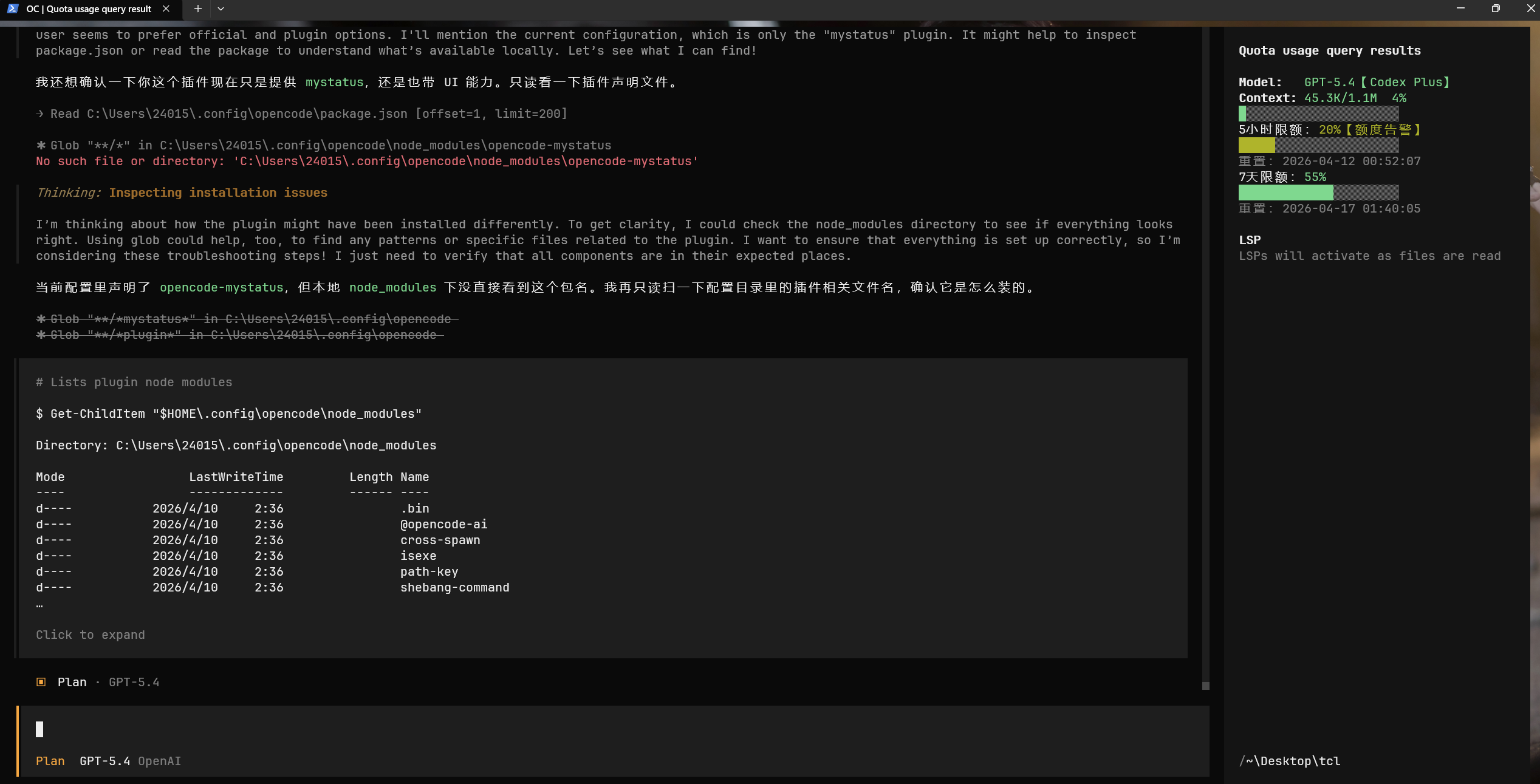
It currently provides:
- a TUI sidebar panel for usage, cost, context, and quota
- compact shared session title decoration
- quota adapters for OpenAI, GitHub Copilot, Anthropic, Kimi for Coding, Zhipu Coding Plan, MiniMax Coding Plan, RightCode, and XYAI
- two tools:
quota_summaryandquota_show
Installation
OpenCode loads the server plugin and the TUI plugin separately.
Add this to opencode.json:
{
  "plugin": ["opencode-quota-sidebar-plus@latest"]
}
Add this to tui.json:
{
  "plugin": ["opencode-quota-sidebar-plus@latest"]
}
For OpenCode >= 1.2.15:
- keep the server plugin in
opencode.json - keep the TUI plugin in
tui.json
What It Shows
After installation, the plugin can show:
- current session token usage
- estimated API-equivalent cost
- context usage status
- provider quota windows and remaining percentage
- balance or subscription-style quota status when the provider exposes it
- descendant subagent usage in session totals when enabled
The TUI sidebar is the main display surface.
The shared session title stays compact and is meant to give a quick summary instead of the full panel layout.
Tools
The plugin registers two tools.
quota_summary
Shows a usage and quota summary for:
sessiondayweekmonth
It returns a markdown report and can also show a toast.
quota_show
Turns compact title decoration on or off.
When enabled, active session titles can include usage and quota information.
When disabled, the plugin restores the current session title back to its base title when possible.
Configuration
The plugin reads quota-sidebar.config.json from these locations, in merge order:
~/.config/opencode/quota-sidebar.config.json<worktree>/quota-sidebar.config.json<directory>/quota-sidebar.config.json<worktree>/.opencode/quota-sidebar.config.json<directory>/.opencode/quota-sidebar.config.json
You can also override the config path with OPENCODE_QUOTA_CONFIG.
Example Config
{
  "sidebar": {
    "enabled": true,
    "width": 36,
    "titleMode": "auto",
    "showCost": true,
    "showQuota": true,
    "contextWarningPercent": 60,
    "contextErrorPercent": 80,
    "quotaWarningPercent": 20,
    "quotaErrorPercent": 5,
    "wrapQuotaLines": true,
    "includeChildren": true
  },
  "quota": {
    "refreshMs": 300000,
    "includeOpenAI": true,
    "includeCopilot": true,
    "includeAnthropic": true,
    "providers": {
      "rightcode": {
        "enabled": true
      },
      "xyai": {
        "enabled": false,
        "baseURL": "https://new.xychatai.com",
        "serviceType": "codex",
        "login": {
          "username": "your-account@example.com",
          "password": "your-password"
        }
      }
    },
    "refreshAccessToken": false,
    "requestTimeoutMs": 8000
  },
  "toast": {
    "durationMs": 12000
  },
  "retentionDays": 730
}
Common Options
sidebar
enabled: enable or disable sidebar renderingwidth: sidebar content width, clamped to20-60titleMode:auto,compact, ormultilineshowCost: show cost outputshowQuota: show quota outputcontextWarningPercent: warning threshold for context usagecontextErrorPercent: error threshold for context usagequotaWarningPercent: warning threshold for remaining quotaquotaErrorPercent: error threshold for remaining quotawrapQuotaLines: wrap long quota linesincludeChildren: include descendant subagent sessions in session totals
quota
refreshMs: quota refresh intervalincludeOpenAI: enable OpenAI quota adapterincludeCopilot: enable Copilot quota adapterincludeAnthropic: enable Anthropic quota adapterproviders: per-provider adapter configrefreshAccessToken: refresh OpenAI access token from refresh token when supportedrequestTimeoutMs: timeout for external quota requests
Notes
- quota output depends on what each provider actually exposes
- if a provider does not expose quota or balance data, the plugin cannot invent it
- TUI rendering and shared title rendering are separate, so install the plugin in both config files
License
MIT
简体中文
opencode-quota-sidebar-plus 是一个 OpenCode 插件,用来在侧边栏中显示配额和使用量信息。
当前代码提供的功能包括:
- TUI 侧边栏面板,显示 usage、cost、context 和 quota
- 紧凑型共享会话标题装饰
- OpenAI、GitHub Copilot、Anthropic、Kimi for Coding、智谱 Coding Plan、MiniMax Coding Plan、RightCode、XYAI 的配额适配
- 两个工具:
quota_summary和quota_show
安装
OpenCode 会分别加载服务端插件和 TUI 插件。
把下面内容写到 opencode.json:
{
  "plugin": ["opencode-quota-sidebar-plus@latest"]
}
把下面内容写到 tui.json:
{
  "plugin": ["opencode-quota-sidebar-plus@latest"]
}
对于 OpenCode >= 1.2.15:
- 服务端插件放在
opencode.json - TUI 插件放在
tui.json
功能说明
安装后,插件可以显示:
- 当前会话的 token 使用量
- 估算的 API 等效费用
- context 使用状态
- 提供商的 quota 窗口和剩余百分比
- 提供商实际暴露时的余额或订阅型 quota 状态
- 启用后把子会话 / subagent 的使用量合并到当前会话统计中
TUI 侧边栏是主要展示界面。
共享会话标题只保留紧凑摘要,不会把完整侧边栏内容都塞进标题里。
工具
插件注册了两个工具。
quota_summary
用于查看以下范围的 usage 和 quota 汇总:
sessiondayweekmonth
它会返回 markdown 报告,也可以同时弹出 toast。
quota_show
用于打开或关闭紧凑标题装饰。
开启后,活动会话标题可以显示 usage 和 quota 摘要。
关闭后,插件会尽量把当前会话标题恢复成原始标题。
配置文件
插件会按顺序读取这些位置的 quota-sidebar.config.json,后面的配置会覆盖前面的配置:
~/.config/opencode/quota-sidebar.config.json<worktree>/quota-sidebar.config.json<directory>/quota-sidebar.config.json<worktree>/.opencode/quota-sidebar.config.json<directory>/.opencode/quota-sidebar.config.json
也可以用环境变量 OPENCODE_QUOTA_CONFIG 指定配置文件路径。
配置示例
{
  "sidebar": {
    "enabled": true,
    "width": 36,
    "titleMode": "auto",
    "showCost": true,
    "showQuota": true,
    "contextWarningPercent": 60,
    "contextErrorPercent": 80,
    "quotaWarningPercent": 20,
    "quotaErrorPercent": 5,
    "wrapQuotaLines": true,
    "includeChildren": true
  },
  "quota": {
    "refreshMs": 300000,
    "includeOpenAI": true,
    "includeCopilot": true,
    "includeAnthropic": true,
    "providers": {
      "rightcode": {
        "enabled": true
      },
      "xyai": {
        "enabled": false,
        "baseURL": "https://new.xychatai.com",
        "serviceType": "codex",
        "login": {
          "username": "your-account@example.com",
          "password": "your-password"
        }
      }
    },
    "refreshAccessToken": false,
    "requestTimeoutMs": 8000
  },
  "toast": {
    "durationMs": 12000
  },
  "retentionDays": 730
}
常用配置项
sidebar
enabled:是否启用侧边栏渲染width:侧边栏宽度,实际范围会限制在20-60titleMode:可选auto、compact、multilineshowCost:是否显示费用showQuota:是否显示配额contextWarningPercent:context 警告阈值contextErrorPercent:context 错误阈值quotaWarningPercent:剩余 quota 警告阈值quotaErrorPercent:剩余 quota 错误阈值wrapQuotaLines:是否换行显示过长 quota 文本includeChildren:是否把子会话 / subagent 会话统计进当前会话
quota
refreshMs:quota 刷新间隔includeOpenAI:是否启用 OpenAI 配额适配includeCopilot:是否启用 Copilot 配额适配includeAnthropic:是否启用 Anthropic 配额适配providers:各 provider 的额外配置refreshAccessToken:支持时是否用 refresh token 刷新 OpenAI access tokenrequestTimeoutMs:外部 quota 请求超时
说明
- quota 输出取决于 provider 实际提供的数据
- 如果 provider 没有暴露 quota 或余额信息,插件不会伪造数据
- TUI 渲染和共享标题渲染是分开的,所以
opencode.json和tui.json都要安装
License
MIT