
opencode-diffsDiff review plugin for OpenCode — browser-based code review with @pierre/diffs
12
61
近 7 天 10
30.6
生态多维模型
5 个月前
2026-02-25
快速安装与配置
opencode.json写入当前项目的 opencode.json,只对这个仓库生效。
opencode.json
{
  "$schema": "https://opencode.ai/config.json",
  "plugin": ["opencode-diffs@0.0.3"]
}
写入 ~/.config/opencode/opencode.json,对所有项目生效。
~/.config/opencode/opencode.json
{
  "$schema": "https://opencode.ai/config.json",
  "plugin": ["opencode-diffs@0.0.3"]
}
若你要在本地改造这个插件,先装到项目里再从本地路径引用。
shell
pnpm add -D opencode-diffsopencode 启动时会通过内嵌运行时自动加载 npm 依赖并缓存至本地目录,无需手动在全局环境执行安装。
An OpenCode plugin that adds a /diff-review command for browser-based code review powered by @pierre/diffs.
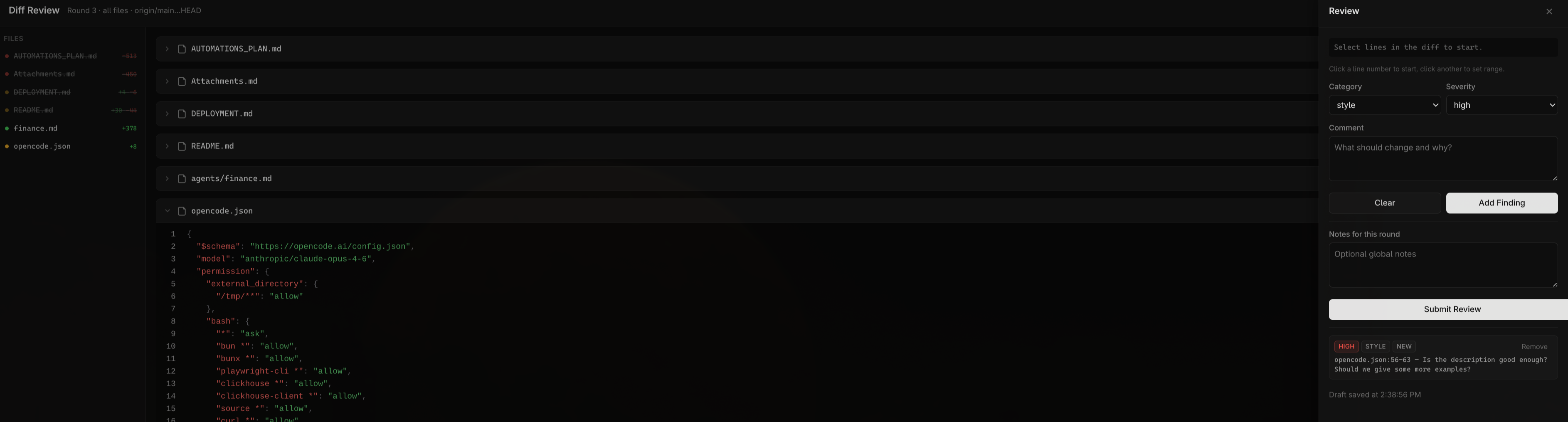
How it works
When you run /diff-review inside an OpenCode session, the plugin:
- Collects diffs from your git working tree (or between a base branch and HEAD)
- Starts a local HTTP server and opens a review UI in your browser
- Waits for you to review — you annotate lines in the diff with findings (category, severity, comment)
- Returns structured results to OpenCode when you submit, so the AI can propose a fix strategy
The idea is to give you a visual, interactive way to review code changes before asking the AI to act on them. Instead of describing problems in chat, you click on the exact lines, categorize the issue, and write a short comment. The AI then receives all your findings as structured data and can reason about fixes more precisely.
Review flow
You run /diff-review
    → Plugin reads git diff
    → Browser opens with syntax-highlighted diffs
    → You click lines, add findings (bug/style/perf/question + severity + comment)
    → You hit "Submit Review"
    → Plugin returns findings to OpenCode
    → AI proposes a fix plan based on your annotations
Multi-round reviews
Each session tracks review rounds. When you run /diff-review again in the same session, findings from previous rounds carry over. If a file was removed or the anchored code changed, old findings are automatically closed. This lets you do iterative review — submit findings, let the AI fix things, then review the new diff.
State and exports
Review state is persisted to .opencode/reviews/<session>/. Each round produces:
state.json— full session state with all findings across roundsround-NNN.json— snapshot of findings for that roundround-NNN.md— markdown summary
Drafts are auto-saved as you work, so you can close the browser and reopen without losing progress.
Setup
Add "opencode-diffs" to the plugin array in your opencode.json:
{
  "plugin": ["opencode-diffs"]
}
OpenCode will install the plugin automatically. This registers the /diff-review slash command.
Usage
Review your working tree changes:
/diff-review
Review against a specific branch:
/diff-review --base origin/main
Filter to specific files:
/diff-review --files src/foo.ts,src/bar.ts
Combine flags:
/diff-review --base origin/main --files src/foo.ts
Review UI
The browser UI has three main areas:
- Sidebar (left) — lists all changed files with add/delete stats. Click a file to scroll to it.
- Diff cards (center) — syntax-highlighted diffs for each file. Click line numbers to select a range. Files can be collapsed and marked as read.
- Review drawer (right) — opens when you select lines. Pick a category (
bug,style,perf,question), severity (high,medium,low), write a comment, and click "Add Finding".
Findings from prior rounds appear with a "Resolve" button. The drawer also has a notes field for general observations and the submit button.
Light/dark mode follows your system preference, or you can toggle it manually.
Development
bun install
bun run build        # build plugin + UI
bun run lint         # lint with oxlint
bun run format       # format with oxfmt
bun run typecheck    # type-check with tsc
bun run check        # all three checks
License
MIT