
Cache Hit
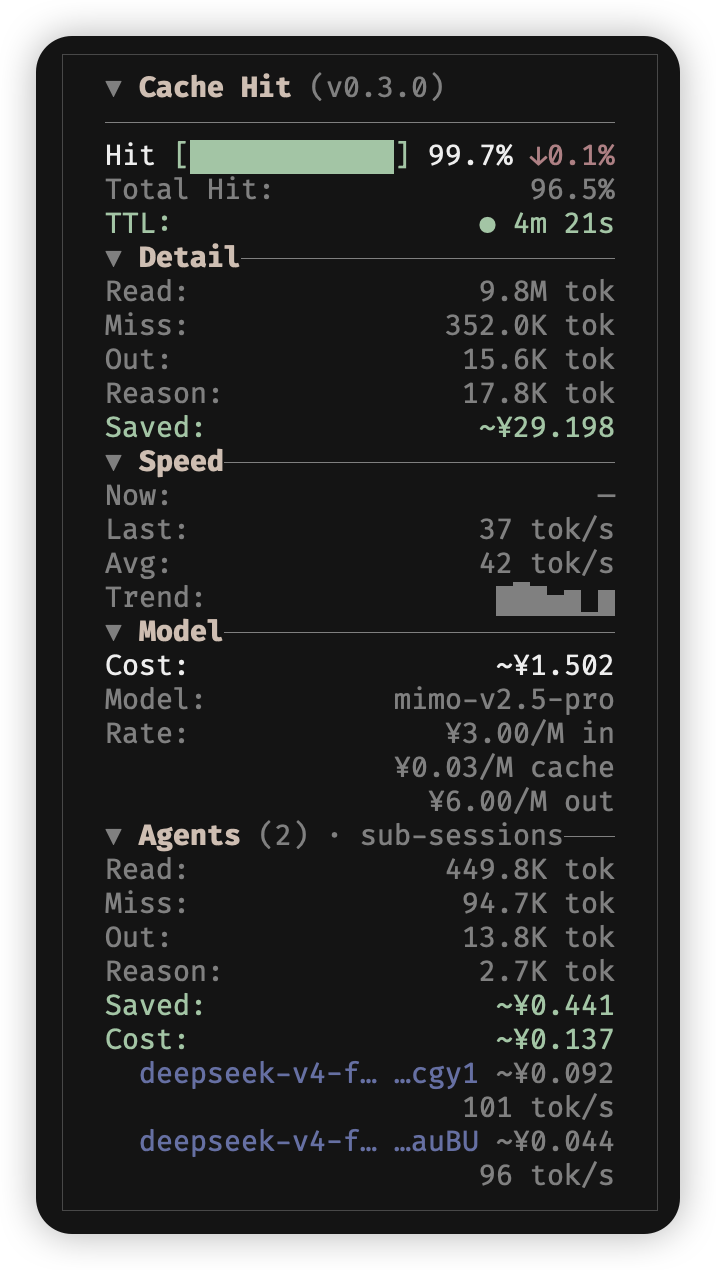
OpenCode TUI sidebar: prompt cache hit rate, tokens & cost with sub-agent rollup. Works with opencode-visual-cache; optional per-call JSONL timeline.
32
近 30 天 +5
1,015
近 7 天 75
55.5
生态多维模型
21 小时前
2026-10-20
快速安装与配置
opencode.json写入当前项目的 opencode.json,只对这个仓库生效。
opencode.json
{
  "$schema": "https://opencode.ai/config.json",
  "plugin": ["opencode-cache-hit@1.0.0"]
}
写入 ~/.config/opencode/opencode.json,对所有项目生效。
~/.config/opencode/opencode.json
{
  "$schema": "https://opencode.ai/config.json",
  "plugin": ["opencode-cache-hit@1.0.0"]
}
若你要在本地改造这个插件,先装到项目里再从本地路径引用。
shell
pnpm add -D opencode-cache-hitOpenCode 启动时会通过内嵌运行时自动加载 npm 依赖并缓存至本地目录,无需手动在全局环境执行安装。

OpenCode TUI sidebar plugin for prompt cache hit rate, token usage, and cost—with first-class sub-agent (child session) rollup. Standalone by default (main + sub-agents in one panel). Optional coexistence with opencode-visual-cache.
[!IMPORTANT] 1.0.0 is the first stable OpenCode 2 release and requires bundled OpenTUI
>=0.6.6. OpenCode 1 is no longer officially supported: the V1 entrypoint stays in the bundle and may still work, but it is best-effort and untested. Pin0.7.xif you still run OpenCode 1.
Languages: English (this file) · 简体中文 · Documentation
Why this plugin
opencode-visual-cache already covers main-session cache visualization (token distribution, savings, slash-driven settings). This project exists because that scope does not fit several real workflows:
- Sub-agent visibility — OpenCode spawns child sessions for Task / explore agents; you need rolled-up cache, tokens, and cost per sub-session, not only the main thread.
- One panel for the whole session — Main session Hit/tokens/cost and a collapsible Agents section for sub-agent rollup.
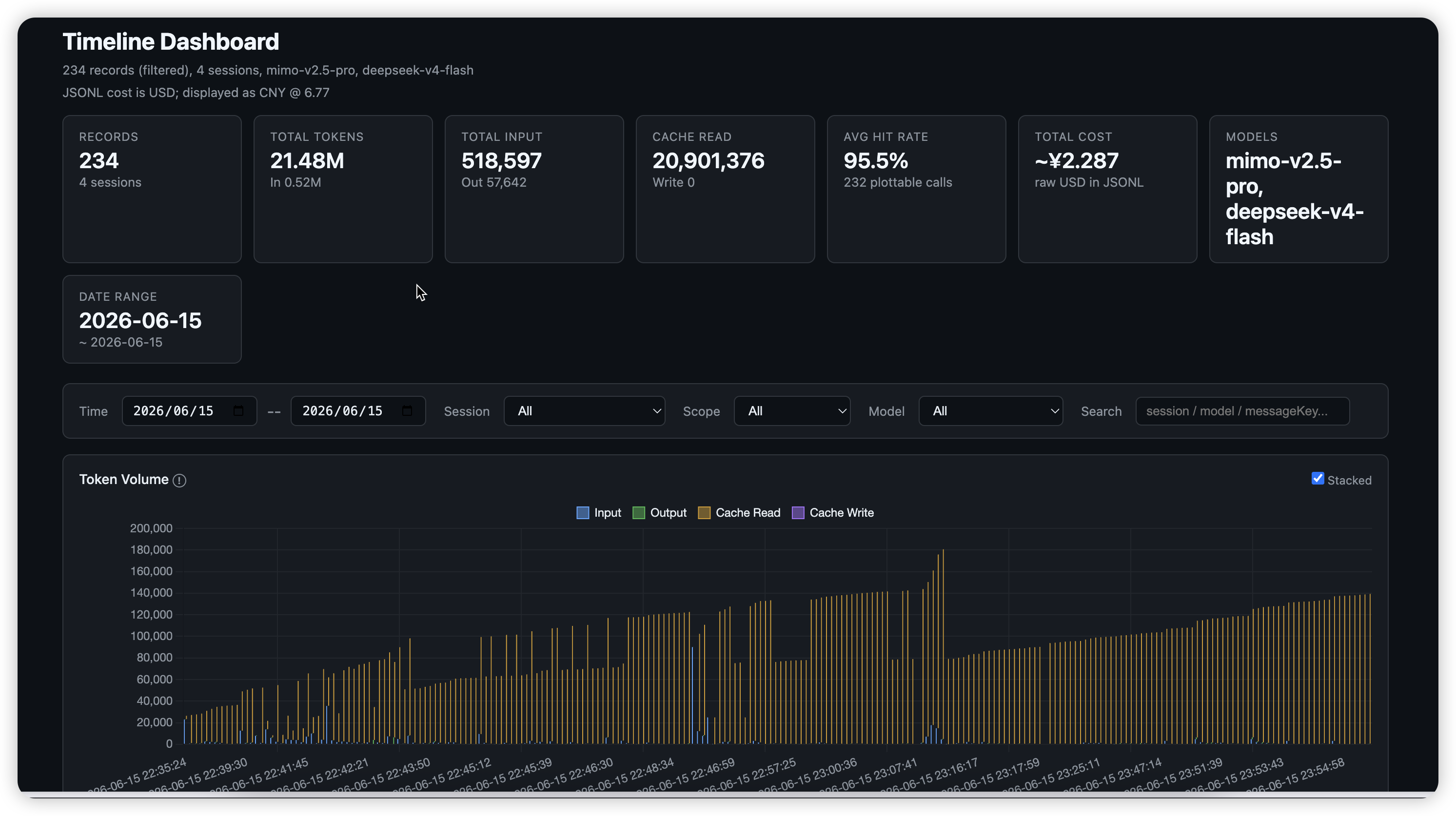
- Analysis off the TUI — Optional timeline JSONL (per assistant turn) for charts, jq, and billing post-mortems without scraping platform logs.
- Shared TUI building blocks —
src/tui-panel/extracted so other sidebar plugins can reuse the same layout language as visual-cache.
Roadmap items (sidebar Timeline section, metric windows, nested sub-agents) are described in docs/en/timeline.md and docs/en/design.md.
Acknowledgments
This plugin is not part of opencode-visual-cache. Its sidebar layout, panel components (src/tui-panel/), and coexistence patterns are heavily inspired by opencode-visual-cache. visual-cache focuses on main-session context / token distribution; cache-hit focuses on per-turn metrics and sub-agent totals.
The cache TTL feature (elapsed time display with color-coded status) is inspired by opencode-cache-timer by nero-sensei. The original plugin provides a standalone sidebar countdown for prompt cache expiration; this plugin integrates the concept directly into the cache-hit panel.
The tool-part TTFT fallback (capturing tool.pending as first-response time when no text/reasoning streaming part exists) is inspired by oc-tps by Tarquinen, which is the first OpenCode plugin to properly handle finish=tool-calls for TTFT measurement.
Features
- Cache hit rate: session-level total (DB aggregate when available) + per-turn rate with trend (↑ / ↓ /
-) on the main block - Token breakdown: cache read / write / miss / output (aligned rows with visual-cache)
- Cost: per-message model rates with multi-currency config (
USD,CNY,EUR,GBP,JPY); read savings, write premium, and net cache value; dynamic pricing for time-of-day tiers (DeepSeek peak/off-peak) and context tiers (context_over_200k, e.g. GPT-5.6) - Sub-agents: Agents section rolls up child sessions only (scope labeled in UI); each row shows model name + session ID suffix with vendor-tinted label (cost in muted gray)
- Main + Agents: main block always shown; Agents section when sub-agents exist (foldable)
- Model lineages: separate provider/model buckets; model switches show
switchorwarminginstead of a cross-model trend - Cache TTL: active and recent model lineages have independent timers
- Compaction filtering:
summary: trueandagent: "compaction"messages do not change interactive metrics - Collapsible sections: Detail / Model / Models (and Agents); theme-adaptive hit bar colors
- i18n:
display.lang—en/zh/autovia config (no slash commands yet) - Timeline (optional): daily JSONL per assistant turn for
jq/ scripts
Comparison with opencode-visual-cache
Standalone use is the default (main + sub-agents in one panel). Layout patterns were inspired by visual-cache; that package is not required.
| visual-cache | opencode-cache-hit | |
|---|---|---|
| Main session context / token distribution estimate | Yes | No — use visual-cache |
| Per-role token breakdown (system / tools / …) | Yes | No |
| Cache savings estimate | Yes | Yes (from provider pricing) |
| Model per-million pricing from provider | Yes | Yes (from SDK provider config) |
Slash commands (/cache-lang, /cache-currency, …) |
Yes | Config file only |
Fold state in api.kv |
Yes | In-session (not persisted) |
| Loaded skills panel | Yes | No |
| Sub-agent session rollup | No | Yes |
| Combined hit (main + subs) | No | Yes when sub-agents exist |
| Per-call JSONL export | No | Optional timeline |
Quick start
Option A: OpenCode command palette (recommended)
Ctrl+P → type install plugin → press Tab to switch scope to global (default is local) → type opencode-cache-hit@latest → press Enter.
Global plugins install to ~/.cache/opencode/packages/opencode-cache-hit@latest/. Create config at ~/.config/opencode/cache-hit.json (all fields are optional):
{
  "currency": "CNY",
  "costUnit": "USD",
  "rate": 6.77
}
Option B: Manual
Create or edit ~/.config/opencode/tui.json / tui.jsonc:
{
  "$schema": "https://opencode.ai/tui.json",
  "plugin": ["opencode-cache-hit@latest"]
}
Local development: use an absolute path to the checkout, such as "/path/to/opencode-cache-hit", instead of the npm name. V2 resolves <dir>/server and <dir>/tui for directory installs; the root server.ts and tui.ts shims cover those paths, and tui.ts re-exports the built dist/tui.js, so run bun run build first (prepare does it automatically on install). V1 resolves exports["./tui"], falling back to the package root's index.tsx.
OpenCode 2
V2 no longer reads tui.json: list the plugin under plugins in opencode.json (or in CLI-only cli.json), and the CLI loads the TUI component automatically. cache-hit.json, the sidebar, and the JSONL timeline behave identically.
// ~/.config/opencode/opencode.json
{
  "plugins": ["opencode-cache-hit@latest"]
}
For the rest of the move to V2 (plugin API, server API, tui.json → cli.json), see the V2 migration guide.
V2 runs plugins on the OpenTUI runtime bundled with OpenCode, so the package requires OpenTUI >=0.6.6 (see peers in package.json). A plugin built against an older OpenTUI fails to load with a duplicate OPENTUI_FORCE_WCWIDTH environment-variable error. The no-op exports["."] server entry keeps the package loadable from opencode.json, which makes V2 report features.tui and mount the sidebar.
For a local checkout (or an unreleased branch), point plugins at the directory instead of the npm name, then fully restart OpenCode:
{
  "plugins": ["./plugins/opencode-cache-hit"]
}
Copy cache-hit.config.example.json → ~/.config/opencode/cache-hit.json (recommended) or next to the plugin root. Restart OpenCode after changing plugin code or config.
| Install | After update |
|---|---|
Local ./plugins/... |
Full restart |
npm @latest |
Restart; if UI is stale, remove ~/.cache/opencode/packages/opencode-cache-hit@latest |
Load errors: ~/.local/share/opencode/log/ (search cache-hit or failed to load tui plugin).
Configuration
Configuration files accept JSONC (line/block comments and trailing commas). cache-hit.config.example.json ships as strict JSON so it stays tool-friendly (jq, editors).
Cost display (USD → CNY example)
{
  "currency": "CNY",
  "costUnit": "USD",
  "rate": 6.77
}
| Field | Meaning |
|---|---|
costUnit |
Currency of msg.cost (usually USD) |
currency |
Sidebar display currency |
rate |
Multiply costUnit → currency |
rate is a manual snapshot — the 6.77 in the example is the USD→CNY rate at the time it was written and does not auto-update. Omitting rate falls back to the same built-in default, so it only needs to be set when you display a non-USD currency and want a current rate (e.g. from Xe, Wise, or OANDA). Use "currency": "USD", "costUnit": "USD" when no conversion is needed.
Supported display currencies in config: USD, CNY, EUR, GBP, JPY (see cache-hit.config.example.json). Runtime slash switching like visual-cache’s /cache-currency is not implemented yet.
Display (display)
"display": {
  "lang": "en",
  "panelBorder": true,
  "showSpeed": true,
  "speedUnit": "tps"
}
| Field | Default | Meaning |
|---|---|---|
lang |
"en" |
en / zh / auto |
panelBorder |
true |
Border/padding |
mainHitLabel |
(i18n) | Optional override for the Hit row label |
showSpeed |
true |
Show/hide speed section |
speedUnit |
"tps" |
"tps" (tok/s) or "tpot" (ms/tok) |
[!NOTE] Changed in 1.0.0:
display.speedUnitnow defaults to"tps"(was"tpot"in 0.x). Set"speedUnit": "tpot"explicitly to keep the old unit.
Agents totals sum child sessions only, not the main session (see agentsScopeHint). Main session metrics stay in the block above; collapse Agents to save space. Per-child rows use the same model slug as the main Model line (truncated when the sidebar is narrow); see docs/en/design.md § Sub-agent row display.
Model lineages and metric history
The main Hit, Total Hit, and cost values use the DB-level session aggregate when available (session.get, complete regardless of message-source caps), keeping the active lineage as the model identifier; the cache TTL follows the active lineage. Read savings, write premium, and net cache value sum eligible messages with each message's provider/model rates. The foldable Models section shows per-lineage buckets separately.
The plugin excludes assistant messages with summary: true or agent: "compaction" from interactive metrics. Timeline JSONL keeps these rows when timeline.logSummaryMessages is enabled and marks them with skippedForMetrics: true.
The plugin requests main-session history directly with a limit of 10,000 messages (on V2 the adapter pages message.list 200 rows at a time via cursor.next until that total or the end of history). When the direct request fails (V2 falls back to the TUI store window, V1 to its 100-message mirror) or the returned history reaches the 10,000 limit, the panel shows a * history truncated hint. V2 cannot prove a populated store window is complete — the host fills it one page at a time — so any non-empty fallback is marked truncated, while a session with no messages is complete once its first sync lands. Streaming speed and TTFT use this live mirror so they can update during a call. If a message has no matching rate, the cost row keeps OpenCode's reported blended cost instead of showing a partial recomputation.
Timeline logs (timeline, default off)
Per assistant turn → JSONL (tokens, cache, cost, TTFT, per-tool toolDurations, and skippedForMetrics). docs/en/timeline.md · 中文.
[!NOTE] A mounted sidebar is a prerequisite. The collector runs inside the sidebar host, so when OpenCode does not render the sidebar (terminal ≤ 120 columns without
session.sidebar.toggle, or any child-session view) nothing is written at all — no rows, no error,timeline.enabled: truenotwithstanding. See § Compatibility.
"timeline": {
  "enabled": true,
  "dir": "",
  "rotateMaxBytes": 16777216,
  "retainRotated": 5,
  "maxAgeDays": 30,
  "maxLogFiles": 20,
  "toolSummary": { "allTools": true, "bash": false }
}
| Field | Default | Meaning |
|---|---|---|
enabled |
false |
Master switch |
toolSummary |
{ allTools: true, bash: false } |
Controls the privacy-sensitive toolDurations[].summary field (secure-by-default: bash off). true/false for all tools, or { allTools, bash?, … } per-tool. Durations (tool, durationMs) are always recorded. See docs/en/timeline.md |
dir |
"" |
logs/timeline-YYYY-MM-DD.jsonl under plugin root |
rotateMaxBytes |
0 |
Same-day size roll to .jsonl.1 |
retainRotated |
5 |
Backups kept per day |
maxLogFiles |
0 |
Cap file count; deletes earliest logs first |
LOG=~/.config/opencode/plugins/opencode-cache-hit/logs/timeline-$(date +%Y-%m-%d).jsonl
tail -f "$LOG"
# time fields are ISO 8601 strings with local timezone (e.g. "2024-05-30T08:00:00.000+08:00")
jq -r 'select(.rootSessionId=="YOUR_ROOT") | [.created,.scope,.hitPercent,.cost]|@tsv' "$LOG"
Retention details: Rotation and retention. Charts: scripts/README.md.
Cache TTL (cacheTTL, default on)
Shows how long the active provider/model prompt cache has been alive. Each model lineage has an independent timer. Color changes when exceeding TTL:
- Green: elapsed < TTL
- Yellow: TTL ≤ elapsed < 2×TTL
- Red: elapsed ≥ 2×TTL
"cacheTTL": {
  "enabled": true,
  "providers": {
    "anthropic": "5m",
    "openai": "5m",
    "deepseek": "2h",
    "google": "1h"
  }
}
| Field | Default | Meaning |
|---|---|---|
enabled |
true |
Master switch |
providers |
{} |
TTL per provider (or provider:model). Human-readable: 30s, 5m, 1.5h |
Built-in defaults (used when provider not in config):
| Provider | Default TTL | Source |
|---|---|---|
| anthropic | 5 min | Anthropic docs |
| openai | 5 min | OpenAI docs |
| deepseek | 2 hours | DeepSeek docs |
| 1 hour | Google docs | |
| xai | 5 min | xAI docs |
| minimax | 5 min | MiniMax docs |
| xiaomi | 5 min | Implicit caching |
| qwen | 5 min | Implicit caching |
| moonshot | 5 min | Implicit caching |
Default TTL: 5 minutes for all providers not listed above. Color changes based on elapsed time vs TTL: green (< TTL), yellow (TTL-2x TTL), red (≥ 2x TTL).
Dynamic pricing (dynamicPricing, default on)
Model rates are normally static per-million USD from OpenCode's provider registry. Some models price by time of day (DeepSeek V4: peak Mon–Fri 09:00-12:00 / 14:00-18:00 Beijing time, off-peak half price — weekends are off-peak) or by context size (context_over_200k, e.g. GPT-5.6: rates roughly double above 200k tokens).
Without config, the plugin already:
- Reads the model's context tier from
state.provider(runtimetiers/experimentalOver200K, normalized internally) and shows the right tier based on total context (input + cache read) vs the threshold. - Applies a built-in DeepSeek off-peak 0.5× multiplier when the schedule below matches (weekdays only for peak, weekends fall to the off-peak fallback).
"dynamicPricing": {
  "enabled": true,
  "timezone": "Asia/Shanghai",
  "schedule": [
    { "level": "peak", "windows": [
      { "start": "09:00", "end": "12:00", "days": [1, 2, 3, 4, 5] },
      { "start": "14:00", "end": "18:00", "days": [1, 2, 3, 4, 5] }
    ] },
    { "level": "offpeak", "windows": [] }
  ],
  "contextThreshold": 200000,
  "providers": {
    "deepseek": {
      "models": {
        "deepseek/deepseek-v4-flash": {
          "multipliers": { "peak": 1, "offpeak": 0.5 }
        }
      }
    }
  }
}
| Field | Default | Meaning |
|---|---|---|
enabled |
true |
Master switch. Disable to restore fully static pricing |
timezone |
Asia/Shanghai |
IANA zone used for schedule matching (DeepSeek prices are Beijing-time based) |
schedule |
DeepSeek peak/off-peak | {level, windows:[{start,end,days?}]} list; HH:MM, cross-midnight windows allowed. days is an optional ISO weekday list (1=Monday … 7=Sunday); omitted or [] = every day. A level with empty windows is the catch-all fallback: it applies whenever no windowed level matches (e.g. weekends with the default DeepSeek schedule) |
contextThreshold |
200000 |
Token threshold for the context tier; per-model contextThreshold wins over the runtime tier size from state.provider |
providers |
{} |
Per providerID → modelID rules |
Per-model rules support two forms (explicit config wins over the built-in DeepSeek default):
multipliers: factor applied to the static rates per schedule level (e.g.{"offpeak": 0.5})levels: absolute rates per level, e.g.{"peak": {"input": 0.44, "output": 0.88, "cacheRead": 0.01}, "offpeak": {"input": 0.22, ...}}. Cache rates may be written as flatcacheRead/cacheWrite(orcache_read/cache_write) or nestedcache: {"read": …, "write": …}(both are accepted; flat wins if both present). Default unit is USD per 1M (same asstate.provider). To write prices in another currency, set"currency": "CNY"and either make it match the displaycost.currency(converted viacost.rate) or provide the per-rule"rate"(USD → that currency, e.g."rate": 1.08for EUR). If the currency cannot be converted (norate, currency ≠ display currency), a warning is logged to stderr and the values are treated as USD.multipliersare ratios and have no currency.contextThreshold: per-model override of the global threshold (wins over the runtime tier size fromstate.provider).
Rates shown in the sidebar switch automatically at schedule boundaries (no polling). The peak/off-peak badge on the rate row appears only when the model actually prices that level (the level exists in its explicit levels/multipliers, or the built-in DeepSeek default applies); plain static models and unpriced levels (e.g. a peak-only rule at an off-peak moment) show no badge. Session cost shown is recomputed per message from its provider/model, request time, and context tier when dynamic rules apply; otherwise OpenCode's own msg.cost is used. If a message has no matching rate, the cost row keeps OpenCode's reported blended cost instead of showing a partial recomputation. Read savings, write premium, and net cache value use the same per-message rates. Sub-agent rows use their session creation time (session.list) for time-of-day pricing.
[!NOTE] Migration (weekday-aware schedules). Schedules now support an optional
daysfield (ISO weekday, 1=Monday … 7=Sunday; omitted = every day) and a catch-all fallback level (a level with emptywindows). DeepSeek's official peak is Monday–Friday 09:00-12:00 / 14:00-18:00 Beijing time; weekends are off-peak. The built-in default schedule is weekday-aware, and new configs written from the examples above are too. Legacy configs withoutdayskeep the old behavior — weekends are still billed as peak. To pick up the fix, add"days": [1,2,3,4,5]to yourpeakwindows (or use the new default schedule with anoffpeakfallback). If you resolve a DeepSeek model while your configured schedule has windowed levels but nodays, the plugin logs a one-time hint to stderr.
Timeline dashboard (docs/en/timeline.md) also recomputes costs offline: it reads ~/.config/opencode/opencode.json (JSONC-aware) for provider rates and injects dynCost per record (shown with ≈ and in charts/totals when it differs from the original).
Refresh official DeepSeek rates: bun scripts/fetch-deepseek-pricing.ts prints a ready-to-paste dynamicPricing snippet — a weekday-aware schedule (peak Mon–Fri, off-peak catch-all fallback) plus providers rates (CNY by default with "currency": "CNY", --usd --rate 6.77 for USD).
Updating
[!IMPORTANT] OpenCode pins
@latestto the first-resolved version and never re-fetches it (opencode#6774, #25293, #30631). Arestartalone will not pick up a newer npm release. If you are running an old cached build, you may hit crashes already fixed upstream (e.g. #3 — the sidebar vanishing withundefined is not an object (evaluating 'config.providers')). OpenCode wraps each plugin slot in a per-slot<ErrorBoundary>(via@opentui/solid, present since v1.17.0). A SolidJS component render error is caught and logged to stderr — the broken slot unmounts silently (no crash screen, easy to miss) while the rest of the TUI survives. Note: lower-level opentui/yoga renderer errors (e.g. layout-phase faults) can still bypass this boundary and crash the whole TUI.
To force an update, delete the cached package, then reinstall and restart:
rm -rf ~/.cache/opencode/packages/opencode-cache-hit@latest
Then reinstall via Ctrl+P → install plugin, and restart OpenCode.
To avoid the pinning issue entirely, install a pinned version instead of @latest:
{ "plugins": ["opencode-cache-hit@1.0.0"] }
Compatibility
Model-agnostic: any OpenCode provider that exposes assistant tokens / cost on messages (DeepSeek, Claude, GPT, etc.). Data comes from the OpenCode session API, same as visual-cache.
Requires:
- OpenCode 2 with bundled OpenTUI
>=0.6.6(all current V2 releases). Plugins run on OpenCode's own OpenTUI runtime; a plugin built against an older OpenTUI fails to load with a duplicateOPENTUI_FORCE_WCWIDTHerror. - OpenCode 1 is no longer officially supported from 1.0.0 (best-effort only). The V1
tui(api)entry andexports["./tui"]remain in the bundle, so it may still work on OpenCode 1; but V1 bundles OpenTUI 0.4.5, below the peer requirement, and later releases will not test or fix OpenCode 1-specific issues. Pin0.7.xif you still run OpenCode 1.
Works alongside visual-cache; no extra dependencies at runtime beyond peers in package.json.
Sidebar not showing? sidebar_content plugins — this one included — then render nothing at all: no panel, no placeholder, no error, while the plugin still loads normally. OpenCode's own sidebar is hidden by any of:
- Narrow terminal — auto-shown only when the TUI is wider than 120 columns (121+, measured on 1.18.x). Below that
<Sidebar>never mounts, so the slot is never called. Open it withsession.sidebar.toggle(default<leader>b); it then appears as a full-screen overlay. - Toggled off earlier — that toggle persists (
sidebar: "hide"in TUI state), so a sidebar hidden once stays hidden at any width until toggled back on. - Sub-agent (child) session — the sidebar is never rendered for a session with a
parentID, and the toggle does not override it. Open the parent session to see the panel.
The client sidebar setting (tui.json on V1, session.sidebar in cli.json on V2) cannot force the sidebar on — its state is only auto or hide. To give it a dedicated key, bind keybinds.sidebar_toggle.
Documentation
| Audience | English | 中文 |
|---|---|---|
| Users | This README | README.zh-CN.md |
| Maintainers | docs/en/design.md | docs/zh-CN/design.md |
| Timeline / JSONL | docs/en/timeline.md | docs/zh-CN/timeline.md |
| TUI panel reuse | src/tui-panel/README.md | src/tui-panel/README.zh-CN.md |
| Contributing / npm | CONTRIBUTING.md | — |
| Coding agents | AGENTS.md | — |
| Index | docs/README.md |
Project layout
index.tsx
cache-hit.config.example.json
src/
  plugin.tsx              # sidebar_content slot
  sidebar-host.tsx        # messages, child sync, timeline
  widget.tsx
  types.ts                # internal TuiApi / TuiEvent contract
  v1-map.ts               # V1 legacy events → internal contract
  v2/                     # V2 context adapter (server entry, map, types)
  stats.ts / timeline/ / tui-panel/
tests/
Development
bun test
See CONTRIBUTING.md for setup, PR notes, and npm publishing. Architecture: docs/en/design.md.
License
MIT
同类生态推荐
Tui Usage
opencode-tui-usage
OpenCode TUI sidebar: precise prompt-cache, token, cost, context, tools, skills, speed & sub-agent usage. English/USD only.

Visual Cache
opencode-visual-cache
OpenCode TUI plugin displaying real-time token cache hit rate in the sidebar

Context Usage
opencode-context-usage
OpenCode TUI plugin: a /context command with the exact token breakdown behind the built-in Context panel (last request) plus session-wide usage, subagent totals, cache hit rate and cost.