
opencode-beads-sidebarShows the current beads plan and its progress in the opencode sidebar
0
23
近 7 天 23
28.4
生态多维模型
8 天前
2026-08-12
快速安装与配置
opencode.json写入当前项目的 opencode.json,只对这个仓库生效。
opencode.json
{
  "$schema": "https://opencode.ai/config.json",
  "plugin": ["opencode-beads-sidebar@0.1.1"]
}
写入 ~/.config/opencode/opencode.json,对所有项目生效。
~/.config/opencode/opencode.json
{
  "$schema": "https://opencode.ai/config.json",
  "plugin": ["opencode-beads-sidebar@0.1.1"]
}
若你要在本地改造这个插件,先装到项目里再从本地路径引用。
shell
pnpm add -D opencode-beads-sidebaropencode 启动时会通过内嵌运行时自动加载 npm 依赖并缓存至本地目录,无需手动在全局环境执行安装。


Shows your current beads plan — and how far through it you are — in the opencode sidebar, the way the built-in Todo panel shows opencode's own throwaway todos.
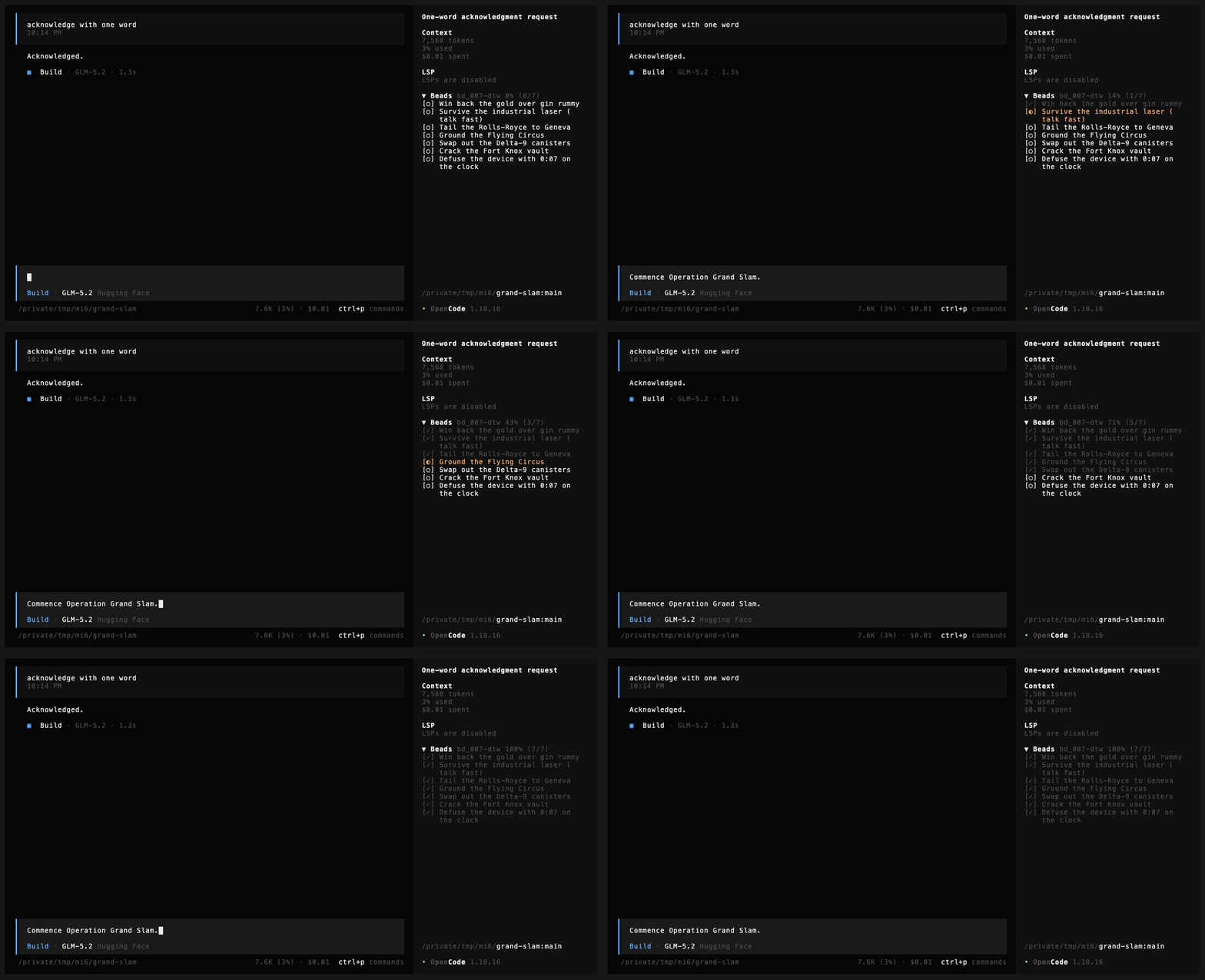
▼ Beads bt-avj 75% (3/4)
[✓] Extract dice geometry
[✓] Add face normals
[✓] Numerals flush with surface
[○] Update smoke test
Beads is durable and dependency-aware; opencode's todos die with the session. This puts the durable plan where you already look.
This is a TUI plugin only. It pairs well with
opencode-beads, which
covers the server side — bd prime context injection, /bd-* commands, a task
subagent — and renders nothing. Neither needs the other.
Install
Needs bd on your PATH and opencode ≥ 1.18.
opencode plugin opencode-beads-sidebar --global
opencode installs the published package and its dependencies itself. TUI
plugins are configured in tui.json, not opencode.json — if the plugin
doesn't appear after a restart, check that the entry landed there. Then open a
session in a repo with a .beads directory.
To run from a checkout instead (for hacking), see Hacking on it.
Installing straight from GitHub (
opencode plugin github:...) does not work — opencode 1.18 mangles the spec into a directory name and never installs it.
What it shows
The panel picks what to display in this order:
- an epic you pinned with Beads: focus an epic
- the epic owning the bead
bdlast touched — this is what makes it follow along as the agent works - otherwise, the workspace's in-progress and ready work
In a repo with no .beads directory it renders nothing at all — no empty box,
no error.
Glyphs match bd statuses, so the panel reads like the CLI:
| glyph | meaning |
|---|---|
✓ |
closed |
◐ |
in progress |
○ |
ready — open, nothing blocking it |
● |
blocked |
❄ |
deferred |
Blocked is inferred rather than read: beads leaves a blocked issue's status as
open, so anything open that bd ready doesn't return is shown as blocked.
Commands
In the command palette (ctrl+p), and as slash commands.
| command | slash | what it does |
|---|---|---|
| Beads: focus an epic | /bd-focus |
pin the panel to one epic for this session |
| Beads: clear focus | /bd-unfocus |
go back to following the last-touched bead |
| Beads: start work | /bd-start |
bd update <id> --status in_progress |
| Beads: close | /bd-close |
bd close <id> |
| Beads: reopen | /bd-reopen |
bd reopen <id> |
| Beads: refresh | /bd-refresh |
drop the cache and re-read |
Clicking a row opens that bead's details.
Actions go through a picker rather than a cursor in the panel, because no sidebar section in opencode takes keyboard focus — the built-in Todo and Modified Files panels are display-only too.
Keybindings are yours to set in tui.json under keybinds, using the command
names above (beads.focus, beads.close, …).
What it does to your data
Reads run as bd --readonly and can't modify anything. The only writes are the
three commands you invoke explicitly — start, close, reopen — and each is
reversible with bd.
bd is invoked directly rather than through a shell, so bead titles and ids are
passed as arguments and never interpreted as shell commands; ids sourced from
.beads/last-touched or bd's own JSON are additionally validated before use, so
a crafted id can't be smuggled in as a flag. Nothing is sent anywhere: no
network calls, no telemetry.
One caveat worth knowing: if the agent is also editing beads while you act on
one, bd is last-write-wins. The panel re-reads after every write so it won't
show you a state the agent has already moved past.
Configuration
Nothing is required. Two things you can change if you want:
Replace the built-in Todo panel instead of sitting under it. The Beads section renders below Todo by default. To hide opencode's todos entirely:
{
  "plugin": ["/absolute/path/to/opencode-beads-sidebar"],
  "plugin_enabled": { "internal:sidebar-todo": false }
}
Trace what it's doing. Set BEADS_SIDEBAR_DEBUG=/tmp/beads.log to log
refreshes, scope resolution, and pinning.
How it stays cheap
A bd call costs 0.3–0.6s, far too slow to sit on a render. So the panel polls
a signature of the .beads directory — newest mtime, depth- and count-capped —
and only shells out when something actually changed. An idle repo costs one
bd run at startup and nothing after.
.beads/last-touched looks like the obvious change signal but isn't one: it
records the bead you last viewed, so bd show rewrites it while bd close
doesn't. It's still used to decide which epic to follow, just not to detect
change. The visible consequence: closing a bead from the CLI updates progress
right away, but doesn't by itself move the panel's attention to another epic.
Hacking on it
git clone https://github.com/nycdubliner/opencode-beads-sidebar
cd opencode-beads-sidebar && npm install
Then point ~/.config/opencode/tui.json at the checkout:
{ "plugin": ["/absolute/path/to/opencode-beads-sidebar"] }
Before sending a change:
npm run build       # compile src/ → dist/ (the plugin loads dist, even from a checkout)
npm run lint        # biome
npm run typecheck   # tsc --noEmit
npm test            # node --test
The unit tests cover the non-JSX modules (bd.ts, scope.ts, commands.ts)
— everything that can run under plain Node. The .tsx files need opencode's
live renderer and are exercised only by the host. test/integration.test.ts
runs against a real bd from your PATH and skips itself when there isn't
one; CI runs it on a macOS runner with brew install beads.
A path-loaded plugin uses its own node_modules at runtime, so npm install
isn't optional, and the installed @opentui/* must match the version opencode
itself runs. The dev pins track @opencode-ai/plugin's own peer range, which
is what keeps a plain npm install conflict-free; the package declares
@opentui/* as peer dependencies so a published install lets opencode pick
versions matching itself — which is why the npm install route is the robust
one.
Three things here are load-bearing and easy to undo by accident. Each one fails by rendering an empty panel rather than raising an error, so none of them announce themselves:
- What ships is
dist/tui.js, compiled bynpm run build— never raw.tsx. opencode's runtime Solid transform explicitly skips files undernode_modules, so raw.tsxin a published install falls back to Bun's plain jsx-runtime: every reactive expression is evaluated exactly once, the panel renders its mount-time values, and no update ever re-renders — no error, just a frozen panel. The build (scripts/build.mjs) bakes in the Solid universal transform (moduleName: "@opentui/solid") and leavessolid-js/@opentui/*imports bare so the host maps them onto its own runtime instances at load. Rebuild after editingsrc/— the dev path install loadsdist/too. - Background refreshes must run under the panel's reactive owner. The store
captures
getOwner()from inside the component body — not from the slot callback, which runs outside the tracking scope — and commits throughrunWithOwner. Without it, re-rendering throwsNo renderer found. - Don't wrap the render path in a
try/catchthat swallows. opencode's slot registry already replaces a throwing plugin with an empty placeholder, so a second layer of swallowing makes failures invisible.
License
MIT