
opencode-token-meterLive tokens/second meter for the opencode TUI — shown inline in the prompt status row, exact on completion.
1
20
5 in 7 days
26.7
Multi-signal model
2 months ago
2026-06-04
Install and configure
opencode.jsonWrites to this project's opencode.json — applies to this repository only.
opencode.json
{
  "$schema": "https://opencode.ai/config.json",
  "plugin": ["opencode-token-meter@0.3.0"]
}
Writes to ~/.config/opencode/opencode.json — applies to every project.
~/.config/opencode/opencode.json
{
  "$schema": "https://opencode.ai/config.json",
  "plugin": ["opencode-token-meter@0.3.0"]
}
If you want to modify the plugin locally, install it into the project and reference the local path.
shell
pnpm add -D opencode-token-meteropencode loads npm dependencies through its embedded runtime on startup and caches them locally — no manual global install needed.
A live tokens/second meter for the opencode TUI.
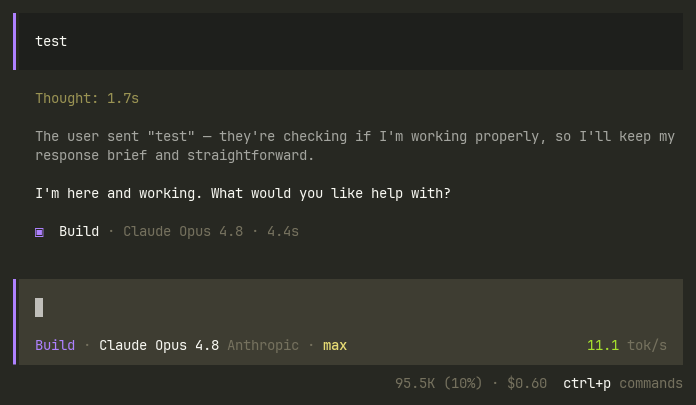
It renders inline in the prompt's status row — the same cluster as the model
name and the context-% / ctrl+p commands hints — and shows:
- While the model streams: an estimated
~N.N tok/s. The estimate is not a fixed 4-chars-per-token guess; it self-calibrates from the real tokens/char ratio of your most recent completed response. - On completion: the exact
N.N tok/s, computed from the provider's real token usage (output + reasoning÷ generation time), and it stays on screen until the next run.
It's a TUI plugin built on opencode's OpenTUI/Solid plugin API. It ships the TypeScript source directly — opencode transforms it at load, so there is no build step.
Requirements
- opencode >= 1.15 (the version that ships the TUI plugin system).
Install
Via opencode (recommended)
opencode plugin opencode-token-meter        # this project
opencode plugin -g opencode-token-meter     # all projects (global config)
This adds the plugin to your tui.json with sensible default options.
Manually
Add it to your tui.json (global: ~/.config/opencode/tui.json, or project:
.opencode/tui.json):
{
  "$schema": "https://opencode.ai/tui.json",
  "plugin": [
    ["opencode-token-meter", { "slot": "session_prompt_right", "liveEstimate": true }]
  ]
}
Restart opencode — tui.json is read once at startup.
Options
| Option | Type | Default | Description |
|---|---|---|---|
slot |
string | "session_prompt_right" |
Where to render. "session_prompt_right" = inline in the prompt status row. "app_bottom" = its own line below the prompt. |
liveEstimate |
boolean | true |
Show the calibrated ~tok/s estimate while streaming. false shows only progress until the exact value at completion. |
charsPerToken |
number | 0 (auto) |
Force a fixed estimate divisor. 0 self-calibrates from real usage; the cold-start fallback is 4. |
gapMs |
number | 1000 |
Max milliseconds between tokens still counted as active streaming. Longer gaps (a tool/command running, or waiting on you) are not counted. |
label |
string | — | Optional prefix shown before the readout. |
How it measures tokens
Active generation time only. The plugin accumulates elapsed time only
between consecutive streamed tokens that arrive within gapMs (default 1000 ms).
Any longer gap is treated as idle and isn't counted, so the rate excludes:
- time-to-first-token (nothing counts before the first token),
- command/tool execution (no tokens stream while a tool runs),
- waiting on you (permission/input prompts), and
- the trailing finalization after the last token.
Because idle gaps aren't counted, the value stays frozen while a command/tool is running instead of drifting down. (opencode's v2 message model attaches no per-token timestamps, so timing is based on when the plugin observes content.)
Tokens. On completion the count is exact (real provider usage:
output + reasoning). While streaming it's estimated from streamed chars,
calibrated from your last response's real tokens/char — never a blind
4-chars-per-token assumption (4 is only the cold-start fallback). Set
liveEstimate: false to show only progress until the exact value at finish.
Note: the active window tracks text/reasoning streaming, while the exact token count includes tokens spent emitting tool-call arguments, so steps that call tools can read slightly high. For ordinary text responses it's accurate.
Development
The plugin is a single file: src/tui.tsx. To hack on it
locally, point a project .opencode/tui.json at the source and restart
opencode:
{ "$schema": "https://opencode.ai/tui.json", "plugin": [["../src/tui.tsx", {}]] }
Optional type-checking (npm i the devDependencies first):
npm run typecheck