
opencode-plan-usageOpenCode plugin to show your Go plan usage (rolling 5h / weekly / monthly) and reset times from the CLI/TUI
0
277
277 in 7 days
35.0
Multi-signal model
4 days ago
2026-08-16
Install and configure
opencode.jsonWrites to this project's opencode.json — applies to this repository only.
opencode.json
{
  "$schema": "https://opencode.ai/config.json",
  "plugin": ["opencode-plan-usage@0.3.0"]
}
Writes to ~/.config/opencode/opencode.json — applies to every project.
~/.config/opencode/opencode.json
{
  "$schema": "https://opencode.ai/config.json",
  "plugin": ["opencode-plan-usage@0.3.0"]
}
If you want to modify the plugin locally, install it into the project and reference the local path.
shell
pnpm add -D opencode-plan-usageopencode loads npm dependencies through its embedded runtime on startup and caches them locally — no manual global install needed.
OpenCode 插件:在 TUI 里用 /usage 命令(或让 agent 调用 go_usage 工具)快速查看你的 OpenCode Go 计划用量和重置时间,不用再开浏览器。
功能
| 入口 | 用法 | 效果 |
|---|---|---|
| TUI 命令 | 在 opencode 输入框敲 /usage 回车 |
toast 弹出三个窗口的用量进度条 + 重置时间 |
| Agent 工具 | 直接问 agent "查一下 Go 计划用量" | agent 自动调用 go_usage 工具并汇报 |
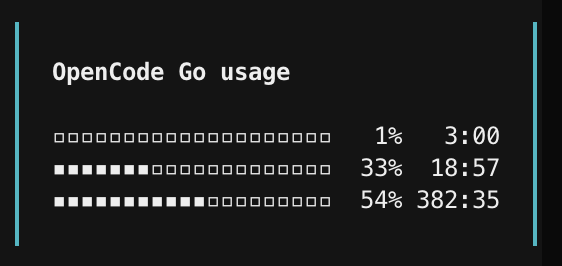
展示三个配额窗口(三行极简输出):
- Rolling 5h($12 上限):滚动 5 小时窗口用量
- Weekly($30 上限):本周用量
- Monthly($60 上限):本月用量
每行依次显示:进度条 + 百分比 + 重置倒计时(h:mm,小时 3 位右对齐、空格补齐,分钟两位)。
原理
官方已提供正式 API(PR #16513,2026-08-11 合并):
GET https://opencode.ai/zen/go/v1/usage
Authorization: Bearer <opencode-go-api-key>
API key 直接从本地 ~/.local/share/opencode/auth.json 的 opencode-go 条目读取(支持 XDG_DATA_HOME 与 OPENCODE_AUTH_CONTENT 环境变量覆盖),无需浏览器、无需 workspace ID、无需 cookie。
安装
方式一:本地路径(当前方式)
把 package.json 里 exports 指向的目录(本仓库)加入两个配置文件:
server 端(~/.config/opencode/opencode.jsonc):
{
  "plugin": ["/Volumes/SourceCode/vscode/opencode-status"]
}
TUI 端(~/.config/opencode/tui.json):
{
  "plugin": ["/Volumes/SourceCode/vscode/opencode-status"]
}
tui.json若不存在则新建;两处配置都保留原有的oh-my-openagent等已有插件。
方式二:npm 发布
npm publish
# 然后
opencode plugin install opencode-plan-usage
使用
# TUI 内
/usage

# 或直接问 agent
go_usage 工具查一下我的 Go 计划用量
示例输出(toast):
OpenCode Go usage
▫▫▫▫▫▫▫▫▫▫▫▫▫▫▫▫▫▫▫▫   0%   4:09
▪▪▪▪▪▪▫▫▫▫▫▫▫▫▫▫▫▫▫▫  32%  20:06
▪▪▪▪▪▪▪▪▪▪▪▫▫▫▫▫▫▫▫▫  53% 383:45
实际效果:
结构
screenshots/
  screen-shot.png   # /usage 命令实际效果截图
src/
  index.js   # 共享逻辑:读 key、调 API、格式化
  tui.js     # TUI 插件:/usage slash command(exports ./tui)
  server.js  # Server 插件:go_usage 工具(exports ./server)
无运行时依赖(@opencode-ai/plugin 仅用于 JSDoc 类型注释),纯 ESM JavaScript,opencode 的 Bun 运行时可直接加载。
已知限制
- API 端点为官方新特性(2026-08-11 上线),响应结构可能随版本变化
- 未设置轮询缓存;每次调用实时请求(建议间隔至少数分钟)
status: "rate-limited"时进度条为 100%(极简模式无额外标记,满条即提示限流)