
opencode-history-fulltext-searchopencode TUI plugin for full-text search over session history
0
29
6 in 7 days
27.1
Multi-signal model
1 month ago
2026-07-09
Install and configure
opencode.jsonWrites to this project's opencode.json — applies to this repository only.
opencode.json
{
  "$schema": "https://opencode.ai/config.json",
  "plugin": ["opencode-history-fulltext-search@0.1.0"]
}
Writes to ~/.config/opencode/opencode.json — applies to every project.
~/.config/opencode/opencode.json
{
  "$schema": "https://opencode.ai/config.json",
  "plugin": ["opencode-history-fulltext-search@0.1.0"]
}
If you want to modify the plugin locally, install it into the project and reference the local path.
shell
pnpm add -D opencode-history-fulltext-searchopencode loads npm dependencies through its embedded runtime on startup and caches them locally — no manual global install needed.
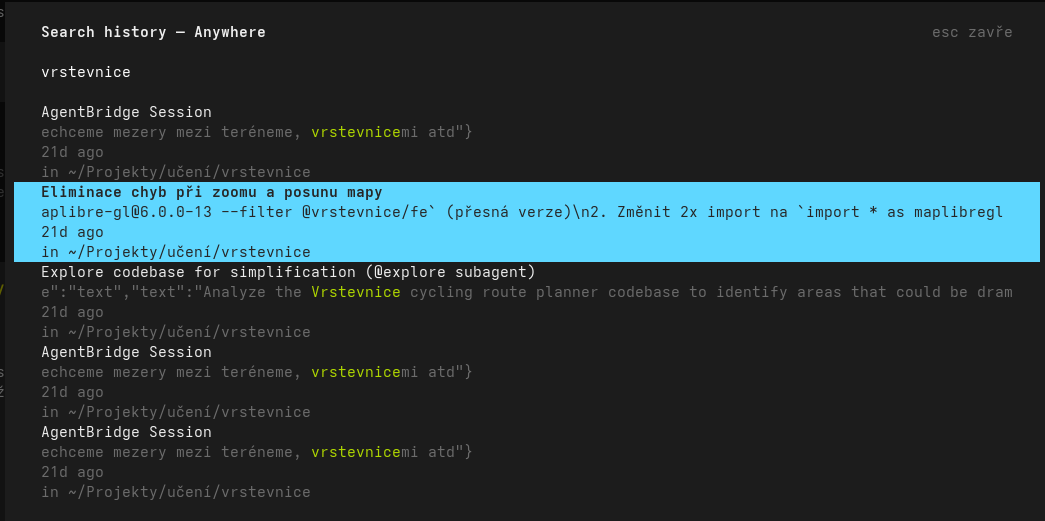
A opencode TUI plugin that adds full-text search over your session history to the command palette. Search across session titles and message content, with two scopes: the current directory, or everywhere.
⚠️ Experimental. This plugin is in the testing phase and reads a large local SQLite database on every search, which may slow down opencode.
Features
- Full-text search across
session.title+ message content. - Two scopes:
Search history — This dir(current directory) orSearch history — Anywhere(all sessions). - Live filtering with the match highlighted and centered in a single-line snippet.
- Noise filtering — indexes only
text/reasoningparts, ignoring tool I/O, step markers, patches and other operational noise. - Cross-dir resume — selecting a session from another directory copies the exact resume command (
cd '<dir>' && opencode --session <id>) to the clipboard instead of switching context.
Install
Add one line to ~/.config/opencode/tui.json:
{
  "$schema": "https://opencode.ai/tui.json",
  "plugin": ["opencode-history-fulltext-search"]
}
Or via the CLI (patches the config for you):
opencode plugin opencode-history-fulltext-search
Then restart opencode — the package and its dependencies are installed automatically.
Not published to npm yet? Install directly from GitHub:
{ "plugin": ["opencode-history-fulltext-search@github:forstjiri/opencode-history-fulltext-search"] }
Usage
- Open the command palette (
Ctrl+P). - Run Search history — This dir or Search history — Anywhere.
- Type to filter;
Enterto open the session (This dir) or copy the resume command (Anywhere);Escto close.
How it works
- Reads
~/.local/share/opencode/opencode.dbread-only (WAL-safe). - Content filter: only
part.data.typeoftextorreasoning, excludingsyntheticrows — drops ~70% of rows that are pure operational noise. - Clipboard tool is auto-detected (
wl-copy→xclip→xsel).
License
MIT — see LICENSE.