
opencode-copilot-budgetGitHub Copilot premium budget in the OpenCode TUI sidebar
4
23
1 in 7 days
27.7
Multi-signal model
4 months ago
2026-04-18
Install and configure
opencode.jsonWrites to this project's opencode.json — applies to this repository only.
opencode.json
{
  "$schema": "https://opencode.ai/config.json",
  "plugin": ["opencode-copilot-budget@1.2.0"]
}
Writes to ~/.config/opencode/opencode.json — applies to every project.
~/.config/opencode/opencode.json
{
  "$schema": "https://opencode.ai/config.json",
  "plugin": ["opencode-copilot-budget@1.2.0"]
}
If you want to modify the plugin locally, install it into the project and reference the local path.
shell
pnpm add -D opencode-copilot-budgetopencode loads npm dependencies through its embedded runtime on startup and caches them locally — no manual global install needed.
Shows your GitHub Copilot premium request budget in the OpenCode TUI sidebar. Only visible when the active provider is github-copilot.
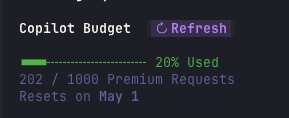
Features
- Progress bar that turns red when you reach 90 % of your budget
- Request count and percentage used
- Automatic quota refresh on first load, every 30 seconds, after prompt submit, and after every AI response
- Reset date display when available
- 30-second cache to avoid unnecessary API calls
- Works with paid and free Copilot plans
Requirements
- OpenCode with
github-copilotas your active provider - A GitHub token via one of:
GITHUB_TOKENorGH_TOKENenvironment variable- GitHub CLI (
gh auth login)
Install
Option A — OpenCode plugin manager
opencode plugin opencode-copilot-budget
This installs the plugin and adds it to your ~/.config/opencode/tui.json automatically.
Option B — manual
Add to ~/.config/opencode/tui.json (create the file if it doesn't exist):
{
  "$schema": "https://opencode.ai/tui.json",
  "plugin": ["opencode-copilot-budget"]
}
Option C — local path (no npm)
Point OpenCode directly at the source file by absolute path:
{
  "$schema": "https://opencode.ai/tui.json",
  "plugin": ["/absolute/path/to/opencode-copilot-budget"]
}
Token setup
The plugin discovers your GitHub token in this order:
GITHUB_TOKENenvironment variableGH_TOKENenvironment variable- Output of
gh auth token(GitHub CLI)
If none of the above are available, add the token to your shell profile:
# ~/.zshrc or ~/.bashrc
export GITHUB_TOKEN="ghp_your_token_here"
To pull it from the GitHub CLI:
export GITHUB_TOKEN=$(gh auth token)
What it shows
| Situation | Display |
|---|---|
| Capped plan | progress bar + 117 / 1000 Premium Requests |
| ≥ 90 % used | progress bar turns red |
| Unlimited plan | 62 used (unlimited) |
| Overage consumed | +5 overage (shown below usage) |
| Reset date known | Resets on 1 May (date in bold) |
| Auto refresh | updates on first load, every 30 seconds, after prompt submit, and after each AI response |
| Token missing / network error | sync unavailable |
| First load | syncing... |
Uninstall
Remove opencode-copilot-budget from the plugin array in ~/.config/opencode/tui.json.
Contributing
All logic lives in a single file — src/index.tsx — so it's easy to get started.
Local development setup
Clone the repo:
git clone https://github.com/bhaskarmelkani/opencode-copilot-budget
cd opencode-copilot-budget
npm install
Point OpenCode at your local clone via an absolute path in
~/.config/opencode/tui.json:{ "$schema": "https://opencode.ai/tui.json", "plugin": ["/absolute/path/to/opencode-copilot-budget"] }Edit
src/index.tsxand restart OpenCode to see changes.
Codebase overview
src/index.tsx — entire plugin: token discovery, API fetch, caching, and UI
| Area | Function / component |
|---|---|
| Token discovery | discoverToken() |
| API response parsing (paid + free tiers) | parseResponse() |
| Fetch with 30-second cache | fetchCopilotUsage() |
| Progress bar | ProgressBar |
| Usage display (SolidJS) | UsageDetail, View |
| Plugin registration | bottom of file |
Submitting changes
- Open an issue first for non-trivial changes so we can align on direction
- Keep PRs focused — one concern per PR
- If you add a new display state, update the "What it shows" table above
License
MIT — see LICENSE.