
design-variant-pickerInteractive human-in-the-loop design variant picker for OpenCode. The agent shows HTML design variants in a browser grid; the user picks or asks for regenerations (produced by the same conversation's model) until satisfied.
1
25
9 in 7 days
27.5
Multi-signal model
2 months ago
2026-06-09
Install and configure
opencode.jsonWrites to this project's opencode.json — applies to this repository only.
opencode.json
{
  "$schema": "https://opencode.ai/config.json",
  "plugin": ["design-variant-picker@0.2.0"]
}
Writes to ~/.config/opencode/opencode.json — applies to every project.
~/.config/opencode/opencode.json
{
  "$schema": "https://opencode.ai/config.json",
  "plugin": ["design-variant-picker@0.2.0"]
}
If you want to modify the plugin locally, install it into the project and reference the local path.
shell
pnpm add -D design-variant-pickeropencode loads npm dependencies through its embedded runtime on startup and caches them locally — no manual global install needed.
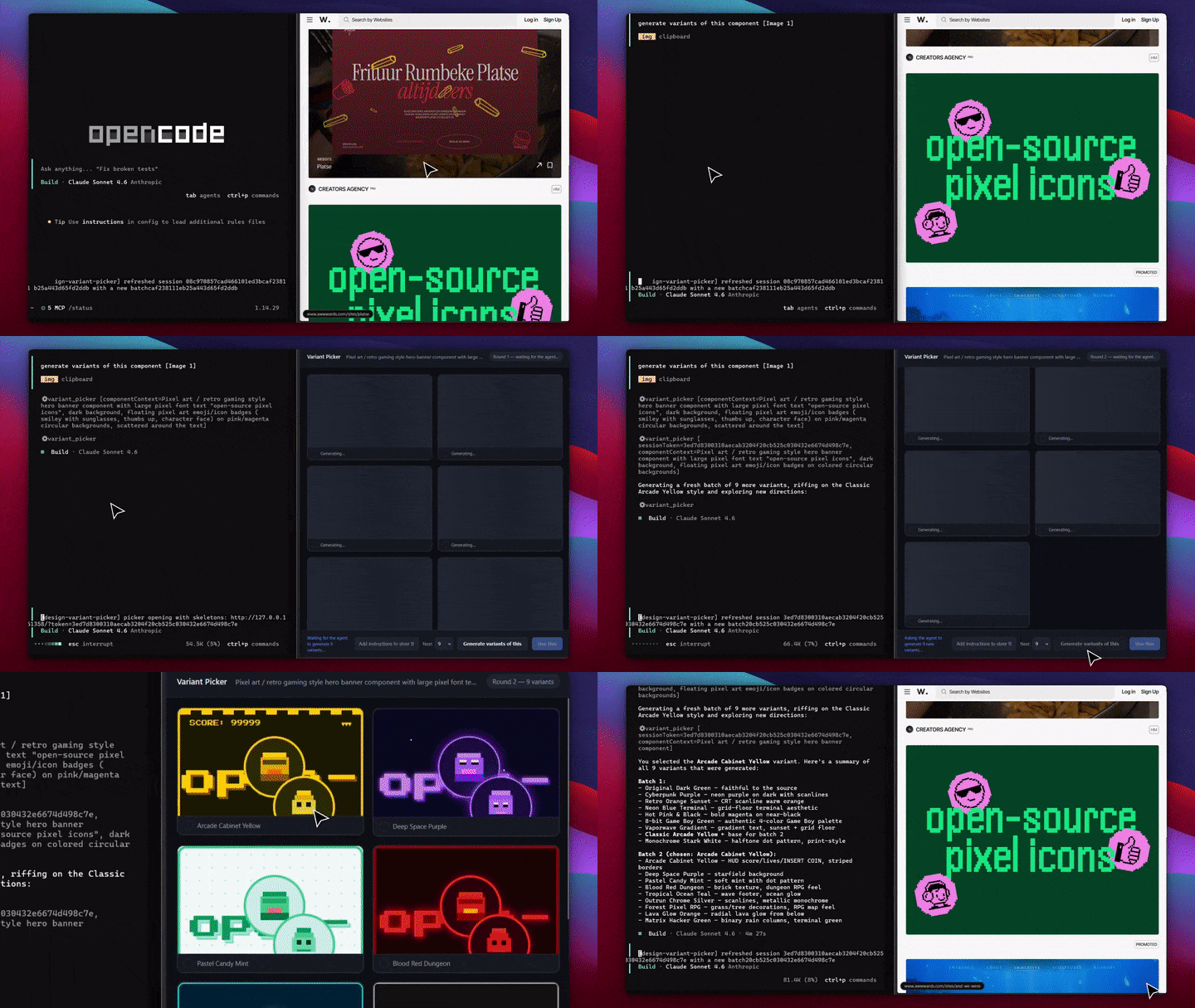
A design picker for OpenCode that keeps you in the loop. The agent builds HTML design variants, and you pick one (or ask for more) from a live grid in your browser. New variants are made by the model you're already chatting with, so there's no image-generating model required. The model just writes HTML, no extra model, no API keys.
Demo
Install
Add it to your opencode.json:
{
  "plugin": ["design-variant-picker"]
}
That's it. Restart OpenCode (the tool binds at session start, so open a new session).
Use
Just ask:
Generate 9 variants of this pricing card and let me pick.
The agent calls the variant_picker tool. A browser tab opens right away and the variants will start loading. From there you drive:
- Click a tile to select it.
- Generate variants of this: the tiles show skeletons, the agent makes a new batch based on your pick and any notes, and the same tab updates in place. Repeat as many times as you want.
- Use this: hands the chosen variant back to the agent, and the chat keeps going.
You can type notes to guide each round, and choose how many variants you want next from the Next: dropdown (default 9).
How it works
agent ──variant_picker(variants)──▶ local picker tab (you)
  ▲                                        │
  │  decision: use | regenerate | abandoned│
  └────────────────────────────────────────┘
       on "regenerate", the agent makes new variants of the
       one you picked and shows them in the same tab
- To skip the first wait, the agent opens the tab with an empty batch (
open) so the skeletons show up immediately, then fills it with the first batch. - The tool waits until you act, then returns
use(with your pick),regenerate(the agent makes the next batch itself), orabandoned(you closed the tab, so the agent never hangs). - Variants render in sandboxed
<iframe>s. The server is bound to127.0.0.1. - Closing the tab cancels cleanly (a beacon resolves the call right away).
Remote access (optional)
To open the picker from another machine, the agent can pass remote: true. This serves the picker through an anonymous Cloudflare Quick Tunnel, which needs cloudflared on your PATH. If it's missing, it falls back to localhost.
License
MIT