
cache-timerPre-emptive prompt-cache saving extension for OpenCode
2
31
19 in 7 days
28.9
Multi-signal model
2 months ago
2026-05-29
Install and configure
opencode.jsonWrites to this project's opencode.json — applies to this repository only.
opencode.json
{
  "$schema": "https://opencode.ai/config.json",
  "plugin": ["cache-timer@1.2.0"]
}
Writes to ~/.config/opencode/opencode.json — applies to every project.
~/.config/opencode/opencode.json
{
  "$schema": "https://opencode.ai/config.json",
  "plugin": ["cache-timer@1.2.0"]
}
If you want to modify the plugin locally, install it into the project and reference the local path.
shell
pnpm add -D cache-timeropencode loads npm dependencies through its embedded runtime on startup and caches them locally — no manual global install needed.



What is it?
A TUI plugin that shows a live countdown to your prompt-cache expiry in the OpenCode session bar.
The countdown indicator and (depending on state) one clickable button sit on the right side of your prompt. The plugin's rule of thumb expressed as UI: hot cache → keep going; cold cache → fork.
- 🔥 Cache: HOT (05:00) — healthy, time remaining. ↻ Refresh is the only button shown (the 90% hot-read discount makes continuing cheaper than forking, so ✨ New chat stays hidden).
- ⚠️ Cache: HOT (00:59) — under one minute, about to expire. Cost math is identical to HOT — only the color changes. ↻ Refresh still shown.
- ❄️ Cache: COLD — expired or model changed. ✨ New chat is the only button shown (forking now is strictly cheaper than paying the cold-write tax to resume).
- 🧊 Cache: COLD (BUSY) — the cache expired while a turn is still running (e.g. a long local tool call). The turn can't be forked until it's stopped, so ✨ Stop & fork is shown: it aborts the running turn and forks a fresh session from the interrupted output, avoiding the cold-start tax on the bloated context.
- ⏳ Starting... — animated spinner shown while a new chat is being seeded and the TUI navigates to it.





When your session is COLD, you have three choices:
- Pay the cold-start tax to continue your session, or
- Start a new session and rebuild context — one click on ✨ New chat.
- Drop the session entirely. Move on. Might not be worth continuing this session at all.
- On cost, starting fresh almost always wins — especially over 100k input tokens (see chart).
- On latency, resuming wins — one up-front cold-write hit beats several
Readround-trips in a fresh session. Worth paying if you're coming back to do one quick thing and don't need to maximize savings.
✨ New chat automates choice #2: it spins up a brand-new session seeded with a tiny continuation prompt (last user message, last assistant reply, and up to 5 most-recently read file paths) and auto-navigates the TUI to it. Inherits the source session's model.
↻ Refresh sends a no-op prompt to the current session to keep the cache hot; it's hidden once the cache goes COLD because clicking it then would pay the full cold-write tax — the exact action this plugin exists to prevent.
The plugin also optionally helps make it easier to start a smarter fresh session with summarized context (off by default — see Configuration to enable). If enabled, it fires a tiny "summarize progress" prompt 15 seconds before the cache goes cold, capturing a hot-read summary which is naturally picked up as the assistant reply that ✨ New chat seeds the fresh session from. This allows you to skip the cold-start write tax of resuming the bloated original while maximizing chat continuity and minimizing cost.
Why this exists
When a 500k-token session goes cold, just resuming an Opus 4.7 session costs $3.12 in cold-write fees before you've done any new work. The auto-summary path — hot-read the existing context to produce a summary, paste it into a fresh session — costs $0.69 under realistic assumptions (50k startup tokens, 1k summary paste, 5 file re-reads at 1000 LOC each). Savings of ~$2.43 per timeout you would have otherwise resumed, scaling linearly with session size:
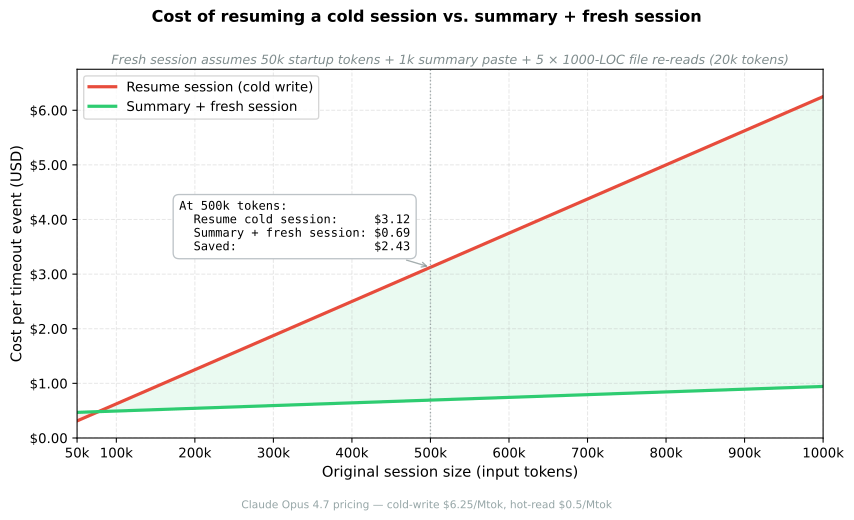
When resume actually wins: rarely on cost — you'd need to re-read essentially the entire original session in the fresh one for the math to flip, which almost never happens. The real argument for resuming is latency: a cold-write is a single up-front wall-clock hit, while a fresh session can spend the first several turns making
Readcalls to rebuild context the original already had. If you're coming back to do one quick thing and want to start immediately, just pay the tax if you can afford the extra cost.
The auto-summary is OFF by default. It requires explicit opt-in so the plugin never spends your tokens without permission. See Configuration to enable it.
🚀 Quick Start
Add the package to the plugin array in your opencode.json:
{
  "$schema": "https://opencode.ai/config.json",
  "plugin": ["cache-timer"]
}
OpenCode auto-installs npm plugins via Bun at startup. Restart OpenCode and you should see a green "Cache Timer loaded" toast.
Configuration
The visual countdown works out of the box with no configuration. To enable the auto-summary, create ~/.config/opencode/cache-timer.json:
{
  "enableAutoPrompt": true,
  "durations": {
    "claude": 300,
    "gemini": 300,
    "gpt": 300
  }
}
| Field | Type | Default | Notes |
|---|---|---|---|
enableAutoPrompt |
boolean | false |
Off by default. Set true to send the auto-summary 15s pre-expiry |
durations |
object | { claude: 300, gemini: 300, gpt: 300 } |
Seconds, keyed by provider family (substring-matched against model id) |
defaultDuration |
number | 300 |
Fallback when the model doesn't match any family |
Per-project overrides live at ./.opencode/cache-timer.json and win field-by-field over the global file. "claude": 300 covers claude-opus-4-7, claude-haiku-4-5, claude-3-5-sonnet, etc.
🛠️ Building from Source
npm install
npm run build   # compiles cache-timer.tsx -> tui.js
🧪 Local Testing (working on the plugin itself)
The TUI half of this plugin is a SolidJS component compiled by Babel (babel-preset-solid with generate: "universal"), so OpenCode can't load cache-timer.tsx directly — it loads the compiled tui.js. To iterate on a local checkout instead of the published npm version:
1. Point opencode.json at your local checkout. Replace the "cache-timer" entry with a file:// URL to the repo root:
{
  "plugin": [
    "file:///absolute/path/to/opencode-cache-timer"
  ]
}
OpenCode resolves the directory through package.json (main: "./index.js" and the ./tui export → tui.js), so it picks up your freshly compiled output instead of the npm tarball under ~/.cache/opencode/packages.
2. Rebuild after every .tsx change:
npm run build
3. Fully restart OpenCode. Plugin code is loaded once at startup; reopening the TUI is the only way to pick up changes.
4. Verify the right build is running. Look for the green Cache Timer v<x.y.z> loaded toast at startup — the version in the toast comes from CACHE_TIMER_VERSION at the top of cache-timer.tsx and is the cheapest way to confirm you're not accidentally running the cached npm install.
Tip for fast iteration: drop defaultDuration to something like 10 (seconds) in ~/.config/opencode/cache-timer.json so the cache flips to COLD quickly and you can exercise the COLD-only ✨ New chat button without waiting 5 minutes.